 UPDF
 UPDF for Windows
 UPDF for Mac
 UPDF for iPhone/iPad
 UPDF for Android
 Nomostar
 UPDF AI Online
 UPDF Sign
 IvyCraft
 Edit PDF
 Annotate PDF
 Create PDF
 PDF Form
 Edit links
 Convert PDF
 OCR
 PDF to Word
 PDF to Image
 PDF to Excel
 Organize PDF
 Merge PDF
 Split PDF
 Crop PDF
 Rotate PDF
 Protect PDF
 Sign PDF
 Redact PDF
 Sanitize PDF
 Remove Security
 Read PDF
 UPDF Cloud
 Compress PDF
 Print PDF
 Batch Process

 About UPDF AI
 UPDF AI Solutions
 AI User Guide
 FAQ about UPDF AI
 Summarize PDF
 Translate PDF
 Chat with PDF
 Chat with AI
 Chat with image
 PDF to Mind Map
 Explain PDF
 PDF AI Tools
 Image AI Tools
 AI Chat Tools
 AI Writing Tools
 AI Study Tools
 AI Working Tools
 Other AI Tools
 AI Bookmark Generation
 AI Bookmark Summary
 AI Watermark Generation
 AI Background Generation
 AI Sticker Generation
 AI Stamp Generation
 AI Editing Suite
 UPDF Copilot
 AI Page Management
 AI Semantic Search
 PDF to Word
 PDF to Excel
 PDF to PowerPoint
 Enterprise Solution
 Enterprise Sign
 Enterprise AI
 Enterprise Plan
 Enterprise User Guide
 Enterprise Webinar
 IT
 Education
 Construction
 Financial Service
 Healthcare
 Insurance
 Legal
 Manufacturing
 Government
 Researchers & PhDs
 Solopreneurs & Freelancers
 Lawyers & Legal Professionals
 Real Estate Agents & Brokers
 Education Solution
 Customer Stories
 User Guide
 UPDF Tricks
 FAQs
 UPDF Reviews
 Download Center
 Blog
 Newsroom
 Tech Spec
 Updates
 UPDF vs. Adobe Acrobat
 UPDF vs. Foxit
 UPDF vs. PDF Expert


Quick answer:
These apps serve different parts of student life. A PDF editor helps you work with course documents, while a reference manager keeps sources ready for citation. Start with the task you need to complete rather than expecting one app to handle every part of studying.
1. UPDF — Best for PDF Study and AI-Assisted Reading
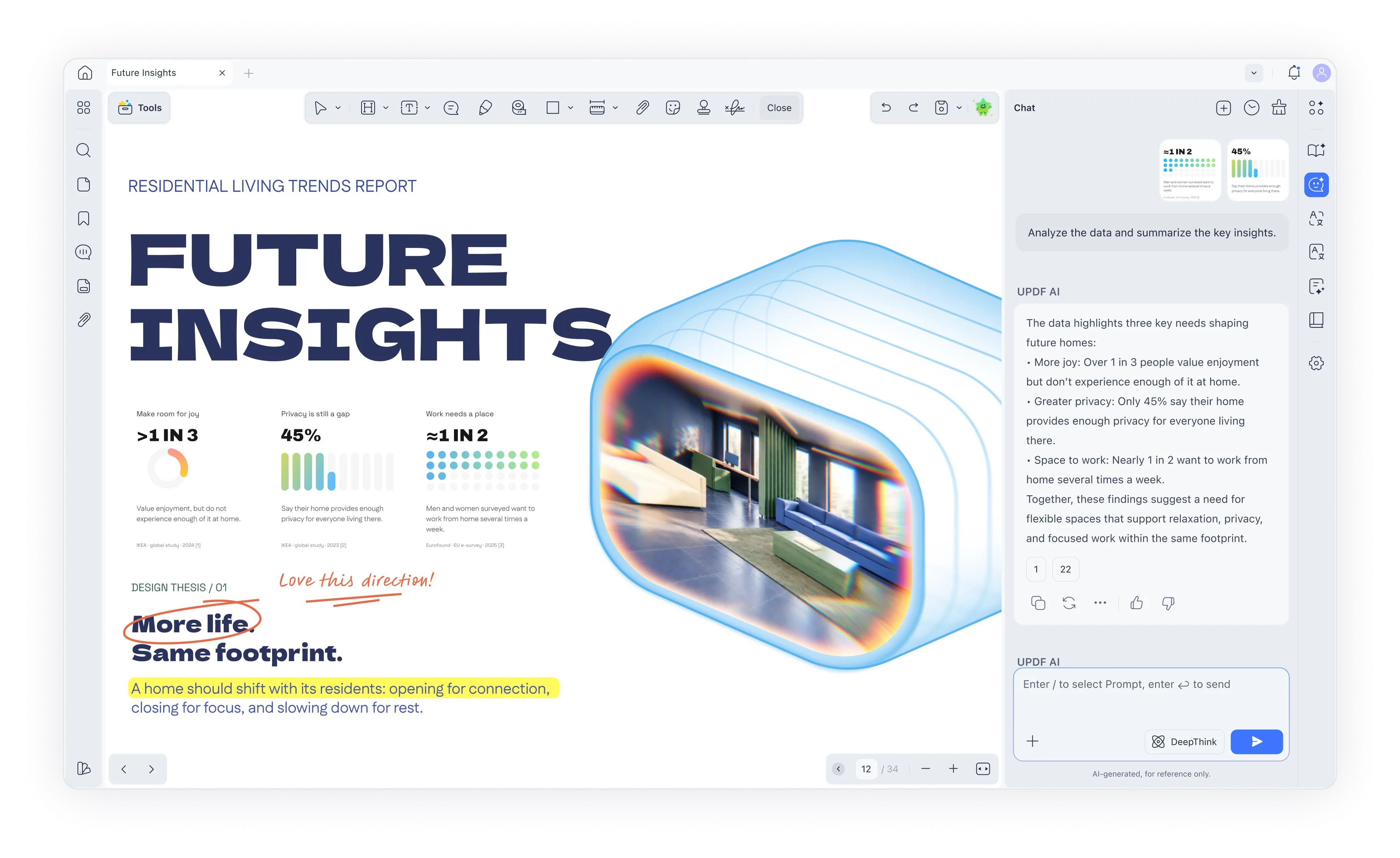
UPDF suits students whose coursework revolves around PDFs, including lecture slides, journal articles, scanned readings, and assignment forms. This AI-powered PDF editor combines reading, annotation, editing, conversion, and AI-assisted summarization, explanation, and translation.
Try UPDF with a course document before purchasing. Files saved with the free version carry a trial watermark; UPDF Pro removes it.
Windows • macOS • iOS • Android 100% secure
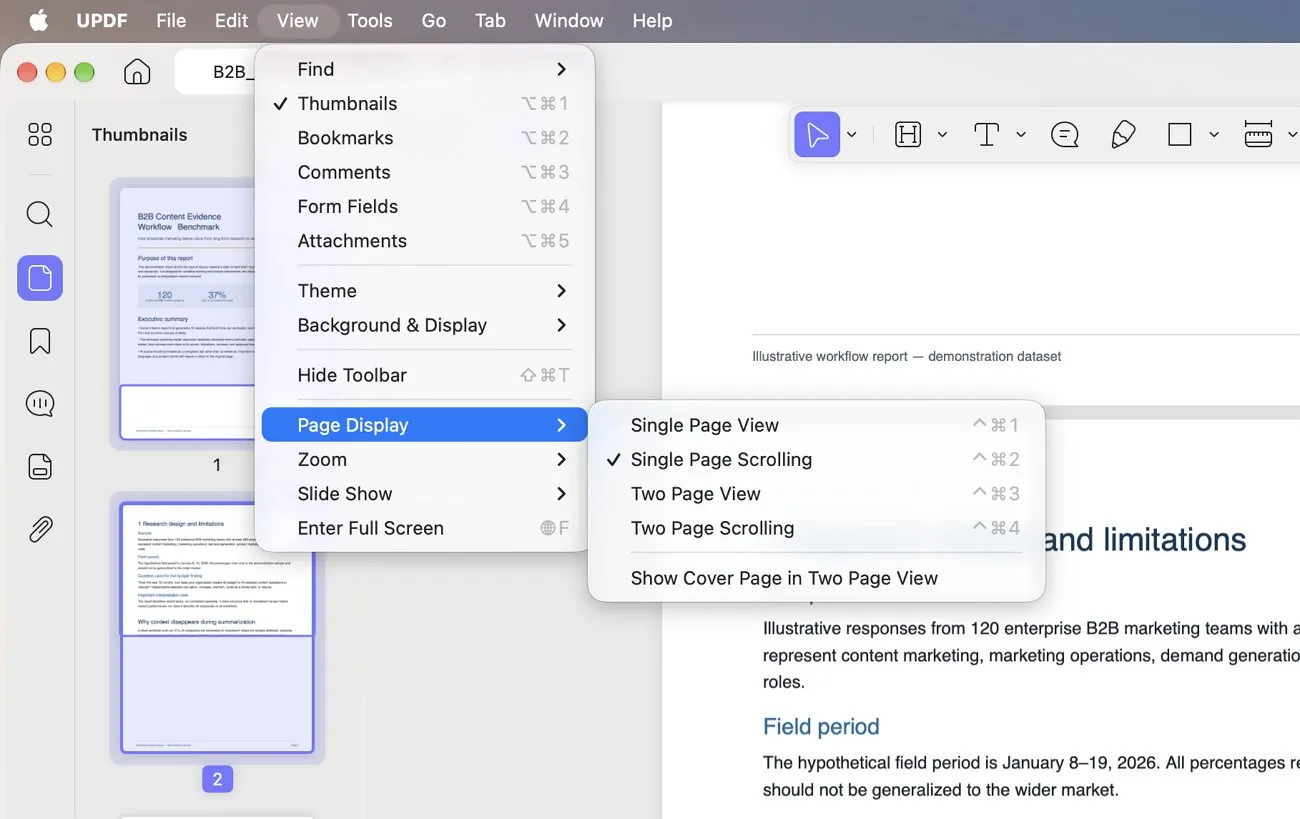
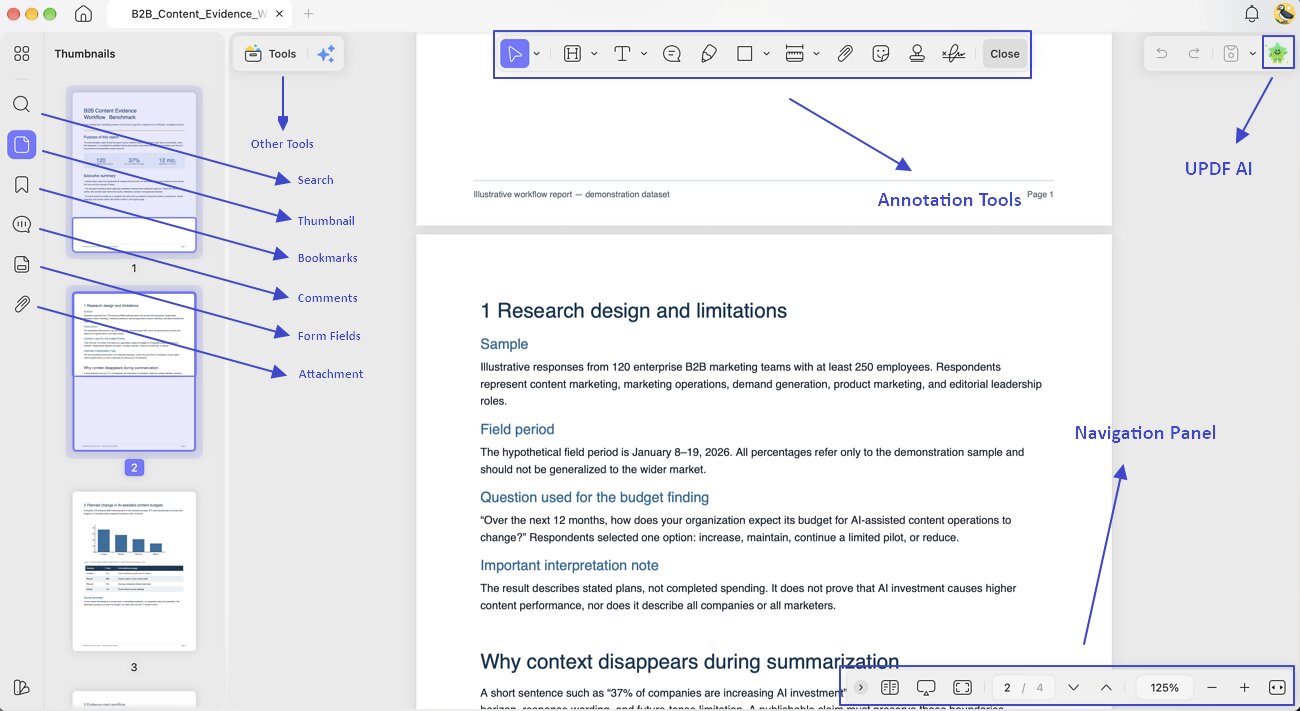
UPDF offers a good reading experience with an adjustable display mode (Single Page or Two Pages), multiple display themes, the ability to display your documents as a slideshow, and AI‑powered features for summarizing, explaining, translating your entire document, or generating a mind map.
For research assignments, UPDF AI Online offers Paper Search for discovering academic sources and Scholar Research for generating structured research reports with references. UPDF describes its search coverage as more than 220 million papers. Full-text access depends on availability and access rights, so finding a paper does not necessarily mean its complete PDF is freely available.
The free AI allowance includes up to 100 questions and five PDFs in total, with a limit of 100 pages and 10 MB per PDF. Try UPDF AI Online with a paper from your reading list.

It can also serve as a note-taking tool with comment features such as sticky notes, drawings, highlights, comments, and more. For difficult points, UPDF lets you select text and ask UPDF AI, then add the AI-generated results as notes to your document with just one click.
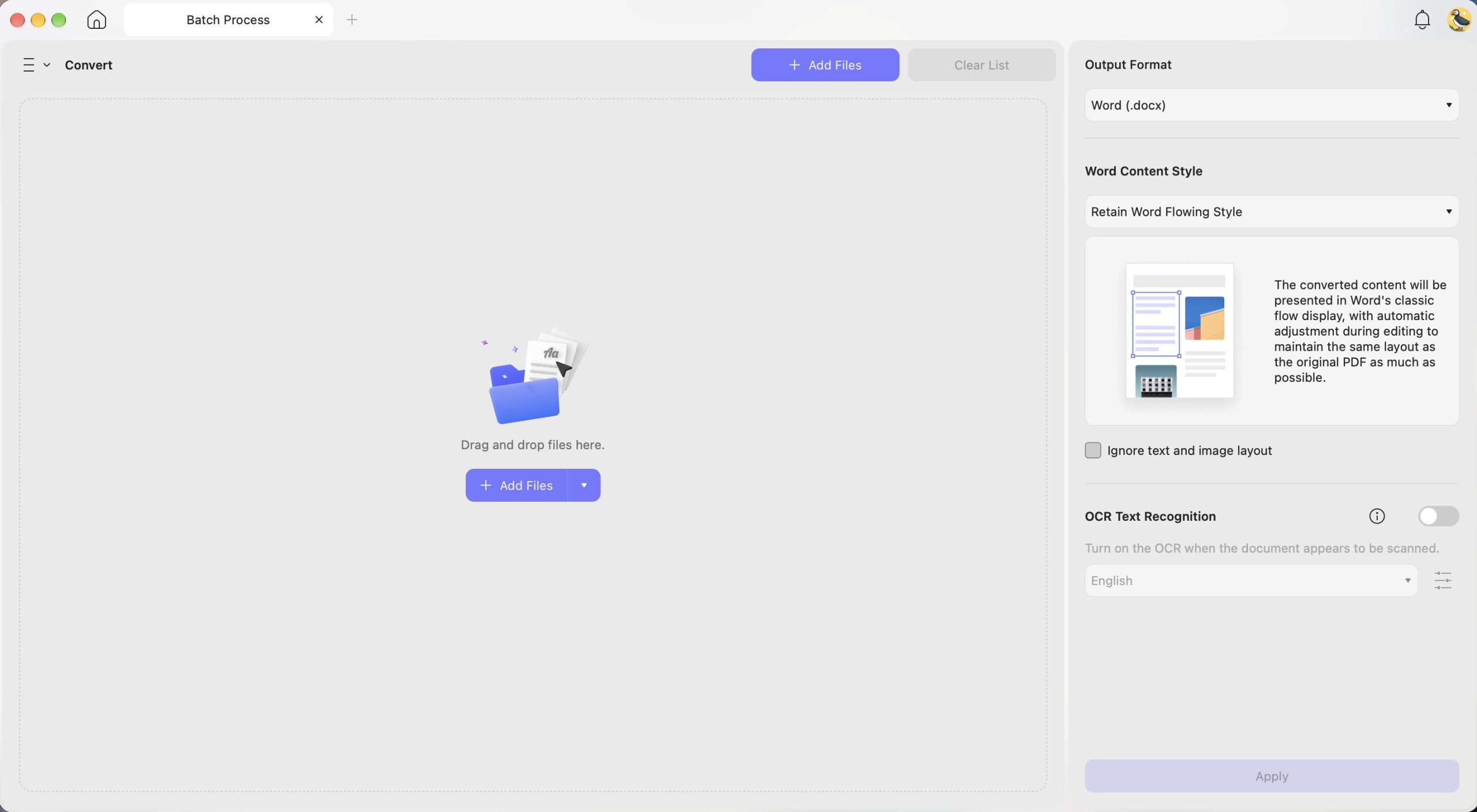
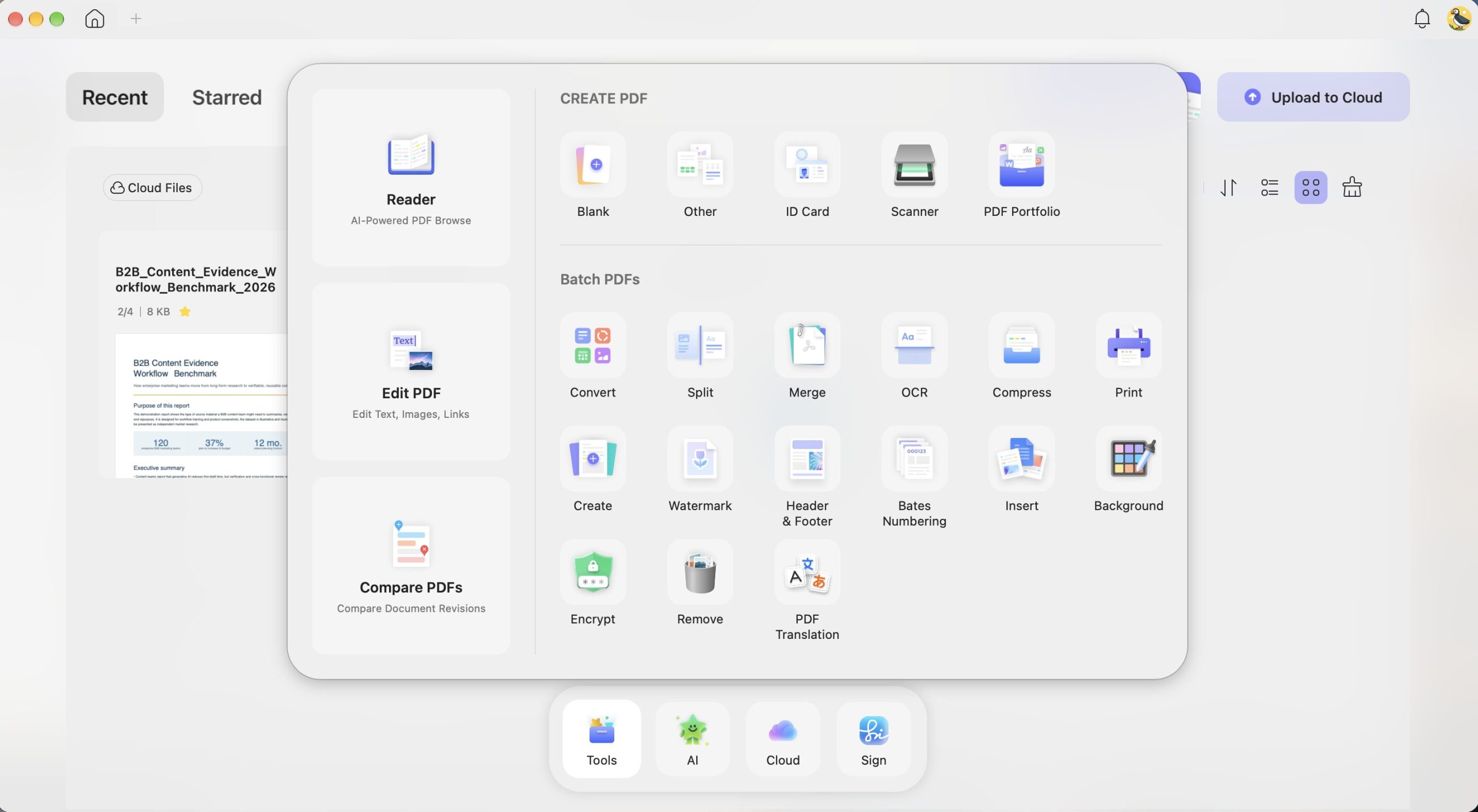
UPDF for Mac converts PDFs to Word, Excel, PowerPoint, and other formats, including images, HTML, and XML. It also creates PDFs from supported Office documents and images. Check the converted file before submitting an assignment, especially when the source includes equations, tables, or custom fonts.
UPDF OCR can turn scanned readings into searchable or editable PDFs, with support for 38+ recognition languages and multiple languages within one document. On Mac, OCR requires an Apple Silicon model and the version downloaded from UPDF’s official website. It is not available on Intel Macs or in the Mac App Store version. Batch OCR is also available on supported Mac installations.
You can scan paper materials with UPDF on mobile and upload them to UPDF Cloud for access on your Mac. Cloud synchronization uploads the files to your account; it is separate from working with a PDF stored locally.
Check the current UPDF plans before purchasing: PDF editing and paid AI access are separate benefits. A premium individual account supports up to four devices. If you choose an offer with a seven-day AI trial, the AI subscription renews separately unless canceled.
Other Key Features:
- Edit All Elements on PDFs: UPDF makes editing PDFs as easy as editing in Word. It is easy to edit text, images, watermarks, links, backgrounds, headers and footers, forms, pages, and more in PDFs.
- Create, Fill, and Sign PDF Forms: Design interactive PDF forms, fill them out effortlessly using intelligent field recognition, duplicate fields across pages for precise alignment, and add electronic or digital signatures to complete your forms!
- Organize PDF: Rearrange PDF pages: add, delete, rotate, replace, extract, split, crop, and reorder.
- Side-by-side Translation: On UPDF AI Online, view the original text and translated version side-by-side while keeping the document layout intact.
- Compress PDFs: Choose an available compression preset to reduce file size, then check that text and diagrams remain readable before submission.
- Combine documents: Merge Word, Excel, PDF, and PowerPoint files all at once into a single PDF.
- PDF Portfolio: Combine multiple files of any format into a single organized PDF package for easy sharing and professional presentation.
When to Use:
Best for:
- Students who regularly read, annotate, edit, convert, or summarize PDF course materials.
Skip if:
- You mainly need a coursework planner, a citation manager, or a general notebook. Notion, Zotero, and Apple Notes are more directly suited to those tasks.
Try UPDF with a representative lecture handout or research paper to check whether its PDF tools fit your study routine.
Windows • macOS • iOS • Android 100% secure
2. Notion — Best for Coursework Planning and Task Organization
Notion helps students organize assignment deadlines, course notes, reading lists, and project tasks in a customizable workspace. Databases and templates can connect course materials with the work that needs to be completed.
Student access: Eligible college and university students can get Notion’s Education Plan for a one-member workspace using a qualifying school email address. Classmates can collaborate as guests, but the individual Education Plan does not provide unlimited workspace memberships.

Key Features:
- Task Management: Create to-do lists, set reminders, and track deadlines.
- Note-taking: Use customizable templates. It can organize lecture notes and study materials.
- Collaboration: Share workspaces with classmates and work on group projects with real-time collaboration.
- Databases: Build relational databases to manage reading lists, research data, and more.
When to Use:
Best for:
- Students who want assignment deadlines, course notes, reading lists, and project tasks in a customizable workspace.
Skip if:
- You only need to capture a quick note and do not want to build or maintain a workspace structure.
Also Read: 5 Best Notion AI Alternatives (True Reviews)
3. Zotero — Best for References and Citations
Zotero helps students collect sources, organize research libraries, annotate PDFs, and insert citations into academic writing. Its integrations with Microsoft Word, LibreOffice, and Google Docs help keep citations and bibliographies connected as a draft changes.
The Zotero Connector saves references from supported webpages to your library. You can then organize sources into collections and insert citations while writing. Review the captured source details before relying on them.

Pricing: Zotero is free to use. Zotero Storage includes 300 MB of free attachment storage; larger storage plans are optional. This allowance concerns synced files such as PDFs, not the size of your local research library.
Key Features:
- Reference Management: Save and organize references from multiple sources with ease.
- Citation Integration: Insert citations and generate bibliographies in your word processor.
- PDF Management: Attach and annotate PDFs to keep your research materials organized.
- Collaboration: Share your Zotero library with classmates and collaborate on research projects.
- Tagging and Notes: Tag references and add notes to track important details.
When to Use:
Best for:
- Students writing source-based essays, literature reviews, dissertations, or group research projects.
Skip if:
- You expect it to verify a source’s claims automatically or replace critical reading.
4. Hemingway Editor — Best for Improving Readability
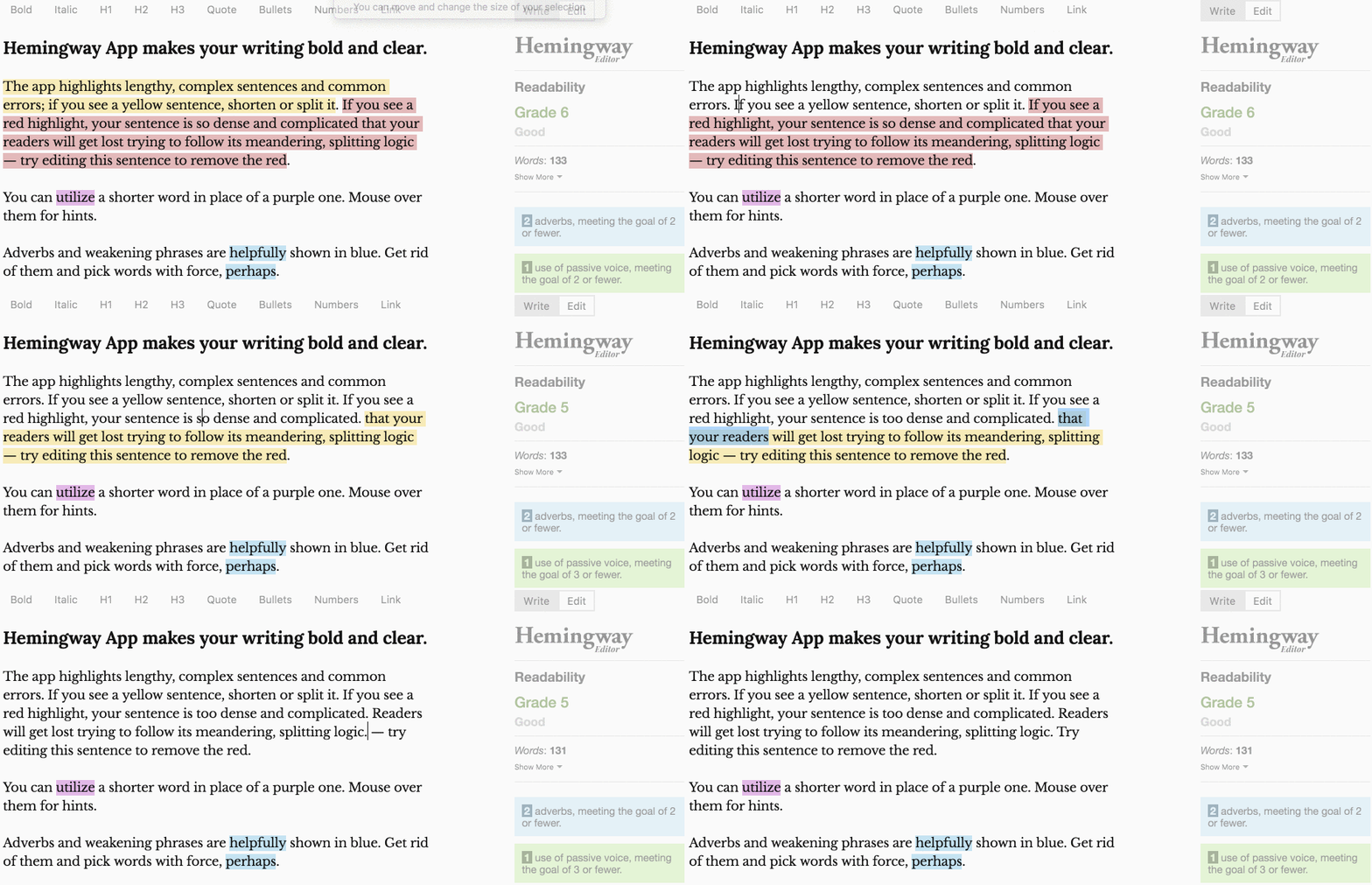
Hemingway Editor helps students spot dense sentences, passive voice, unnecessary adverbs, and wording that may be difficult to read. It is useful for revising an existing draft, especially when the argument is sound but the prose needs tightening.
Choose the version carefully. Hemingway Editor 3 for Mac costs US$19.99 and works offline, but does not include the newer AI features. Hemingway Editor Plus is a separate online subscription with AI rewriting and advanced grammar fixes.
Key Features:
- Readability feedback: Identify sentences that may be difficult to follow.
- Style highlights: Review passive voice, adverbs, and complicated wording.
- Writing metrics: Check word count and readability grade level.
- Optional AI editing: Use Editor Plus for AI rewrites and advanced grammar corrections.
When to Use:
Best for:
- Students revising essays for clearer, more concise prose.
Skip if:
- You need source verification, citation management, or subject-specific feedback on an argument. A readability score does not assess academic accuracy.
Also Read: 6 Best Creative Writing Apps to Ease Your Writing
5. Apple Notes — Best Built-In Mac App for Class Notes
Apple Notes is a practical starting point for students who want to capture class notes without installing another app. It comes with macOS and lets you organize notes into folders, create checklists, and keep images, links, and PDF attachments alongside your writing.
While Notion suits structured course planning, Apple Notes works well for quickly recording an idea, collecting study materials, or reviewing notes between classes.
Key Features:
- Flexible note organization: Use folders, tags, and Smart Folders to organize notes by subject or project.
- Study materials in one place: Keep text, images, links, and PDF attachments together.
- Audio recording: Record audio directly in a note. Audio transcription requires a Mac with M1 or later and a supported device language.
- Math in notes: Work through supported expressions and calculations alongside your written explanations.
- Sync and collaboration: Use iCloud to access notes across supported Apple devices and collaborate on shared notes.
When to Use:
Best for:
- Students who want a built-in app for everyday class notes, checklists, and study materials.
Skip if:
- Your main task is managing academic citations or editing the original text and layout inside PDFs. Zotero and UPDF serve those tasks more directly.
Apple Notes is included with macOS. Available features depend on your macOS version, hardware, language, and account settings.
FAQs About Mac Apps for Students
1. Can I submit an Apple Notes note as a PDF?
Yes. Apple Notes on Mac can export a note as a PDF. Review the exported file before submitting it, especially if the note contains attachments or unusual formatting.
2. Why does a Zotero bibliography still contain incorrect details?
Citation formatting depends on the metadata saved in your Zotero library. Check the author, title, publication date, and item type against the original source, correct the library record, and refresh the citations in your document.
3. Can I collaborate on a locked Apple Notes note?
A locked note cannot be shared for collaboration. Apple Notes also prevents sharing a folder that contains locked notes. Use a separate, unlocked note for material you intend to share with classmates.
Final Thoughts
Choose the app that matches your study task. UPDF suits PDF coursework, Notion helps organize assignments, Zotero manages sources and citations, Hemingway Editor improves readability, and Apple Notes handles everyday note-taking.
If PDFs make up a large part of your coursework, try UPDF with a representative lecture handout or research paper. Check its annotation, conversion, and AI features against your needs before choosing a paid plan.
Windows • macOS • iOS • Android 100% secure




 Enrica Taylor
 Enola Davis