VibePulse is a macOS menu bar app that tracks token spend for locally used AI coding agents parsed by agentsview.
- Agents parsed by the installed agentsview version appear when they have positive-cost usage in the selected history window
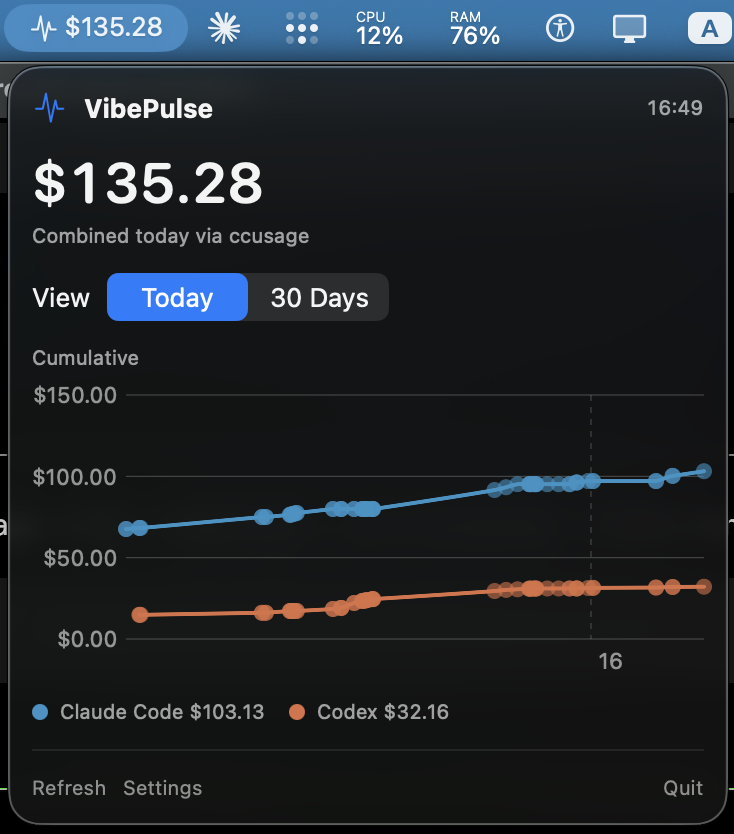
- Combined daily total in the menu bar (what you would pay per token without a subscription)
- Today view shows cumulative spend over the day
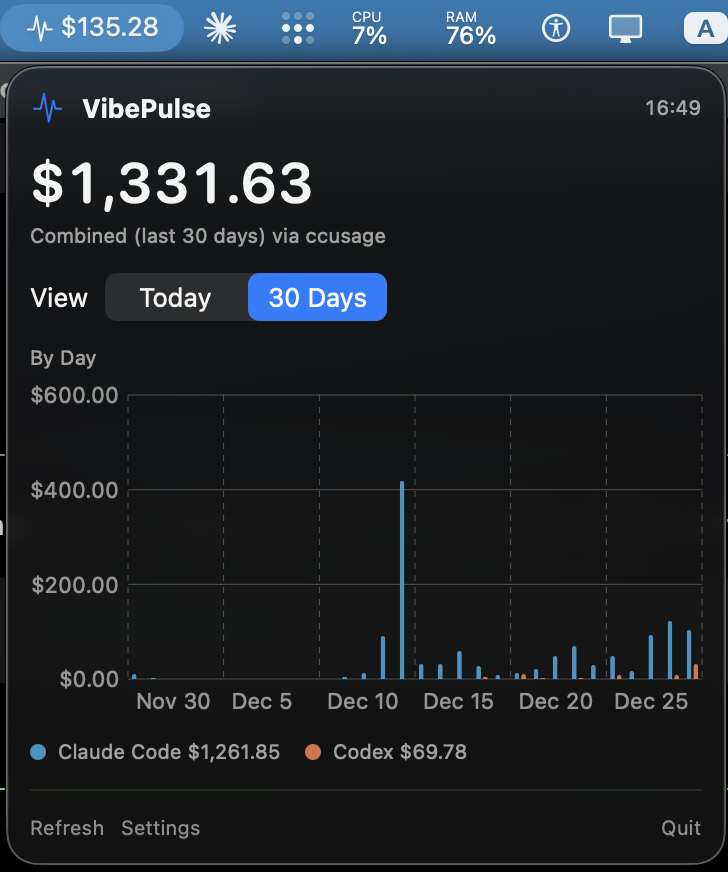
- 7-day and 30-day views show daily totals
- 1-year view shows monthly totals for the last 12 calendar months, including the current month
- Group charts by agent, model, or machine
- Configurable refresh schedule
- Built-in data maintenance for historical imports
- macOS 13+ (Ventura)
- agentsview current release installed with
usage daily --timezonesupport (agentsviewon PATH or path set in Settings) - Local usage from at least one agentsview-parsed agent with priced activity in the past year
- Download the latest
.dmgfrom GitHub Releases. - Drag
VibePulse.appto your Applications folder. - Launch it. If macOS blocks the app, open System Settings -> Privacy & Security and allow it.
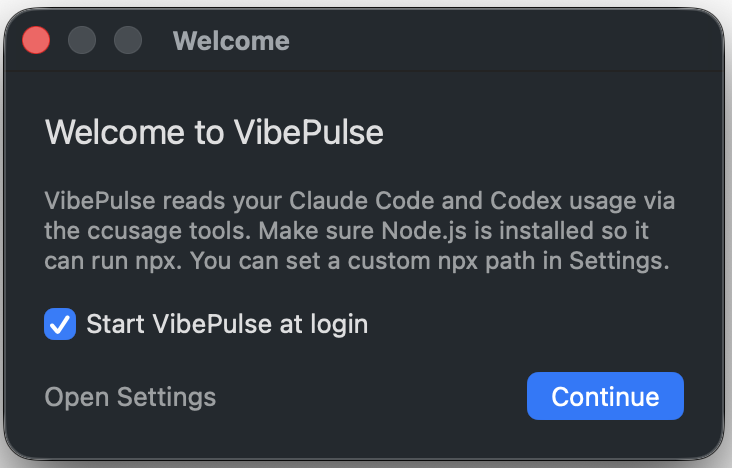
- A welcome window explains the agentsview requirement, notes the default 15-minute refresh cadence, and lets you toggle start at login.
- You can revisit Settings from the menu bar at any time.
Install agentsview:
curl -fsSL https://agentsview.io/install.sh | bashThis installs agentsview to ~/.local/bin/agentsview or /usr/local/bin/agentsview.
VibePulse runs outside your shell, so if agentsview is installed to a non-standard location, set the path in Settings -> Dependencies. To read from an AgentsView server instead, set its URL there; for example, https://archive.example.com. If the server requires authentication, enter its bearer token in Server token. Tokens are stored in your login keychain for the configured server. Clearing the token removes it from the keychain.
Servers that require a token must use HTTPS, except for loopback connections to this computer. Anonymous HTTP connections are also supported.
For mise installations, VibePulse automatically checks ~/.local/share/mise/shims/agentsview before standalone installations. The shim follows your mise-selected version as it changes. If you set the path manually, enter the absolute path to the shim, expanding ~ to your home directory. The field accepts an executable file path; shell commands such as mise exec -- agentsview belong in a terminal.
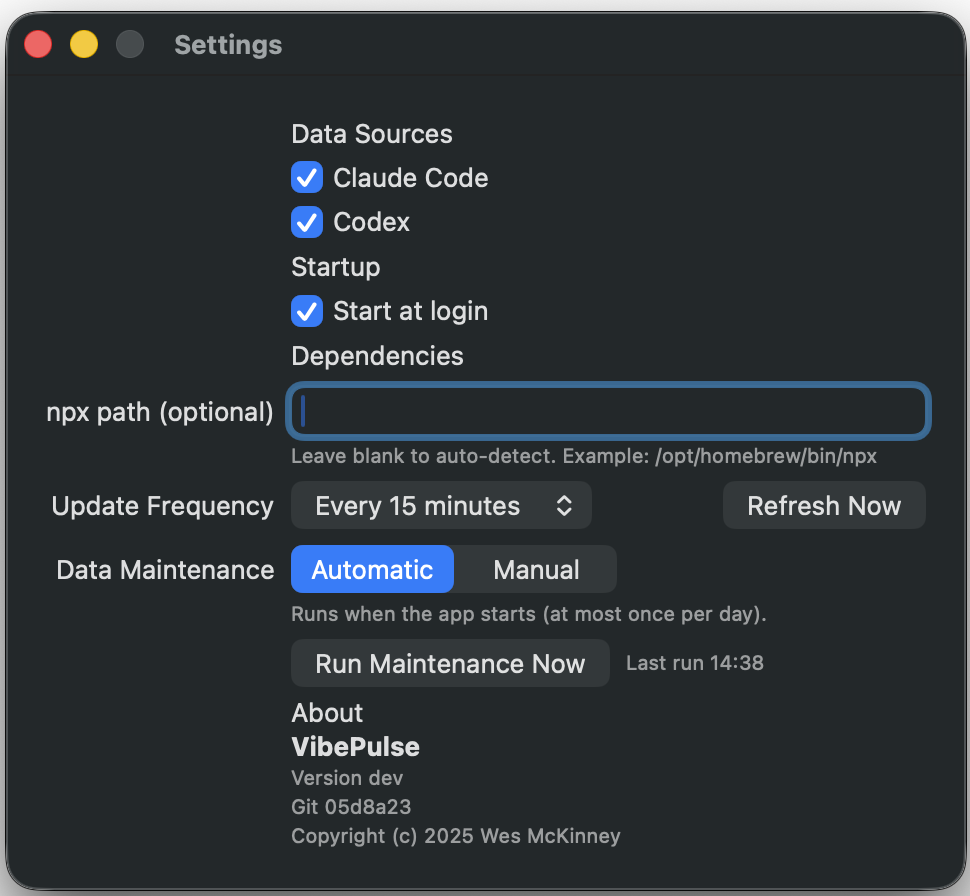
- Data Sources: VibePulse discovers agents with positive-cost usage in the past 30 days, or the past 12 calendar months after selecting 1 Year. Turning one off hides it from totals and charts without stopping imports or deleting history.
- Include automated sessions: Enabled by default under Data Sources. Turn it off to exclude automated reviews from server reports. Both reports are fetched on every server refresh and cached separately, so changing this setting switches histories without fetching again. This setting is unavailable with the local CLI, which always includes automated sessions.
- Startup: Start VibePulse at login (macOS may require approval).
- Dependencies: Set an AgentsView server URL and optional token, or a custom local
agentsviewpath. - Refresh: Choose how often the app refreshes in the background (5m, 15m, 1h, 4h, 1d). Opening the menu fetches recent usage immediately, including changes from an AgentsView sync. The Refresh button also fetches immediately.
- Data Maintenance: Normalize historical data and rerun import fixes.
Select 1 Year to import older history and show monthly totals. The first load can take longer than a normal refresh. The app keeps that history locally and reuses the year import for the rest of the day while it is running. Between year imports, opening the menu and scheduled refreshes fetch only 30 days. While viewing the year, a new day or source/timezone change renews the year import, and Refresh reloads it immediately.
- All usage data stays local on your machine.
- Usage databases live in
~/Library/Application Support/VibePulse/:vibepulse.sqliteholds combined usage andvibepulse-non-automated.sqliteholds usage without automation. - VibePulse has no analytics or telemetry.
- It runs an aggregate agentsview usage report to discover agents, then filtered per-agent reports to store their usage. Server connections fetch both combined and non-automated reports; the local CLI supplies only combined usage. Normal refreshes cover 30 days; year imports cover the last 12 calendar months. Reports come from the configured server when present, otherwise from the local CLI. The Machine view uses labels from the CLI report or the configured server to show names instead of installation IDs.
- Agent not shown: Run
agentsview usage daily --format json --breakdown --since 30d --timezone America/Los_Angelesin Terminal, replacing the timezone with your system's IANA identifier. The agent must appear inagentBreakdownswith positive total cost during that window. - No data: Run
agentsview usage dailyin Terminal to verify usage data exists. - agentsview not found: Install agentsview or set the path in Settings -> Dependencies.
- Start at login: macOS may require approval in System Settings -> Login Items.
swift runscripts/build_dmg.sh v0.1.0The DMG will be created in dist/.
MIT