Godmode for companies · Mac and Windows
Hand them the busywork. They do it in your own browser and apps, start to finish.
Free for 7 days. No card, no sign-up. Book a demo
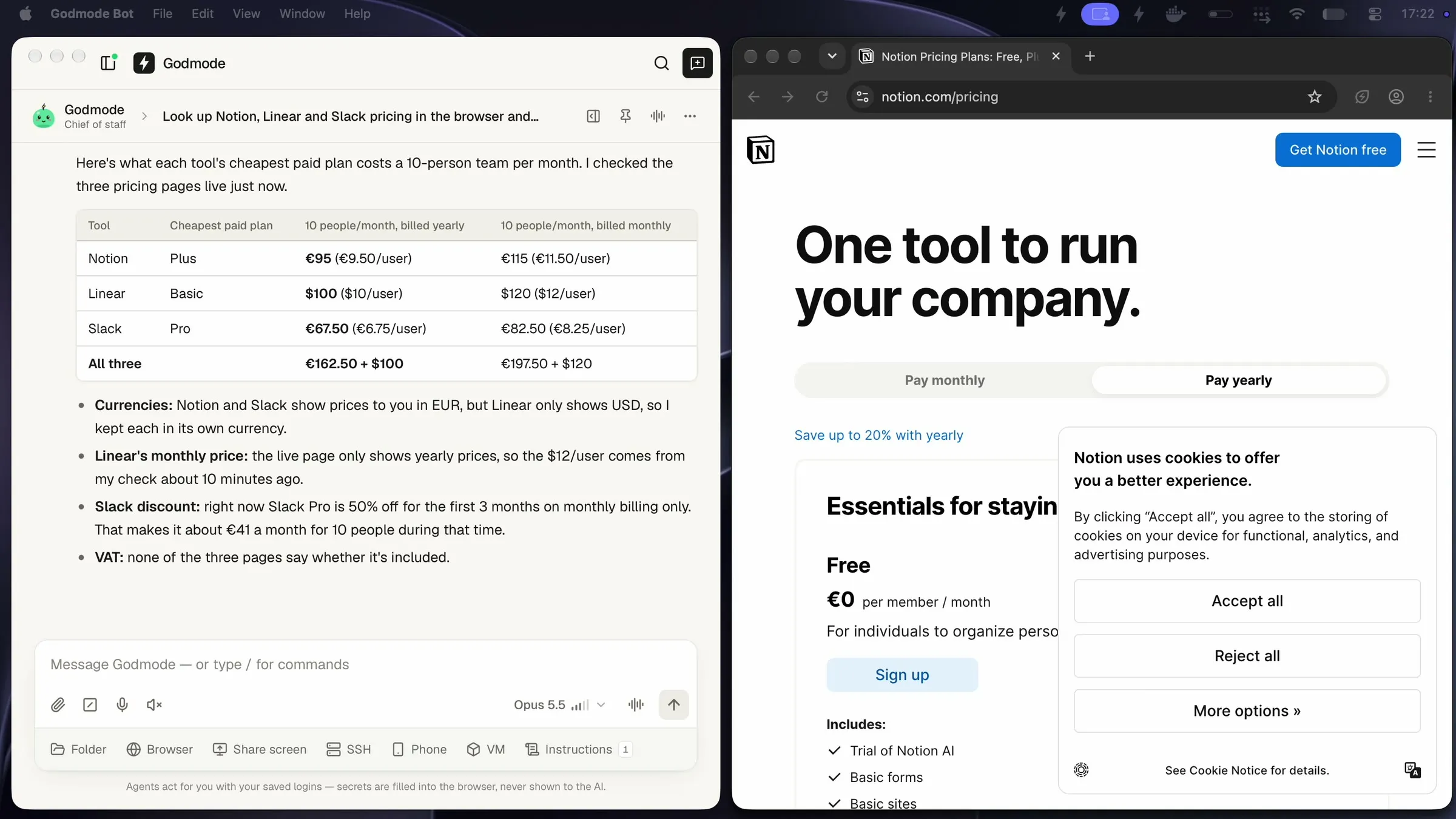
Asked to compare Notion, Linear and Slack for a 10-person team, Godmode opened the three pricing pages in its own browser and came back with a table.
What is Godmode?
Godmode, also called Godmode Bot, is an AI coworker app for companies, made by Codext GmbH in Germany. It runs on Mac and Windows. You describe a computer task in plain words. Godmode does it in your own browser and apps, signed in with your own logins, and asks before it sends, pays or deletes anything.
More about GodmodeReal recording
Six websites in. One spreadsheet out.
More recordings

Your tools
Works in the tools your team already uses.
Gmail, Outlook, Excel, Teams, Slack, Notion, Google Sheets, HubSpot, DATEV, Shopify, Chrome, Google Drive
And any website you can log intoWorks in the tools your company runs on.
Signed in with your own logins, like a colleague.
-
 Gmail
-
 Outlook
-
 Excel
-
 Word
-
 Google Sheets
-
 Google Drive
-
 Google Calendar
-
 Teams
-
 Slack
-
 Zoom
-
 Notion
-
 WhatsApp Web
-
 Dropbox
-
 Trello
-
 Asana

“Today Godmode does a big part of our office work: it drafts our monthly invoices and works through our ticket inbox.”
What it does
Godmode is a desktop app for Mac and Windows. Each AI coworker gets a computer’s worth of tools: the browser, your programs, your files and your logins.
01 / 05
Works in your browser and apps
02 / 05
Signs in without seeing passwords
03 / 05
Asks before it sends, pays or deletes
04 / 05
Runs on a schedule
05 / 05
A whole team of agents
Real screen recordings
Real runs of Godmode on a normal Mac, recorded in November 2026. The login and invoice demos use test data. We only cut the waiting and sped it up.
- almost real time
Logins and 2FA
Fills in password and 2FA from the vault. The AI only sees “Secret hidden”
Signed in on the first try on a public test site. Godmode typed the saved username, password and 2FA code into the page itself; in the chat they show up only as “Secret hidden”.
 Password vault Real run: 20 seconds
- sped up 9x
Research
Researches six websites and hands you a spreadsheet
6 coworking day passes from €15 to €25 with links, saved as an Excel file on the Desktop, plus where each price came from.
Works in your browser Real run: 3 min 21 s - sped up 3x
Dashboards
Pulls live numbers and builds you a dashboard
AutoGPT, LangChain, MetaGPT, AutoGen and CrewAI with stars, contributors and last release, straight from the GitHub API. Charts, a table and a Refresh button, open next to the chat.
Artifacts Real run: 1 min 12 s - sped up 4x
Shopping
Compares the price in three online shops
Amazon.de €206.99, MediaMarkt €219.00, Otto €233.00, each with a link. Cookie banners and a wrong delivery country handled on the way.
Works in your browser Real run: 1 min 46 s - sped up 3x
Lead research
Builds a lead list and checks which shop system each one runs
5 Stuttgart coffee roasters with their own online shop, with links. 4 run on Shopify, one on WooCommerce, read from each shop’s page code.
 Works in your browser Real run: 44 seconds
- sped up 4x
Competitor research
Reads three pricing pages and compares the plans
Notion Plus €9.50, Linear Basic $10, Slack Pro €6.75 per user, billed yearly, plus the biggest catch of each free plan. It even found Slack’s yearly price hidden in a tooltip.
Works in your browser Real run: 1 min 10 s - almost real time
Files
Sorts and renames 15 messy invoice PDFs
15 invoices in 3 month folders, renamed like 2026-10-23_Packhaus-GmbH_295.12.pdf, with a total per month: €4,165.42 overall.
Works with files on your Mac Real run: 24 seconds - sped up 2x
Website check
Checks your website: uptime, speed, SSL and broken links
Up with HTTP 200, first byte after 0.10 s, SSL valid until Feb 22, 2027, and all 30 links on the homepage load. One sentence in, a full check out.
Runs commands on your Mac Real run: 23 seconds - sped up 4x
Every week
Turns one sentence into a weekly report
A Monday 08:00 automation, set up from that one sentence. The first run finished right away with 5 picks.
Automations Real run: 1 min 27 s
Right on your computer
Godmode doesn’t stop at the browser. It works in the apps on your Mac like you would: fills official PDF forms in Preview, types into Numbers and Pages, reads letters from the tax office. Real runs, recorded in November 2026 with made-up company data. We only cut the waiting and sped it up.
How it works
- 01
Download and open
Free for 7 days, no card and no sign-up. Setup walks you through everything in a few minutes, including signing in with your Claude plan.
- 02
Tell it the task in plain words
Type it like you would ask a colleague. Or send it from your phone, Slack or Telegram. Want it every Monday? Just say so.
- 03
It does the work and checks with you
It signs in, clicks through and hands it back done. Before it sends, pays or deletes anything, it asks you, unless you already told it to go ahead.
Download last month’s invoices from our supplier portals and put them in Dropbox. → 23 invoices filed. Send the 7 payment reminders now?
After each call today, update the deal in HubSpot and draft the follow-up email. → 4 deals updated, 4 follow-ups in your drafts. Send them?
Put this week’s ad numbers from Meta, Google and TikTok into our report sheet. → Report updated. 4 ads without sales flagged. Pause them?
By entrepreneurs, for businesses
One app. Every department.
Each person gets their own Godmode, with their own agents, logins and automations. One plan for the whole team, on one company invoice.
- Back office
- Finance
- Sales
- Marketing
- Support
- Online shop
 We run our own company with it first. Daniel Ehrhardt, founder of Codext GmbH
Security
Handing work to an AI should feel like handing it to a careful colleague. So Godmode keeps your keys at home and checks with you before the big steps.
Runs on your computers
Your data stays with you.
Godmode runs on your own Macs and PCs. Logins, notes and history stay on them, and the app has no tracking and sends nothing to us.
What the AI sees when it signs in
- YouLog into the supplier portal and download September’s invoice.
- GodmodeFilled your login [secret hidden]
- GodmodeFilled the 2FA code [secret hidden]
- GodmodeSigned in. Invoice saved to Documents.
-
Encrypted password vault
Passwords and 2FA codes are typed into the page by Godmode. The AI never sees them, and chats and logs black them out.
-
Approvals before big steps
Sending, paying, deleting, posting: by default it stops and asks first. Anyone can take over with one click.
-
Every step on the record
Watch each run live. Its chat and steps stay on the computer, so you can see what was done and when.
-
Your own Claude account
Godmode thinks with Claude from Anthropic. Tasks are processed under your company’s own Claude account.
-
Notarized by Apple
The Mac app is signed by Codext GmbH, and Apple checks it before it opens.
Signed for Windows
The Windows app is signed by Codext GmbH, so Windows shows who made it.
-
Invoiced from Germany
Codext GmbH, Wolpertshausen. Company invoices with VAT ID, and a phone number with a human on the other end: +49 7904 5203106.
Pricing
Download Godmode and use everything free for 7 days. No card, no sign-up. If it saves you time, keep it. If not, just stop using it.
10% off every month through
Enterprise
More than 5 users
Priced for your team.
More than 5 users: volume pricing, with setup, training and invoice.
1 user = 1 person with their own Godmode instance and licence.
Every plan includes
- Unlimited AI coworkers, tasks and automations
- Works in your browser and apps, signed in as you
- Runs on a schedule or when an email arrives
- Password vault with 2FA codes
- Message it from your phone, Slack or Telegram
- Every update while you’re subscribed
Done-for-you setup
€2,500 one-time, plus VAT
We set Godmode up with you and build your first automations, so it saves you hours from week one.
See what’s includedWhat is Godmode?
Godmode, also called Godmode Bot, is an AI coworker app for companies, made by Codext GmbH in Germany. It runs on Mac and Windows. You describe a computer task in plain words. Godmode does it in your own browser and apps, signed in with your own logins, and asks before it sends, pays or deletes anything.
More about GodmodeDo I need to know how to code?
No. If you can explain the task to a colleague, you can hand it to Godmode. You type or say what you need in plain words, and it does the clicking. Setup is a normal app install and walks you through the rest.
How is this different from ChatGPT?
ChatGPT answers in a chat window, and then you do the work. Godmode does the work: it signs in to the websites and programs you use, clicks through, finishes the task and hands you the result. It can also do it again by itself every week, or whenever an email arrives.
What happens after 7 days?
Godmode asks if you want to keep it. It’s from €299/month (incl. VAT). If you don’t keep it, nothing is charged, because you never gave us a card. Everything you set up stays on your computer, so you can pick up where you left off.
Do I need a credit card to try it?
No. Download it and use every feature free for 7 days. No card, no account. You only enter payment details if you decide to keep it.
Do I need a Claude plan?
Yes. Godmode thinks with Claude, the AI from Anthropic. You sign in with your Claude Pro or Max plan once during setup. No plan yet? The setup shows you how to get one. If Godmode works for you all day, Max fits better than Pro. An Anthropic API key works too.
Can you set it up for me?
Yes. With our done-for-you setup (€2,500 one-time, plus VAT) we find your biggest time sinks in a workshop, set Godmode up on your computers and build up to 5 automations with you, tested on your real accounts. Your team gets a training and you get 30 days of support.
See the setup serviceIs my data safe? Does it see my passwords?
Your passwords and 2FA codes live in an encrypted vault on your computer. Godmode types them into the login page itself, so the AI only learns that a password was filled, never what it is, and only on that login’s own website. Your logins, notes and history stay there too, and the app sends nothing to us. The tasks you give and the pages it reads are processed by Claude under your own Claude account.
Will it do things without asking me?
By default it asks you before important steps like sending an email, paying, deleting or posting. If your task already says to do that step (“send the reminders”), it goes ahead. You can watch every step live and take over with one click. When a website wants a code from your phone, it asks you for that too.
Does it work on Windows?
Yes. Windows 10 and 11, on x64 and ARM PCs. Godmode runs on Mac too, with Apple chip or Intel.
Can my team use it?
Yes. Each person installs Godmode on their own computer and gets the same 7 free days. The Team and Business plans cover 3 or 5 people on one invoice, and Enterprise covers more.
How do I cancel?
In two clicks, in the billing portal (linked in the app and in your receipt), or by email. It keeps working until the end of the month or year you paid for. And if it’s not for you, email us within 14 days of your first payment and we refund it in full, no questions asked.
Does it work when my computer is off?
It works while your computer is on and awake. Want it working around the clock? Run it on a spare Mac that stays on, like a Mac mini, and reach it from your phone. Email us and we’ll help you set it up.
What can’t it do?
Some websites block robots with puzzles (CAPTCHAs) or want a code from your phone. Then you click “Take control” for a moment and it carries on. Like any AI it can make mistakes, so check important work until you trust a routine.
Can I get an invoice for my company?
Yes. Add your company name and VAT ID at checkout and you get a proper invoice by email. Payments are handled by Stripe; we never see your card.
Stop doing work a computer can do.
Enter your work email. In a 20-minute demo we look at your team’s week and show you what Godmode would take over.
Or try it yourself: Download free for 7 days Download free for 7 days Download free for 7 days
 Book a demo