LD Manager
Know what runs on your Mac. Fix what doesn’t
- macOS
Free Version 0.1.5 · Open source, MIT · Notarized by Apple · Not affiliated with Apple
A free, open-source Mac app and CLI that lists every launchd job, Apple’s included, and joins every layer into one status. The Doctor names why a job failed and offers a fix. For the most-searched error, see “Bootstrap failed: 5”.
Inside the app
A look inside
-
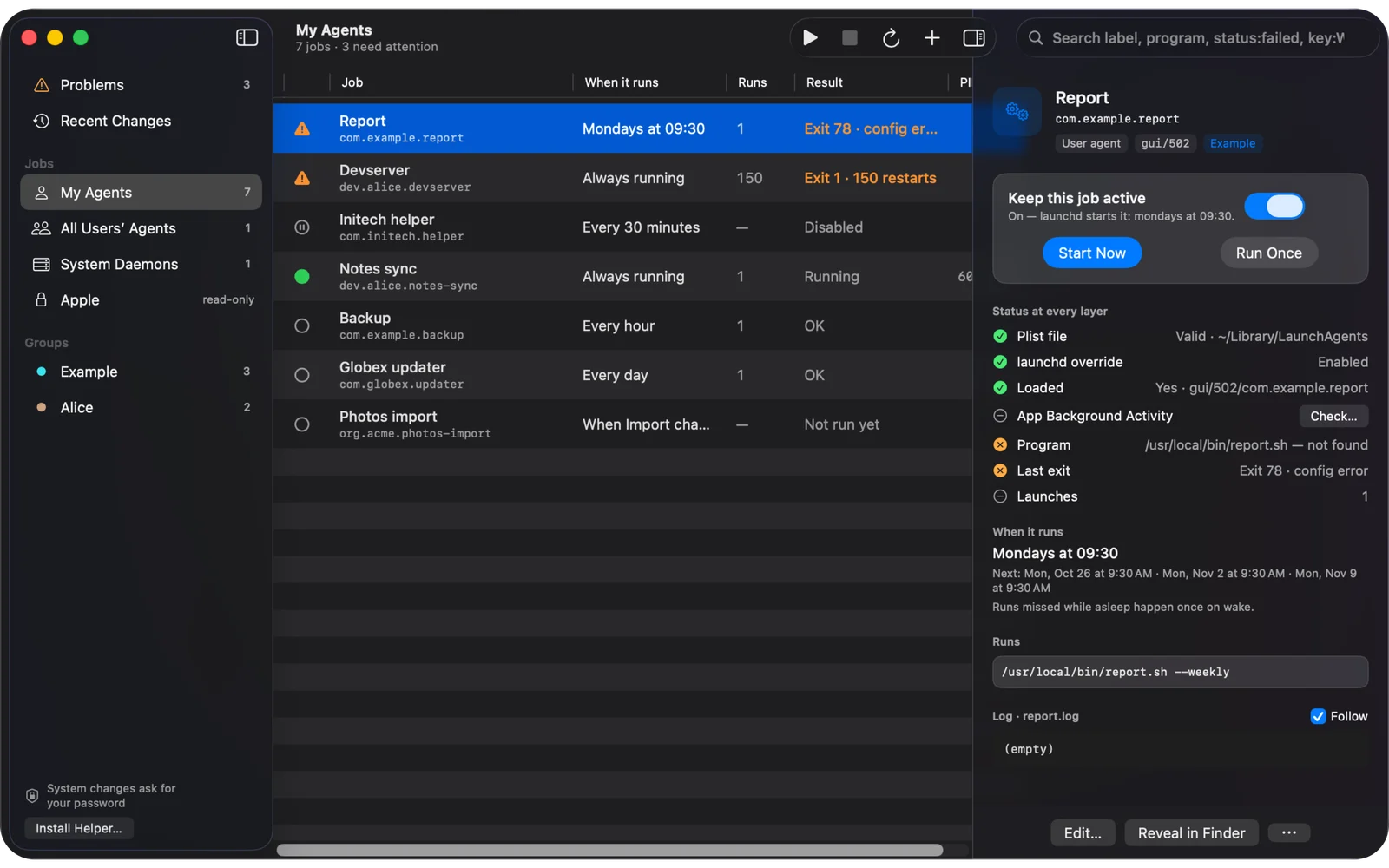
Every layer of a job, in one status.
The plist, loaded state, override, Login Items, last exit and launches, side by side.
Here Report failed with exit 78: its program is missing.
-
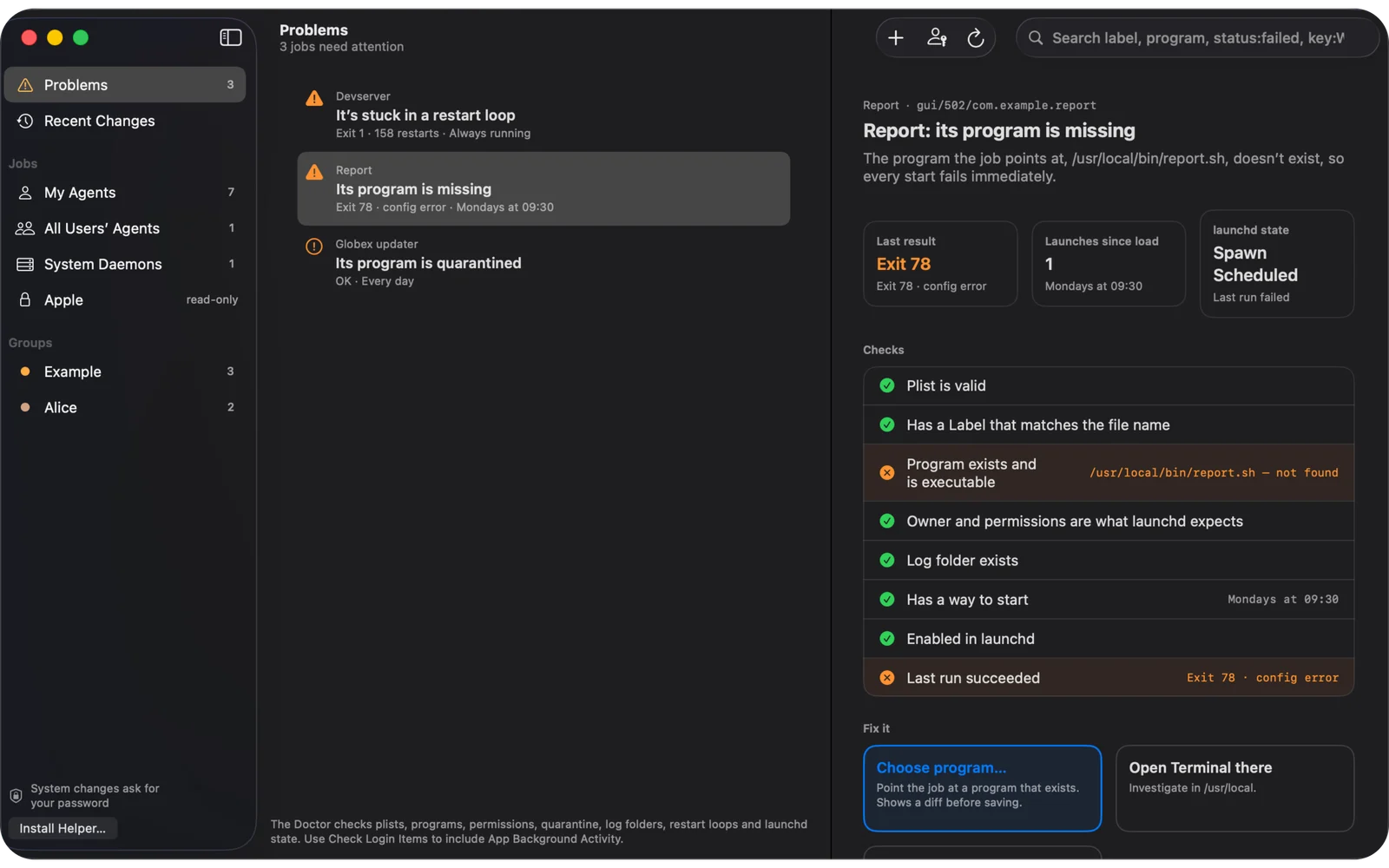
The Doctor names the cause.
Plists, programs, permissions, quarantine, log folders and restart loops, each checked, with a fix offered for what fails.
Problems collects every job that needs attention.
-
A diff before every save.
Edit as a form, keys or XML; unknown keys stay as they are. Each save keeps a backup.
Made-up jobs, from the project’s own demo.
-
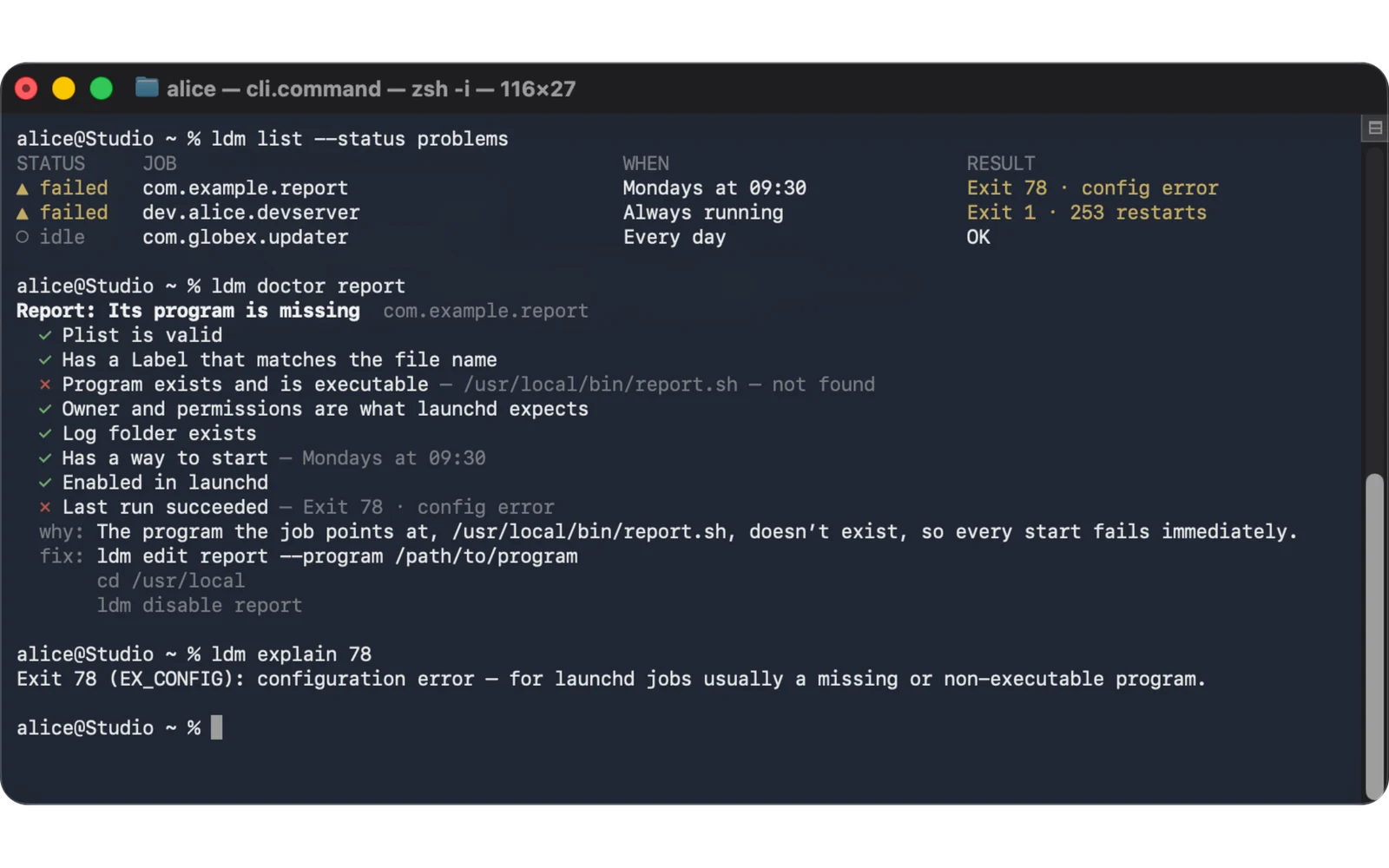
The same, from the terminal.
ldm list, ldm doctor and ldm explain 78, on the same core as the app.
--json, --dry-run to print launchctl commands, and documented exit codes.


Built for the job
Who LD Manager is for
Mac developers who write their own agents
See if launchd loaded your agent and why it exited; edit without retyping XML.
A Mac mini as a server
Catch restart loops and failed runs in always-on daemons from the menu bar.
Power users checking what starts at login
Agents and daemons apps installed: which run, and which are merely allowed to.
Mac admins who script
ldm with --json, documented exit codes, and --dry-run to see launchctl commands first.
Capabilities
What it does
Every launchd job, every layer
Plist, loaded state, override, Login Items switch, PID and last exit, joined into one status.
The Doctor
Checks plists, programs, permissions, quarantine, log folders and restart loops, and offers a fix for each.
Schedules and exit codes in plain words
StartCalendarInterval reads as “Mondays at 09:30”; exit 78 as EX_CONFIG, usually a missing or non-executable program.
Lossless editing, with backups
Unknown keys survive, you see a diff before every save, and Recent Changes restores any backup.
An optional helper for system jobs
Approve it once in System Settings › Login Items to change system jobs without a password.
The ldm command line
The same core in a terminal, with --json, --dry-run and documented exit codes.
Practical guides
Start with what you want to do
launchctl “Bootstrap failed: 5: Input/output error”: what it means and how to fix it
7 minute read → launchdlaunchd exit code 78 (EX_CONFIG): why your LaunchAgent won’t run
7 minute read → launchdHow to replace cron with launchd on a Mac
7 minute read → Login items“Background Items Added” on a Mac: find what it is and turn it off safely
7 minute read →The short answers
Questions about LD Manager
Is LD Manager free?
Yes. LD Manager is free and open source under the MIT licence. The source is on GitHub.
Can I download it yet?
Yes. A signed and notarized download for macOS 26 or later is on this page, and the source is on GitHub.
What is the difference between a LaunchAgent and a LaunchDaemon?
A LaunchAgent runs as a user, in that user’s session: ~/Library/LaunchAgents for yours, /Library/LaunchAgents for every user. A LaunchDaemon runs in the system domain, usually as root, from /Library/LaunchDaemons, even with nobody logged in. LD Manager shows Apple’s own, in /System/Library, read-only.
Why does my launchd job exit with code 78?
78 is EX_CONFIG, a configuration error, usually a missing or non-executable program. Check that the path in Program or ProgramArguments exists, is executable and doesn’t start with ~, which launchd doesn’t expand. The Doctor checks each; ldm explain 78 prints the meaning.
Does LD Manager need my administrator password?
Not for your own agents. For agents for all users or system daemons, LD Manager uses macOS’s own administrator prompt, or no prompt once you approve its optional helper in System Settings › Login Items.
Will editing a plist in LD Manager lose keys it doesn’t know?
No. Changes go into the file’s own dictionary, so keys the form doesn’t show stay as they are. You see a diff before every save, and each save keeps a backup you can restore from Recent Changes.
Can I use it from scripts?
Yes, with ldm. It prints --json for scripts, --dry-run prints the exact launchctl commands instead of running them, and the exit codes are documented: 0 ok, 1 error, 2 usage, 3 no such job, 4 authorization, 5 launchd rejected, 6 the Doctor found problems, 7 timed out waiting for launchd.
Why isn’t LD Manager on the Mac App Store?
Apps on the Mac App Store must be sandboxed, and a sandboxed app cannot drive launchctl. LD Manager is distributed directly instead.
Does LD Manager connect to the internet?
Only to check for updates, once a day, from GitHub. It sends no analytics and no system profile and has no account; updates are verified with a signature before they install. You can turn the check off in Settings › Software Update. The ldm command never connects.
How is it different from LaunchControl, Lingon or KnockKnock?
LD Manager is free, open source and focused on why a job isn’t working. LaunchControl is the most complete paid launchd tool, Lingon makes creating jobs easy, and KnockKnock and BlockBlock list what persists without managing it. LD Manager isn’t affiliated with them.
Is LD Manager made by Apple?
No. LD Manager is an independent project, not affiliated with, endorsed by or sponsored by Apple. Mac and macOS are trademarks of Apple Inc.
Privacy by design
What LD Manager knows about you
- LD Manager collects nothing about you. No account, no analytics, no telemetry.
- Its only network connection is a daily update check with GitHub, which you can turn off. Everything else happens on your Mac.
- It reads launchd’s state through launchctl and the plist files on your disk, and writes only the plists you edit, their backups, a cache and its own settings.