A small, fast VPN client that routes every application its own way.
Written in Zig. No Electron, no bundled proxy core, no telemetry.


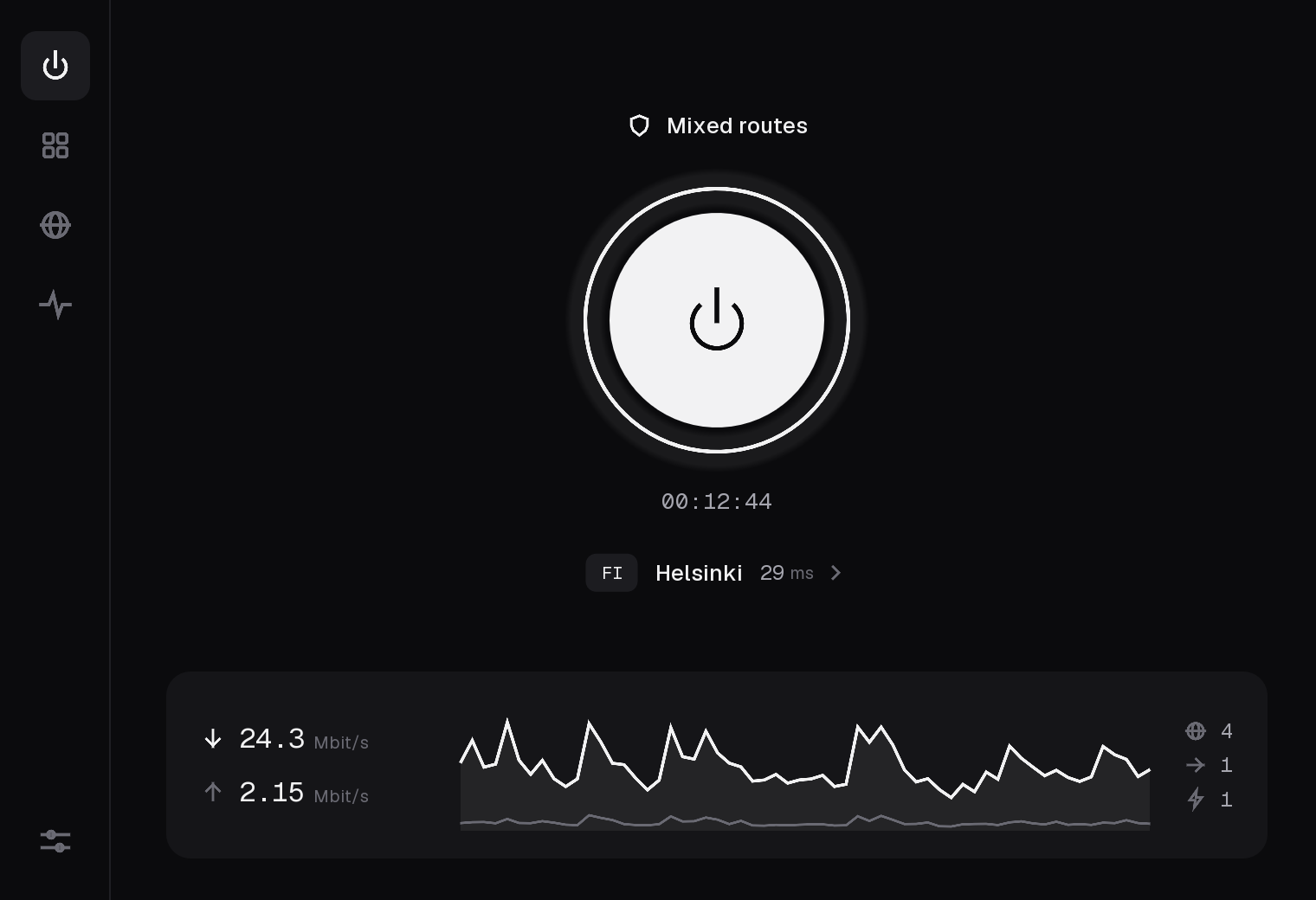
BLACKWALL is a client for the servers you already have: paste a subscription link or a single key, and it carries your traffic over VLESS, Trojan, Shadowsocks or VMess. What sets it apart is where the decisions are made. Every application gets its own route (through the VPN, through one particular server, straight to the internet, or nowhere), and the protection around those routes is built so that an application you sent through the VPN never quietly falls back to your real address.
It is one codebase with its own data plane: the TCP/IP stack, the TLS 1.3 and REALITY handshakes, HTTP/2 and every protocol are implemented in this repository, in Zig. A release is a single file of 3 to 14 MB.
You bring the servers. BLACKWALL is a client. It does not sell, provide or recommend VPN servers. The app has no account and no backend, and sends nothing about you anywhere (privacy). The project's website counts visits and downloads per day, without cookies or addresses (worker/).
- Features
- Platform support
- Protocols and transports
- Install
- Getting started
- Routes
- Protection
- How it works
- Security model
- Build from source
- Testing
- Project layout
- Known limitations
- Roadmap
- Contributing
- License
Routing
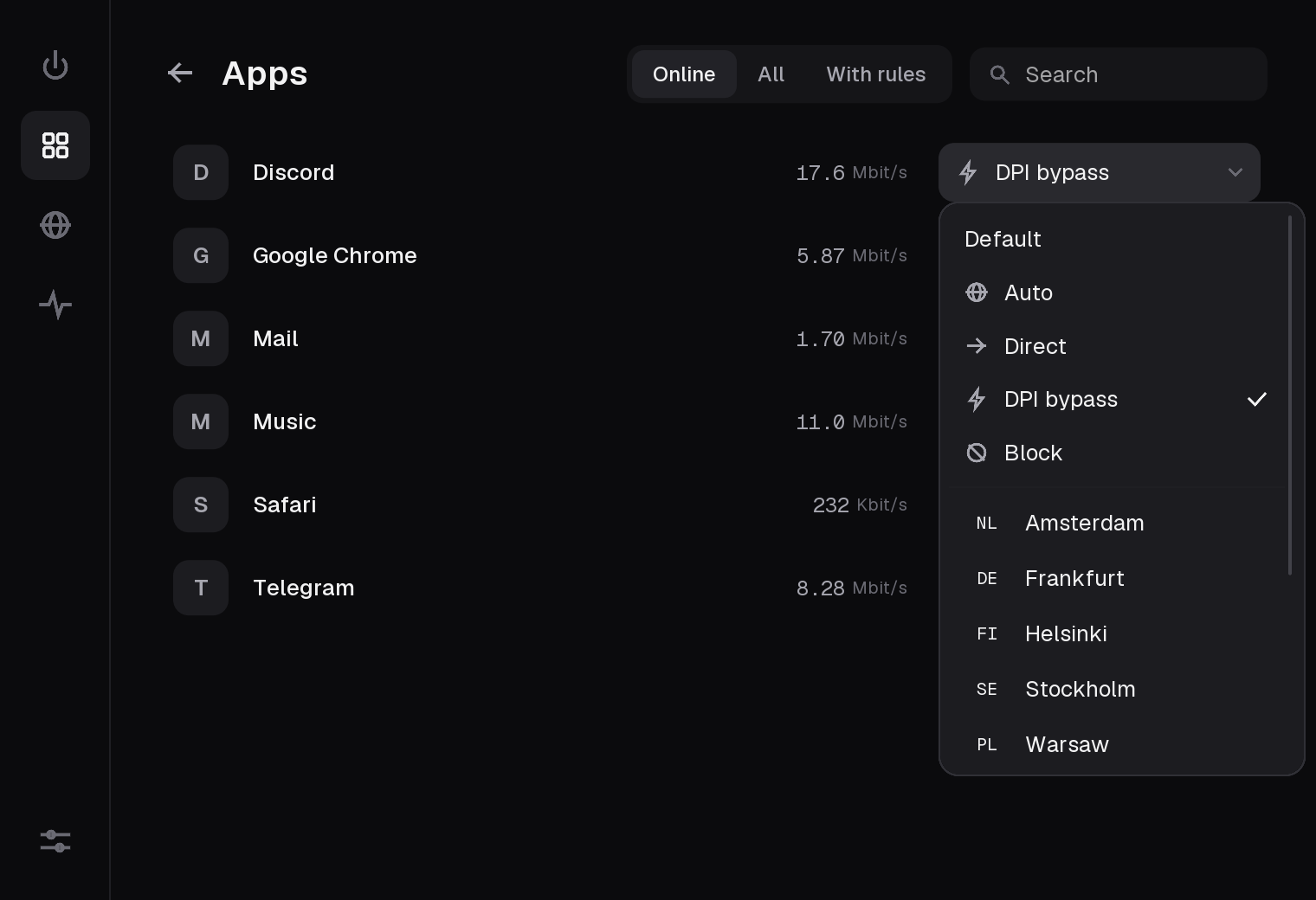
- A route per application: VPN, a pinned server, direct, or blocked. All of them work at the same time.
- Programs an application starts follow its rule: a shell,
gitorcurllaunched by an app is routed like that app unless it has a rule of its own. - A route per site:
youtube.comand everything under it, for the applications without a rule of their own (an application held to the VPN stays there whatever it opens). The name comes from the tunnel's DNS, or from the connection's first bytes (TLS SNI, HTTP Host) when the system resolves on its own. - DPI bypass: a direct route whose TLS ClientHello leaves in a shape that filters matching the site's name do not recognise, picked per host from three ways.
- A default route for everything without a rule.
- Live traffic per application, and a history graph.
Servers
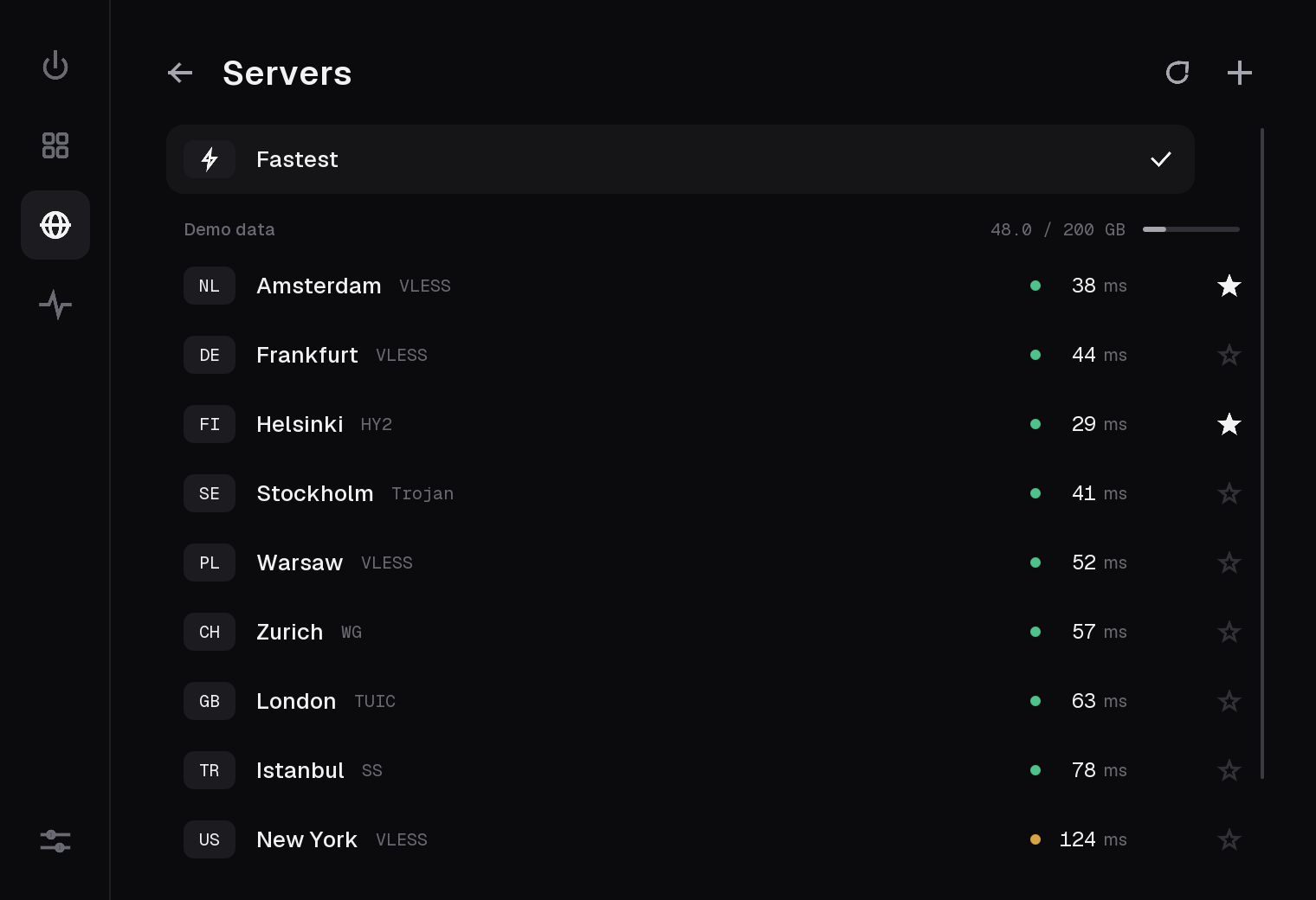
- Subscriptions by link, or keys pasted one by one. Several subscriptions at once.
- A provider's "Auto" (an Xray balancer in a JSON subscription, as Remnawave, Marzban and
3x-ui serve it) is one entry: its servers measured one by one, the fastest in use, the
others its reserve. Names are kept across refreshes, so the choice survives a changed
list, and a refresh never drops the connection. The provider's title, refresh period
(
profile-update-interval), announcement and support link are read from the headers. - A QR code instead of typing: from the camera or a picture on Android, from the clipboard or the screen on a computer, read by a decoder in this repository.
- Latency for every server; "Fastest" picks one for you.
- The country a server really exits in, found with one request through it, shown when it differs from what the provider says.
- Copy a server as a link or as an Xray JSON configuration.
- Reserve servers: star the ones you trust. When the server in use stops carrying traffic, BLACKWALL reconnects to it once, then moves to the starred ones, fastest first, checking each with a real request. It moves back when the main server answers again.
Protection
- Kill switch, selective or strict.
- An application that cannot be identified is never let out past the VPN: while any application or site is held to the VPN and the default route is direct, a connection whose owner is unknown is refused.
- IPv6 blocked, tunneled or left to the system.
- Protection after Disconnect: applications with a VPN rule of their own stay offline while the VPN is off.
- Hold from boot (macOS): traffic is held from the moment the system starts until the VPN is up, so applications that launch at login cannot get out first. On Android the system's own "Always-on VPN" does the same.
- Detection of another VPN that stands in the way, with a way to stop it.
Everyday use
- A background service carries the traffic. Close the window and nothing changes.
- A menu bar / tray item with the state, the server, the current speed and the two or three actions you need.
- Signed automatic updates. Settings, subscriptions and rules are kept.
- A report for GitHub issues in Settings: the recent log as a file, with links, keys and the addresses of servers and sites taken out. A crash is written to a log and says where to report it.
- A configuration file that cannot be read is kept beside the new one, never overwritten.
- English, Russian and Chinese.
| macOS 13+ (Apple Silicon) | Android 10+ | Linux (x64) | Windows (x64) | |
|---|---|---|---|---|
| Capture all traffic (TUN) | Yes | Yes | Yes | Yes (Wintun) |
| Routes per application | Yes | Yes | Yes | Yes |
Local SOCKS5 proxy (127.0.0.1, port 1080 when free) |
Yes | No | Yes | Yes |
| Protection after Disconnect | Yes | Yes | Yes | Yes |
| Kill switch | Yes (pf) | Android's own "Always-on VPN" | Yes (nftables) | Yes (WFP) |
| Traffic held from boot | Yes | Android's own "Always-on VPN" | No | No |
| Menu bar / tray / notification | Yes | Yes | Built, untested | In use since 0.2.10 |
| Automatic updates | Yes | No | Yes | Yes |
macOS is the platform used and tested every day. The Android app has been through an emulator (Android 16, arm64) from first start to a reboot with "Block connections without VPN" on, and not through daily use on a phone yet. On Linux the capture, the routes per application, the protection after Disconnect and the strict kill switch pass an end-to-end test in a virtual machine (Alpine, kernel 6.18), run by hand before a release; the window and the tray have not been through a real desktop yet. Linux needs kernel 5.7 or newer. On Windows the capture through Wintun, the routes per application, the system service with its install and signed upgrade, and both kill switch modes pass an end-to-end test on a Windows machine in CI on every push to the code; protection after Disconnect runs on the same path but has no test of its own there. The window, the tray and the updater there have been through real Windows desktops since 0.2.10, which is where their first bugs were found and fixed.
| Protocol | Security | Transports |
|---|---|---|
| VLESS | REALITY (with Vision), TLS, none | TCP, WebSocket, HTTPUpgrade, gRPC, XHTTP |
| Trojan | TLS, REALITY | TCP, WebSocket, HTTPUpgrade, gRPC, XHTTP |
| VMess (AEAD) | TLS, REALITY, none | TCP, WebSocket, HTTPUpgrade, gRPC, XHTTP |
| Shadowsocks | AEAD (AES-GCM, ChaCha20) and 2022 (BLAKE3) | TCP, UDP |
Every combination above is checked against a real Xray
server: a download, an upload and a small request per link. UDP goes through every
protocol and is checked the same way, a datagram and a DNS query per protocol
(blackwall-proxy udp <link> <ip:port>). Link formats understood:
vless://, trojan://, ss://, vmess:// (both the base64 JSON and the URL form), and
Xray JSON subscriptions.
The TLS ClientHello follows Chrome's, the WebSocket and HTTPUpgrade requests match Xray's byte for byte, and server certificates are always verified. A server whose front answers the WebSocket or HTTPUpgrade request with 5xx (its backend away for a moment) is dialed again, up to five times over three seconds, as Xray does.
Download the file for your system from the releases page. Each release comes in three languages; pick the one you read.
| System | File |
|---|---|
| macOS 13+ (Apple Silicon) | BLACKWALL-<version>-<lang>-macos-arm64.zip |
| Windows (x64) | BLACKWALL-<version>-<lang>-windows-x86_64.exe |
| Linux (x64) | BLACKWALL-<version>-<lang>-linux-x86_64.tar.gz |
| Android 10+ (arm64, x86_64) | BLACKWALL-<version>-android.apk (every language in one file) |
The builds are not signed by Apple or Microsoft yet:
- macOS: right-click the app, choose Open (on macOS 15 and newer: open it once, then System Settings, Privacy & Security, Open Anyway). The first connection in TUN mode asks for the administrator password once, to install the network helper.
- Windows: SmartScreen, More info, Run anyway. The first Connect asks once (UAC) to install the BLACKWALL system service, which carries the traffic; later releases replace it by themselves. See docs/windows.md.
- Linux: unpack the archive and run
./install.sh, which puts BLACKWALL into the applications menu for your user (no root). The first Connect in TUN mode asks for your password once, through the system's dialog, to giveblackwall-tunits network permission. - Android: open the APK and allow the installation from that source. The first connection asks once whether the app may be a VPN. The app is also on its way to Google Play; the APK from here and the app from Google Play are signed differently, so one does not update the other.
Every release file has a .sig next to it, an Ed25519 signature the updater checks
before it installs anything. See docs/updates.md.
- Open Servers, press +, and paste a subscription link or a key.
- Go back and press the power button.
- Open Apps to give an application its own route.
- Star a few servers you trust. They become the reserve.
Explanations of every option live in Settings. The main screens stay free of text on purpose.
| Route | Where the application's traffic goes |
|---|---|
| Default | Wherever "Default route" in Settings says: the VPN or direct |
| Auto | Through the VPN, on the main server (or its reserve) |
| A server from the list | Through that server and no other. If it cannot be used, the application is blocked, never sent direct |
| Direct | The normal internet, with your real address |
| DPI bypass | Direct, with the TLS ClientHello split so that name filters miss it |
| Block | No network |
The same routes apply to sites. An application's own rule (or that of the application that started it) comes first; a site's rule takes the rest.
A route that goes through the VPN has exactly two fallbacks: another VPN server from the reserve, or no connection. There is no path from a VPN route to a direct connection.
Kill switch. Selective stops the applications that are routed through the VPN when it drops; direct ones keep working. Strict stops everything except the connections to the VPN servers themselves, using the system firewall (pf on macOS, nftables on Linux, WFP on Windows). If the firewall rules cannot be set, the connection does not start.
Protection after Disconnect. Turning the VPN off is not the same as lifting the protection. Applications with their own VPN rule, and blocked ones, stay offline while the VPN is off; everything else uses the normal internet.
Hold from boot (macOS). With "Launch at login" on, TUN mode, a kill switch that is not off, and either "Connect automatically" or applications held after Disconnect, the network helper captures all traffic as soon as the system has a network and holds it until the service takes over. If no service comes within two minutes of a login, it lets go, so a broken installation cannot leave the machine offline.
Reserve. Recovery is driven by failures, not by polling. When connections start failing, the address is looked up again and one real request is sent through the same server. If that fails, the starred servers are tried, the ones measured fastest first, each with a real request. To know which is fastest, each starred server is measured through itself (1 MB) half a minute after the list changes and then every half hour, one at a time and only while traffic flows.
flowchart LR
    apps["Applications"] -->|all traffic| tun["utun device"]
    subgraph service["blackwall-service (your user)"]
        tun --> stack["TCP/IP stack<br>fake-IP DNS"]
        stack --> who["Which application?"]
        who --> route{"Route"}
        route -->|VPN| out["VLESS / Trojan / VMess / Shadowsocks<br>TLS 1.3, REALITY, WS, gRPC, XHTTP"]
        route -->|direct| direct["Physical interface"]
        route -->|block| drop["Refused"]
    end
    out --> server["Your server"]
    helper["blackwall-helper (root)<br>utun, routes, DNS, firewall"] -. hands over the utun .-> service
    window["BLACKWALL window<br>and menu bar item"] <-->|JSON lines over a Unix socket| service
Three processes on macOS, each with one job:
- The window shows the state and edits the configuration. It carries no traffic and can be closed.
- The service runs as your user and is the whole data plane: a TCP/IP stack in user space that terminates every connection the system sends into the tunnel, finds the application behind it, picks its route and carries it.
- The helper (macOS) is a small root daemon that does only what needs root: it creates the tunnel device, sets the routes and the DNS, holds the firewall rules of the strict kill switch, and hands the device to the service. If the service dies, the helper keeps the traffic captured instead of letting it leak.
The other systems have the same window and the same service, and differ in who holds the
privilege. On Linux a small program with one capability (blackwall-tun) creates the
device and hands it to the service. On Windows the service is a system service
(LocalSystem) with a Wintun adapter, and the window reaches it over the loopback
(docs/windows.md). On Android the core is a library inside the app,
behind the system's own VpnService (docs/android.md).
A few details worth knowing:
- Fake-IP DNS. Name lookups are answered with addresses from
198.18.0.0/15, so each connection arrives with its domain name and the server resolves it. Your resolver does not see where proxied applications go. - Application identity. A connection is matched to a process through the kernel's
socket tables, and the process to the outermost
.appbundle that contains it. When a process has no rule, the applications that started it are asked, nearest first. - No external core. There is no Xray, sing-box or OpenSSL inside. The protocol code is a few thousand lines per protocol, allocates almost nothing per connection, and is tested against the reference servers.
- Least privilege. On macOS only the helper runs as root, and it runs no shell and no
command the caller chooses. Every value it receives is validated before it reaches an
ioctl, a route message or a command line. It serves one user: the one who installed it. On Linux nothing runs as root:blackwall-tunholds one capability,CAP_NET_ADMIN, granted to that file once through polkit. It creates the device, its routes and the kill switch's nftables table, hands the device to the service and exits. The service and the window run as you, with no capability, so updating them asks for nothing; the updater replacesblackwall-tunonly when it changed, and only the user who installed it may run it. On Windows the service runs as LocalSystem from%ProgramFiles%, where only administrators write; the user who installed it may start, stop and query it, and it replaces itself only with a newer service signed by the release key. - Stopping another VPN is done only for a process whose identity (pid, start time, executable) was re-checked at the moment of stopping, and never for a system process.
- Updates are signed. The updater installs a file only when its Ed25519 signature matches the public key built into the running app, and only when the unpacked app really is the expected, newer version. The helper (and the Windows service) accepts a newer one of its own kind on the same terms, so the administrator is asked once per installation.
- Servers are verified. With plain TLS the certificate chain is checked up to a trusted root, every link of it a certificate authority; with REALITY the server proves it holds the key from the link.
- Fail closed. A VPN route whose server is gone, unknown or unsupported is blocked. A connection whose application cannot be identified is refused wherever letting it out could bypass a rule. A strict kill switch that cannot be set stops the start.
- Secrets stay local. Subscription links and keys are stored in the configuration file in your user folder and are never logged.
Found a security problem? Please report it privately to the maintainers rather than in a public issue.
You need Zig 0.17.1. Everything else is fetched by the
build, except wintun.dll for a Windows package (-Dwintun=, from
wintun.net) and the Android SDK for the Android app.
zig build                 # the app, the service and the tools, into zig-out/
zig build run             # build and start the window
zig build test            # all tests
zig build service         # only the background service (and the helper, or blackwall-tun)
zig build package -Doptimize=ReleaseSafe -Dlang=en # a release file in zig-out/package| Option | Meaning |
|---|---|
-Dlang=en|ru|zh |
Interface language (one build per language; default ru) |
-Dtarget=... |
Cross-compile, for example x86_64-windows or x86_64-linux-gnu |
-Doptimize=ReleaseSafe |
Release build |
-Dversion=x.y.z |
Version, instead of the one in build.zig.zon |
-Dstrip=false |
Keep debug information in a release build |
-Dwintun=<path> |
Windows: the wintun.dll (amd64) the service carries |
-Dupdate-repo=owner/name -Dupdate-pubkey=<base64> |
Where updates come from and the key that signs them. The default is this project's; -Dupdate-repo= (empty) builds without the updater |
On macOS, zig build package produces zig-out/BLACKWALL.app with the service and the
helper inside, ad-hoc signed.
Releases are built by GitHub Actions from a v<version> tag; see
docs/updates.md for the signing key and the release steps.
export ANDROID_HOME=~/Library/Android/sdk     # an SDK with a platform, build-tools and an NDK
export JAVA_HOME=/path/to/jdk-17
zig build android -Doptimize=ReleaseSafe      # zig-out/package/BLACKWALL-<version>-android.apk
zig build android-bundle -Doptimize=ReleaseSafe   # the .aab Google Play takes
There is no Gradle: Zig builds the core as libblackwall.so against the NDK's libc, and
android/build.sh compiles and packs the shell with the SDK's own tools
(aapt2, javac, d8, zipalign, apksigner). The APK is about 3 MB. See
docs/android.md for how the app is put together and how releases are
signed.
zig build testThe suite covers the protocol code against recorded and scripted peers, the TCP/IP stack,
the routing table, the recovery logic, the configuration file and the release tooling.
CI runs it on macOS, Linux and Windows on every push that touches the code, checks the
formatting (zig fmt --check), builds the window in all three languages and builds the
Android app. The Linux capture, routes per application, protection after Disconnect and
the strict kill switch are checked end to end in a virtual machine by hand;
on Windows tools/windows/e2e.ps1 and
upgrade.ps1 do the same on a CI machine (the adapter, routes
per application, the service, the kill switch, a signed upgrade and a forged one); the
Android app is checked in an emulator.
Two tools help when working on the data plane:
# a local SOCKS5 proxy through one server, with counters
zig-out/bin/blackwall-proxy 1080 'vless://...'

# does this server accept a connection, and does a real request get through?
zig-out/bin/blackwall-proxy check 'vless://...'
Throughput and memory against other clients are measured by tools/bench; the site shows the figures.
To render every screen to PNG without touching your configuration (sample data):
HOME=$(mktemp -d) BLACKWALL_SHOTS=out zig-out/bin/blackwallsrc/
main.zig, app.zig the window: frame loop and application state
app/updater.zig the window's side of automatic updates
link.zig the window's side of the background service
report.zig, shots.zig the window's log and report; every screen rendered to PNG
i18n.zig, countries.zig the three languages; country names
ui/ screens, widgets, theme
platform/ installed applications, autostart, tray, other VPNs in the way
core/ everything that is not the window
outbound.zig what a server is: share links, security, transport
proxy.zig dialing, and one flow from end to end
socks.zig the local SOCKS5 inbound
tunnel.zig the TUN data plane: flows, routes, UDP
ipstack/ TCP/IP stack, packets, DNS and fake addresses
tls13.zig, vision.zig TLS 1.3, REALITY, Vision
ws.zig, httpupgrade.zig, grpc.zig, xhttp.zig, h2.zig, hpack.zig, browser.zig
trojan.zig, vmess.zig, shadowsocks.zig, xudp.zig, udp_out.zig
dpi.zig, sni.zig the DPI bypass route; names from a flow's first bytes
failover.zig the main server and its reserve
model.zig, store.zig the configuration and its file
sublink.zig, xrayjson.zig subscriptions and links, in and out
qr.zig the QR decoder
ipc.zig, helper_ipc.zig window, service and helper talking to each other
update.zig the updater
wintun.zig, win_scm.zig, afd.zig Windows: the adapter, the system service, sockets
service/ the background service; Linux and Windows capture and kill switch
helper/ the root helper (macOS): utun, routes, DNS, pf
android/ the core as a library for the Android app
tools/ release signing, headless proxy (blackwall-proxy)
android/ the Android shell: VpnService, the window, resources
assets/ icons, fonts, the Linux installer
tools/ the site generator, icons, Google Play upload, benchmarks,
end-to-end checks on a Windows machine
site/, worker/ the website and the Cloudflare Worker behind it
docs/ Windows, Android, updates, privacy, release notes, screenshots
.github/workflows/ tests, Windows end-to-end, releases, the site
- Windows: the list of applications comes from the Start menu shortcuts that point at a program (Store apps and installer-advertised shortcuts are not in it yet; they can still follow the default route); traffic is not held from boot; IPv6 resolvers of the network are not captured.
- Linux: a connection is matched to its application only for your own processes (another user's daemons follow the default route); programs in Flatpak or Snap, and those started through a wrapper script, appear under their real executable once they have had traffic. The kill switch covers this machine's own traffic, not that of containers or virtual machines it forwards.
- Android: no automatic updates, no pinned server per application in the interface yet, and with "Block connections without VPN" on, Android itself cuts off the applications set to Direct.
- QUIC from proxied applications is dropped on purpose so that browsers fall back to TCP. Other UDP goes through every protocol (XUDP over VLESS and VMess, UDP associations over Trojan, Shadowsocks UDP), except Shadowsocks 2022 through a relay (identity headers), where it is dropped.
- XHTTP supports the stream-one mode.
- "DPI bypass" reshapes the TLS ClientHello of a direct connection (two records, two segments, or the first segment with TTL 1, whichever gets through for that host). It helps against filters that match the site's name; a site blocked by its address stays blocked. Plain HTTP and QUIC are not reshaped (QUIC is dropped on that route so browsers use TLS over TCP).
- A changed route applies to new connections; open ones finish on the route they started with.
- DNS queries other than address lookups are forwarded to the network's own resolver.
- The apps are not notarized or signed by Apple or Microsoft.
The current release is 0.2.x.
- 0.3 — Linux on a real desktop: the window and the tray; a scripted end-to-end test.
- 0.4 — Windows: Store applications in the list, traffic held from boot.
- 0.5 — WireGuard.
- 0.6 — QUIC and Hysteria2.
- 0.7 — TUIC.
Issues and pull requests are welcome. A few things keep the project the size it is:
- Prefer the lighter design even when it is harder to write. There is a budget: the package stays small and the service stays cheap when idle.
- A new protocol or transport comes with tests against the reference server.
- The main screens carry almost no text. Explanations go into Settings.
zig build testandzig fmt --check src build.zigpass on all three systems before a change lands.
MIT.
BLACKWALL is built with Zig, DVUI and SDL, and is tested for compatibility against Xray.