A reasoning and relay studio that runs entirely in your browser.
One HTML file. No build step. No account. No server holding your keys.
This is the part worth reading before anything else.
GlassBox has no backend. There is no account system, no database, no telemetry, and no server that ever sees your API keys, your prompts, or your outputs.
- API keys are stored in your browser's
localStorage, on your device, and are sent only to the provider you configured them for — straight from your browser to Anthropic, OpenAI, or whoever, with nothing in between. - Prompts, responses, traces, notes and files are stored the same way. Nothing is uploaded anywhere.
- The hosted copy is static. Vercel serves one HTML file and never sees a request after
that. It cannot read your
localStorage— no server can. - The downloaded copy runs from your own RAM. Nothing is hosted at all; the page is
served by a local process on
127.0.0.1that only your machine can reach.
Because there is no cloud sync, there is also no safety net: clear your browser data and it is gone. Settings → Export Full Backup writes a JSON file you own. Take one.
Your agents, as a room you can watch. This is not decoration — every character, walk, speech bubble and alert is driven by real state. A character typing at a desk means that bot really holds that task. Two characters talking means that message really was sent. A red mark over someone's head means something destructive is genuinely waiting for your approval. When the swarm is idle, the room is idle — that honesty is the feature.
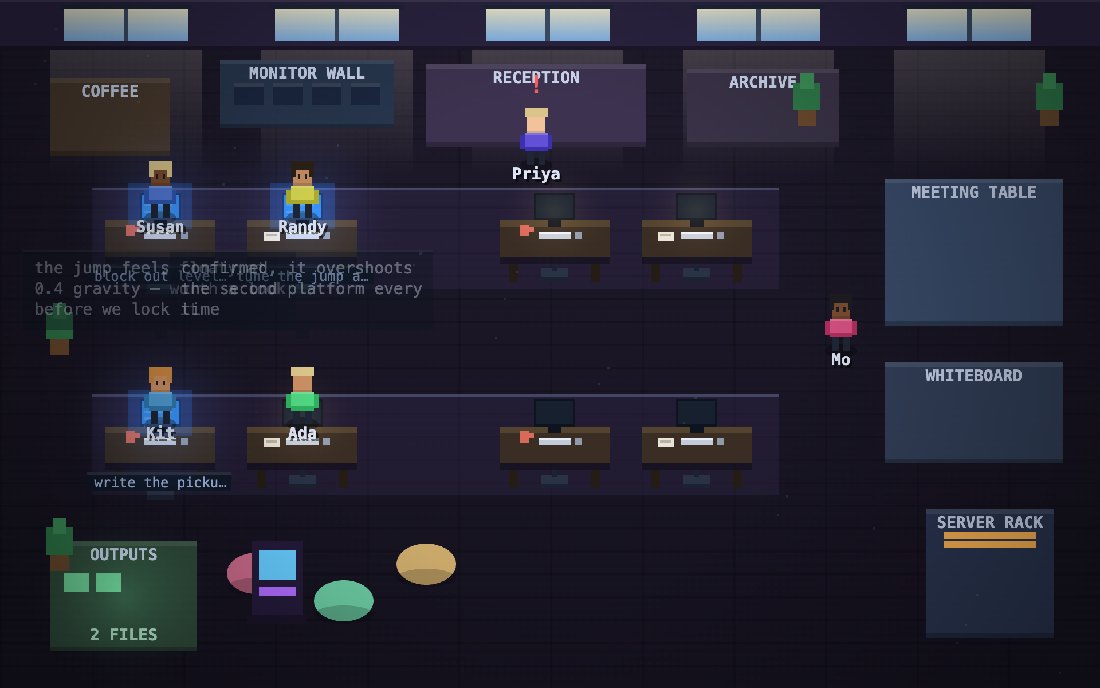
Six office themes that change the layout, not just the palette — a startup loft with bean bags and a slide, a game studio with pods and an arcade, a trading floor with dense rows and a live ticker, cubicles, an agency, a lab. One dial takes the team from strictly factual to full banter, and it rewrites the prompt rather than filtering the output.
A real three.js editor, built to the same shape as the official one: menubar, outliner,
properties inspector, transform gizmos, and a command stack where every change is
undoable. 16 primitives, 5 light types, 2 camera types, drag-and-drop placement that
lands where you point, drag-to-reparent in the outliner, and glTF / JSON / standalone-HTML
export. Drop a .glb onto the viewport and it loads.
The scene runs in a sandboxed iframe, so a shader that fails to compile cannot take the rest of the app down with it.
Every model call becomes a span with a parent, so a run reads as a tree rather than a flat log — and the shape is the diagnostic. A healthy run is broad and shallow; a run that has gone wrong is one branch descending forever, or the same node repeating.
On top of that sit local heuristics that cost nothing to run: circular reasoning (a later step restating an earlier one), steps that spent tokens and returned nothing, a model that thought itself out of an answer, sudden context loss, runaway depth, error cascades. Each one reports why, because an unexplained warning is noise.
Unkernel — a real Linux in a tab, wired into the rest of GlassBox (pass 46). The 🖥 Unkernel tab boots Linux 7
compiled to WebAssembly (unkernel, MIT) on your own device in about two seconds: Alpine or Debian, a real
package manager, the internet (through unkernel's public Wisp relay, your own, or off), a disk that keeps your changes, and
terminals. Inside it http://glassbox/ is the app itself: a glassbox command (glassbox tabs, glassbox open lab,
glassbox ask "…"), an OpenAI- and Anthropic-compatible endpoint for every GlassBox model, an MCP server with GlassBox's tools,
and your Studio files at /mnt/glassbox/studio both ways. So Claude Code, Codex, Kimi, Gemini, OpenCode or Qwen Code installed
there (one tap each) can work the rest of GlassBox — and anything that changes something still waits for your approval. Each CLI
also becomes a model (Claude Code · in Linux) in every model list. A terminal on your computer — Ghostty, Warp, Terminal —
can open a shell in that Linux: start the bridge, then node glassbox-bridge.mjs attach. Needs a browser with JSPI
(Chrome/Edge 137+, Firefox 153+, Safari 27+); the tab says so when it is missing.
Agent Skills (pass 46). Skills follow the Agent Skills format: a folder with a
SKILL.md (name, description, optional licence, compatibility, metadata, allowed-tools) plus scripts, references and assets.
Import a folder, SKILL.md files, or a GitHub repo; each is checked against the spec; export them all as a zip. Models see a
catalog, load a skill's body when it is relevant, and read its other files only when they need them. The same folders appear
inside Unkernel at ~/.agents/skills and ~/.claude/skills, so the CLIs there use them too.
Adaption (pass 46). Adaption's hosted MCP server is a connector (datasets, synthetic data, AutoScientist fine-tuning; training launches wait for approval), its skill pack is in the Stack, and the models you train appear as a provider once you paste your Adaption key.
Auto · free — every feature works with no key, and keeps working (pass 45). With no key, the app answers with Auto · free: it picks the best free model for the kind of task — code, reasoning, a quick question, a long document — from lists each free provider publishes, read live at start and every six hours (no more hard-coded lists that go stale: the one that named OVH's removed Mistral-Nemo is gone). If the model in use is removed, rate-limited, refuses, goes silent or stops half-way, the work passes to the next free model and the text already written is continued, not restarted. Free sources: Kilo's free routes (NVIDIA Nemotron-3-Ultra 550B and eight more, through the hosted gateway or the bridge), OVHcloud (18 models), LLM7, Pollinations, a small model on your machine — and, if you switch them on, the Vexa community gateway and AI Horde volunteers. Settings → Free models shows each model's live record. Any model can still be pinned.
A tab bar that behaves like a native one, arranged your way (pass 43). On a phone the app has a floating tab bar. As a Home Screen app on iPhone it no longer bounces with the page, flashes grey on a tap or rebuilds itself as you move around, it gives way to the keyboard the way a native tab bar does, and it keeps clear of the notch in landscape. Tap All → Edit tab bar to arrange it: two to five tabs (plus All), each holding one page or a group of pages; any of 120 icons (searchable); any name; drag tabs and pages to reorder them; labels always, only under the selected tab, or off; and whether a tab reopens where you left it or at its first page. Start again from rebuilds it from your setup answers or from the section groups. Whatever you do, every section that is switched on stays in exactly one tab.
Home. The app opens on one page: a box to type into (Chat, Agent or Research), starts picked from your setup answers, your recent chats, and a plain list of what is ready and what is not — with the one button that fixes each. The sidebar has a filter, pins and recents. Every earlier look, theme and layout is still in Customise, plus two new ones (Jet: flat and fast; High contrast).
Approvals per call. Tools that only look run. Tools that change something wait for your yes, on a card that shows exactly what will be sent. You can also make everything ask, or nothing. A tool you always allow is not asked about again.
Upgrade — the app improves itself, with any model. Describe what you want. A model you choose (OpenRouter, any provider, or a local one) proposes a new panel, a theme, a skill or a rule for the agent; the app checks it; nothing is installed until you press Apply; everything can be undone. Local models are held to additions only. Change the app itself goes further: the model edits a copy of the app's own source, and you only get that copy if it starts and passes all of the app's own checks, next to an untouched copy, in a sandbox that cannot see your data.
Nod. Nod is n8n's personal agent with its own computer and browser. The Nod tab sends errands to a Nod you run, shows what it says and answers its approval requests. Any model here can hand work to it. Nod refuses web pages on purpose, so this goes through the bridge.
More platforms, and sign-in. Meta Muse Spark, OpenAI, Anthropic, Together, Fireworks and Perplexity are one switch and a key away (Models → Providers). "Sign in with OpenRouter" gets a key without copying one.
A terminal anywhere. bash cloud/start-terminal.sh prints one connect code; paste it in Terminal → Your own host.
A Codespace on this repo prints it for you and comes with Claude Code, Codex, Gemini CLI, OpenCode and Kimi Code.
"Shared session" lets Ghostty, Warp or any terminal app join the same shell (tmux attach -t glassbox).
Faster (pass 42). Old build against new, measured back to back with the CPU slowed four times to stand in for a phone:
| Before | After | |
|---|---|---|
| Work blocking the page at start | 1,400 ms | 510 ms |
| Switching tabs (typical / slow) | 81 / 209 ms | 41 / 95 ms |
| Drawing a streamed answer (300 updates) | 781 ms | 203 ms |
| Re-drawing a 200-message chat | 319 ms | 37 ms |
| Background work while idle (per 5 s) | 122 ms | 21 ms |
| Finding near-duplicates in 2,000 dataset rows | 3,318 ms | 22 ms |
The last row (measured at full speed) is the one piece of native code: a Rust set-similarity join compiled to WebAssembly (native/, 59 KB, identical results to the JavaScript it replaced, which stays as the fallback). Everything else that was slow was the page doing the same drawing twice, and was fixed there. A C scanner was also built, measured at under 3× and deleted — native/LEDGER.md has the numbers.
Models and providers — any model id on any OpenAI-compatible provider, live /models
sync, and a hand-typed escape hatch that survives every refresh · Ollama, LM Studio and
Unsloth Desktop · cross-provider reasoning-trace capture and transplant · Ultrathink for
models that expose a large thinking budget · fallback routing when a local model dies
mid-thought.
Agents — a bot roster that collaborates by messaging each other, with every handoff
recorded · a task board with artifact locks, so two bots can never overwrite each other's
work · a destructive-action gate that holds rm -rf, force-pushes and anything touching
money or real people until you approve it · a reasoning-model manager that plans and
delegates but never builds · Slack-style calls with browser text-to-speech.
Documents and knowledge — on-device OCR (PaddleOCR or Tesseract) that reads scanned
PDFs with no upload and no per-page cost · a brain that imports from Granular, Obsidian,
Logseq, Notion or any folder of markdown · real .docx / .xlsx / .pptx generation in
the browser · GitHub repo reverse-engineering.
Measurement — cost per completed task, not per token · prompt-cache-stable message ordering · semantic response caching · golden traces you can regress against · A/B harness experiments · a device lab that sweeps the UI at real viewport sizes.
And — MCP connectors over HTTP and stdio · OpenBot integration · web search with domain filters · a long-horizon mode where only the harness may mark work done · office document generation · scheduled monitors that tell you what meaningfully changed on a page.
Open glassbox-jet.vercel.app. Add a provider key in Settings and you are working. Nothing installs.
| macOS | GlassBox-macOS.dmg — drag GlassBox.app to Applications. |
| Windows | GlassBox-Windows.zip — unzip, run GlassBox-Launch.bat. |
| Anything | Download GlassBox.html and open it. One file. |
macOS first launch: the app is not code-signed, so Gatekeeper will refuse it once. Right-click
GlassBox.app→ Open → Open. You only do this one time.
Windows needs Python 3 on PATH (tick Add python.exe to PATH in the installer). The launcher only uses it to serve the folder locally.
Rebuilding the desktop downloads. Run desktop/build-desktop.sh. It assembles the .app
from the sources in this repo, builds the disk image and the Windows archive, and then verifies
each one: that the launchers' health token is present in the page and inside the first 4000 bytes
they actually read, that the assembled app serves and passes its own probe, and that the page
inside the image and the archive matches this repo byte-for-byte.
That verification is not ceremony. Both downloads had gone stale without anyone noticing: the image carried a page five months behind, and both the macOS and PowerShell launchers probed for a window title that had since been renamed — so the app would start its server, fail its own health check and quit. Nothing in the web app could have detected either. Build the downloads with the script, never by hand.
Opened directly, the page's origin is null, and Ollama and LM Studio both refuse a null
origin, so local models never connect. Both launchers serve the folder on 127.0.0.1 and
walk to the next port if one is busy — they check that a port is actually serving GlassBox
before reusing it, rather than assuming.
ollama serve
ollama pull qwen3.8:27b
Then press Connect Ollama in Settings. GlassBox probes 127.0.0.1, localhost and
[::1] together and keeps whichever answers — macOS often runs two Ollama servers at once
(the desktop app on IPv6, a terminal ollama serve on IPv4), and localhost resolves to
IPv6 first, so a terminal-set OLLAMA_ORIGINS is frequently never reached.
If you opened the HTML directly rather than through a launcher:
OLLAMA_ORIGINS='*' ollama serveStart its local server (default http://localhost:1234), then add it in Settings as an
OpenAI-compatible provider. Its /v1/models endpoint populates the model list.
Serves models behind an authenticated local API and speaks two dialects on one port —
OpenAI's /v1/chat/completions and Anthropic's /v1/messages. Create a key in Unsloth
(avatar → Settings → API), paste it into the Local tab, and press Probe. It walks
:8000 :8888 :1234 :11435 :8080 and reports which one answered.
node glassbox-bridge.mjsA single-file Node companion, no dependencies. You only need it for things a browser genuinely cannot do:
- run local MCP servers — a browser cannot spawn a process, ever
- drive installed CLI agents (Claude Code, Codex, and others it detects)
- fetch URLs that refuse cross-origin requests
- write handoff files to a folder you choose
It generates a random token at startup, hands it to the first tab that asks, and the token dies with the process. Nothing persists.
glassbox.d.ts types the automation surface. The app exposes ~1,100 functions and state
values on window.__gb, which is how its own test suite drives it:
/// <reference path="./glassbox.d.ts" />
const span = window.__gb.spanStart('my-call', 'llm', { model: 'x' });
window.__gb.spanEnd(span, acc);
console.log(window.__gb.checkReasoning().flags);
The WebAssembly inside the page is built from native/rust/simjoin. To rebuild it, or to prove the
bytes in GlassBox.html came from that source (needs Rust with the wasm32-unknown-unknown target):
bash native/build.sh --verifyMIT. See LICENSE.