








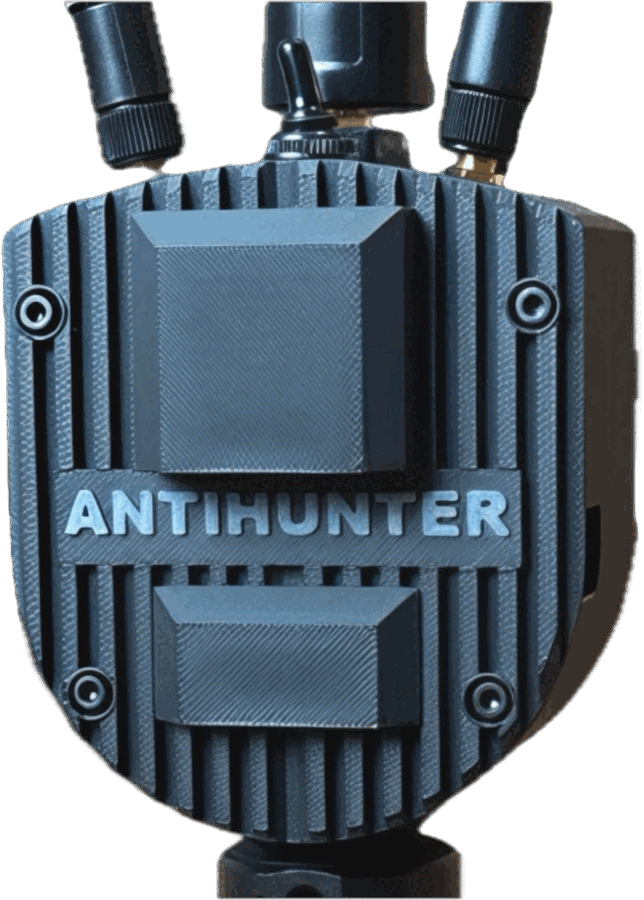
AntiHunter is distributed WiFi and BLE intelligence & attack detection. Controlled from its own WiFi, or using Meshtastic radio commands.
Vibration based scans and self-destruct option. Defensive by design. Knows the devices and networks around you, alerts when it matters. Integrates as far or close as you choose.
Featured in Seeed Studio Best 20 XIAO Projects in 2025.
At a glance
- ESP32-S3 · WiFi + BLE scanning · GPS · SD logging · vibration sensing · LoRa mesh
- Drop-in ESP32-C5 build adds 5 GHz alongside 2.4 GHz (beta)
- Full firmware: web UI over the node's own AP · Headless firmware: serial + mesh only, no AP
- Sentinel counterintel engine (beta)
- Vibration & attack triggered actions for set and forget operation
- Add nodes to cover more ground; they share detections over the mesh and can report to Command Center
Tip
New to AntiHunter? Start Here - setup, decisions, troubleshooting, and every guide & manual.
- Quick Start
- What It Detects
- Use Cases
- Hardware
- Build & Flash
- Configuration & Operations
- System Architecture
- Mesh Networking
- Reference
- Acknowledgments
- Legal
Flash it from your browser.
Visit the docs folder for additional user resources and troubleshooting.
Built or bought a node/kit? The Operator's Guide takes you from unboxing to deployment: antennas, flashing, mesh setup, every detector, the vibration sensor, Command Center install and a printable quick-reference card.
-
Open the Web Flasher in Chrome or Edge, on desktop.
- Pick Full (web UI) or Headless (serial + mesh)
- Choose a Release Channel (Stable or Beta)
- Plug in your ESP32-S3, and click Connect & Flash.
-
First boot:
- Full firmware - connect to the
AntihunterWiFi AP (passwordantihunt3r123), open http://192.168.4.1. Change the AP credentials under RF Settings first. - Headless firmware - configure it, then use serial or mesh commands.
- Full firmware - connect to the
-
Set up the Meshtastic radio. Mesh commands do nothing until this is done. Soldered Core and Assembled tiers arrive with it applied - set your region, pairing pin and channel, then skip to step 4.
The radio needs four settings, however you get there: Serial module enabled, mode TEXTMSG, baud 115200, and the RX/TX pins for your board -
19 RX / 20 TXon Heltec V3,10 RX / 9 TXon T114. Then set your LoRa region, or the radio will receive but never transmit.Pick whichever suits you:
-
Phone app - pair the radio over Bluetooth in the Meshtastic app and set the four values under Module Settings → Serial, then Region under LoRa. No computer needed.
-
Browser - the Meshtastic web client talks to the radio over USB from Chrome or Edge. Same four settings, nothing to install.
-
Script - plug the radio in on its own USB and let it do all four for you:
pip3 install 'meshtastic[cli]' pyserial
python3 scripts/meshtastic_config.py
With no arguments it prints the current settings and opens a menu.
--boardtakesheltec-v3ort114and picks the right pins. Full options under Radio Setup.
-
-
Add a watchlist entry or start a scan.
Warning
- The AP default is
Antihunter/antihunt3r123, published here and the same on every unit. Change both in RF Settings before you deploy. - Set the erase PSK if you plan to use Secure Data Destruction. Privacy Mode redacts the web UI only - exported logs and SD data still carry MACs, SSIDs and GPS.
To flash from a terminal or build from source, see Build & Flash.
| Feature | What it does | Scan modes |
|---|---|---|
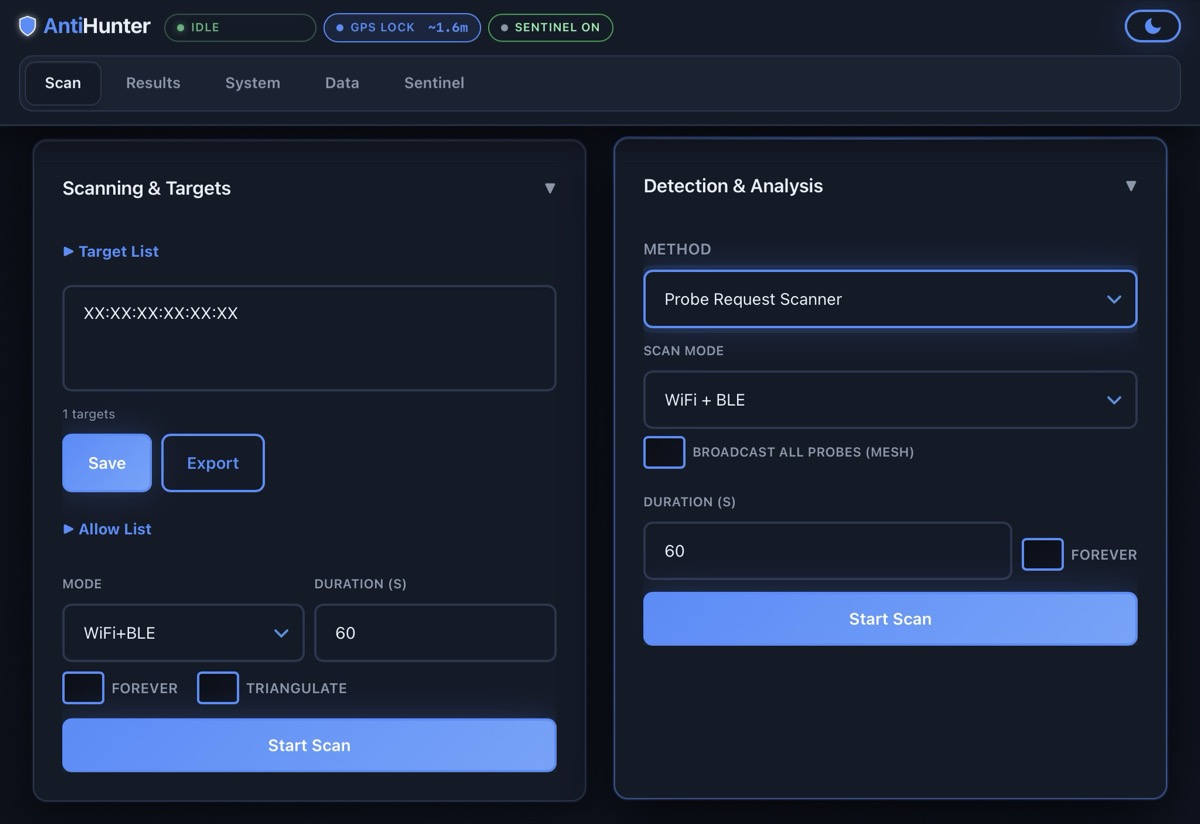
| Target Scan | MAC/OUI/SSID watchlist with instant mesh alerts | WiFi, BLE, or both |
| Device Scanner | Captures all nearby WiFi and BLE devices with RSSI, channels, names | WiFi, BLE, or both |
| Probe Request Scanner | Passive sniffer -- reveals SSIDs devices are searching for | WiFi, BLE, or both |
| Ghost SSID Detection | Flags probed SSIDs with no responding AP nearby | Probe / Device scan |
| Baseline Anomaly Detection | Learn-then-alert: spots new, missing, and changed devices | WiFi + BLE |
| MAC Randomization Correlation (beta) | Links randomized MACs to persistent identities via behavioral signatures | WiFi + BLE |
| Deauth Attack Detection | Real-time deauth/disassoc frame detection with source tracking | WiFi promiscuous |
| Sentinel Counterintel (beta) | Passive detection of attacker-tool activity (deauth/beacon/auth/assoc floods, SAE DoS, karma, evil-twin, probe floods, handshake capture); per-detector toggles, mesh broadcast, and optional persistent start-on-boot | WiFi promiscuous |
| CSI Motion Detection (upcoming) | Device-free motion sensing -- no device on the person, per-area strength; trigger measured per install. Onbeta only |
WiFi |
| Drone RID Detection | Identifies drones broadcasting Remote ID (ODID/ASTM F3411, French ID); Serial + CAA | WiFi beacon/NAN + BLE (BT4/BT5) |
| Packet Capture | Writes a standard pcap to SD that Wireshark opens -- WiFi frames with a radiotap header, BLE as Bluetooth HCI. One radio per capture, channel list selectable, bounded by a file size cap | WiFi or BLE |
| Triangulation | Multi-node RSSI-based location estimation via mesh (experimental) | WiFi, BLE |
| Feature | What it does | Where |
|---|---|---|
| Mesh Networking | LoRa mesh via Meshtastic -- alerts, remote commands, coordination | UART serial |
| Fleet Roster | Live node and radio roster with per-node mode, uptime, temperature, hits and GPS | Web UI, System tab |
| Secure Data Destruction | Tamper-triggered or remote wipe with post-wipe obfuscation | Vibration / mesh |
| Vibration Trigger | Choose a scan to run when vibration detected | Vibration / mesh |
| Privacy Mode | One-click MAC/GPS/SSID redaction for screenshots | Web UI button |
| Hidden SoftAP | Stops the access point beaconing its SSID. Not access control | Web UI, RF Settings |
| Battery Saver | 80MHz CPU, light sleep, reduced GPS, mesh heartbeat only | Mesh command |
| SD Repair | Lets a node rebuild an unmountable SD card by itself. Off by default -- rebuilding erases the card | System tab / mesh |
| Allowlist | Global device allowlist -- used by Target Scan and Baseline | Web UI / API |
| Data Explorer | Review findings, device logs and scan data | Web UI / API |
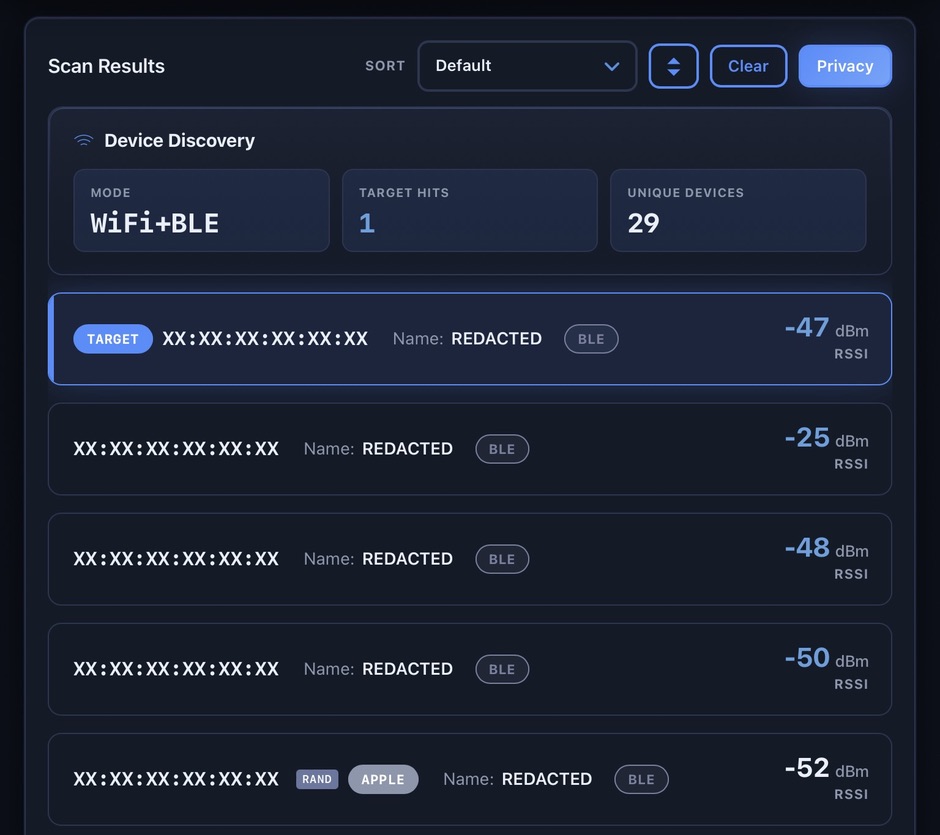
Maintain a watchlist of MAC addresses (full or OUI prefix), SSIDs, or identity IDs (T-XXXX). Scans WiFi channels and BLE frequencies, alerting on detection via web UI, mesh, and command center.
- WiFi-only, BLE-only, or combined scanning
- Global allowlist filters out known devices
- Logs RSSI, channel, GPS, and device names to SD
- Real-time alerts over mesh network
Web UI Scan tab, with the watchlist under Targets
Mesh
@ALL SCAN_START:2:300:1..11Settings
- Watchlist
@ALL CONFIG_TARGETS:AA:BB:CC:DD:EE:FF|MyNetwork- RSSI floor
@ALL CONFIG_RSSI:-80- Channels
@ALL CONFIG_CHANNELS:1..11
- Captures all WiFi and BLE devices in range: MACs, SSIDs, signal strength, names, and channels.
- WiFi AP discovery runs a periodic all-channel scan (gated by WiFi Scan Interval); target frames are captured passively in promiscuous mode while hopping channels between scans.
- Check Capture Probes to piggyback probe-request collection onto the scan, feeding the probe database (MAC, vendor, RSSI, SSIDs, randomization status).
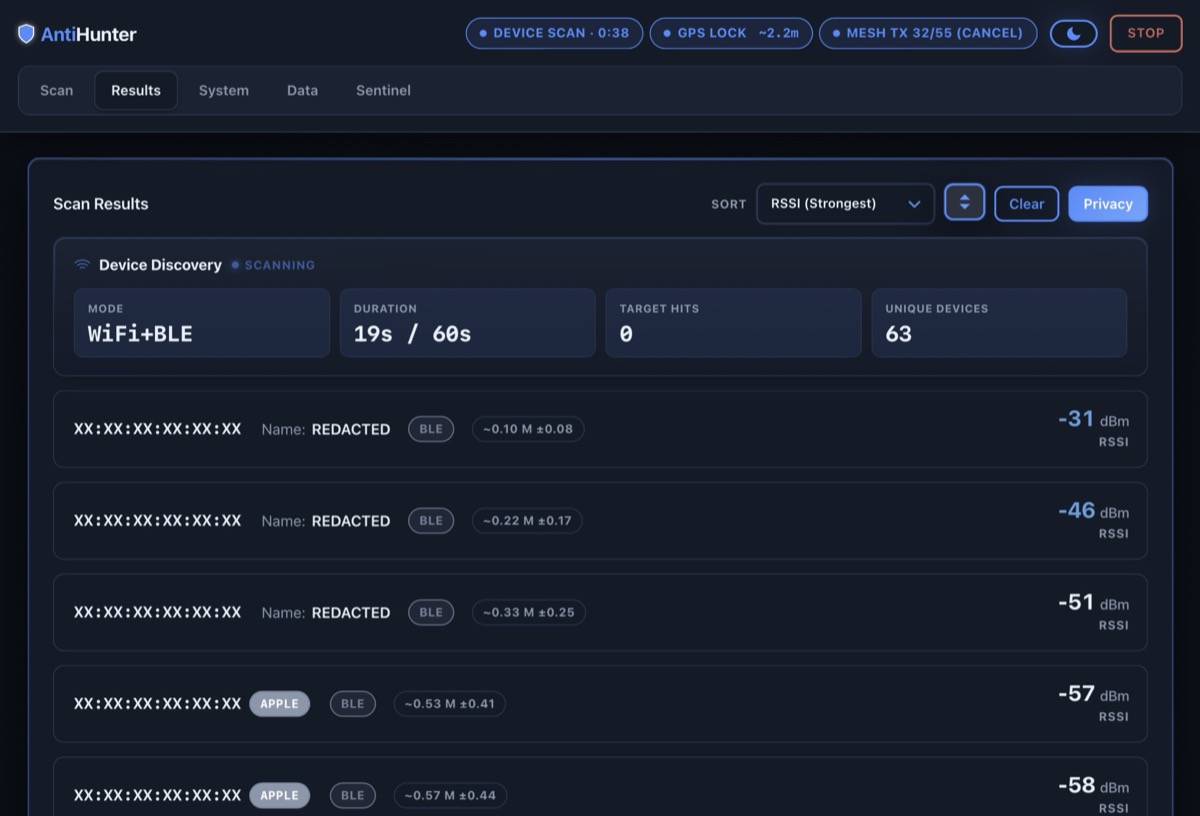
Web UI Scan tab -> Device Discovery
Mesh
@ALL DEVICE_SCAN_START:2:300:+PROBESettings
- RSSI floor
@ALL CONFIG_RSSI:-80- Channels
@ALL CONFIG_CHANNELS:1..11- Cross-scan dedup
@ALL CONFIG_DEDUP_TTL:300
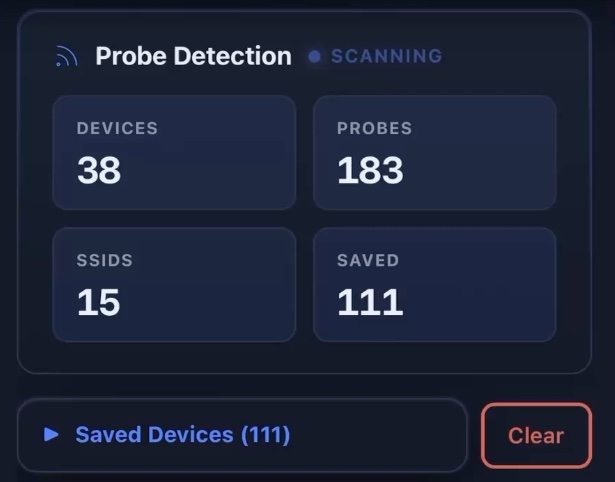
Correlates all three 802.11 address fields to detect ghost SSIDs (networks that exist only in a device's history), identify which APs responded, and catch silent devices via destination-address matching.
- Ghost SSID detection: flags SSIDs a device probes for with no AP answering, shown with a
~prefix. These are networks it joined somewhere else - Catches silent devices: matches probes addressed to a target MAC, so a sleeping device that never transmits its own identity still shows up
- Correlates requests, responses and destination addresses into one record per device
- Vendor lookup against the IEEE table, randomized-MAC flagging, and SSIDs on the watchlist alongside MACs and OUIs
Web UI Scan tab -> Probe Request Scanner
Mesh
@ALL PROBE_START:2:300:+ALLSettings
+ALLlogs every probe, not just watchlist hits- RSSI floor
@ALL CONFIG_RSSI:-80- Channels
@ALL CONFIG_CHANNELS:1..11
links randomized MAC addresses to persistent device identities using behavioral signatures: IE fingerprinting, channel sequencing, timing, RSSI patterns, and sequence-number correlation. Assigns identity IDs (T-XXXX) with SD persistence.
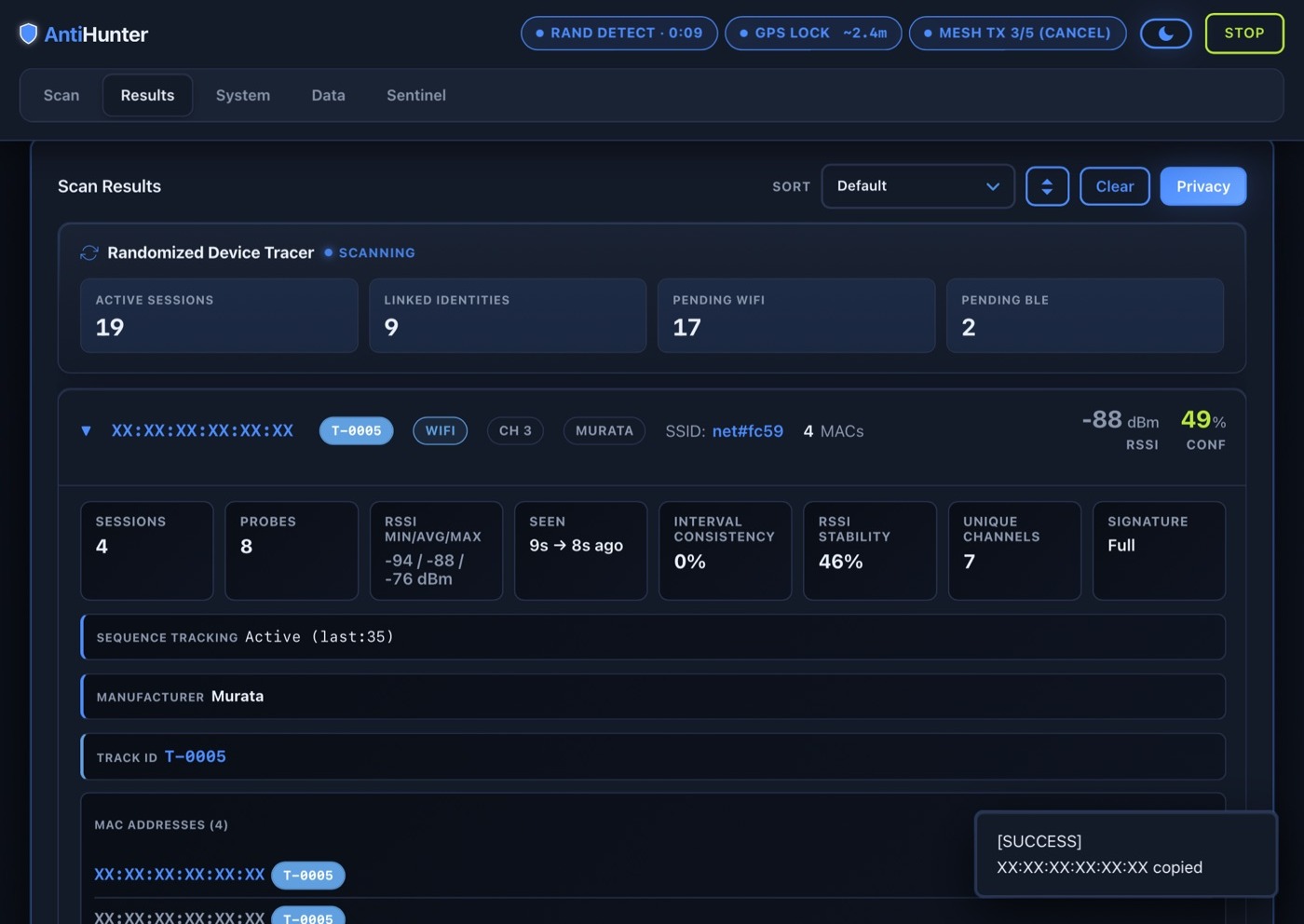
- Tracks up to 256 devices at once. Past that, the one not seen for longest is dropped
- Dual signature support (full and minimal IE patterns)
- Confidence-based linking with adaptive thresholds
- Detects global MAC leaks and WiFi-BLE correlation
Tip
Use the Privacy button to redact MACs, GPS, and SSIDs before sharing screenshots.
Web UI Scan tab -> Randomized MAC Tracer
Mesh
@ALL RANDOMIZATION_START:2:300Settings
- Mode
0WiFi,1BLE,2both- RSSI floor
@ALL CONFIG_RSSI:-80
Detects drones broadcasting Remote ID under the FAA and EASA standards, over both radios.
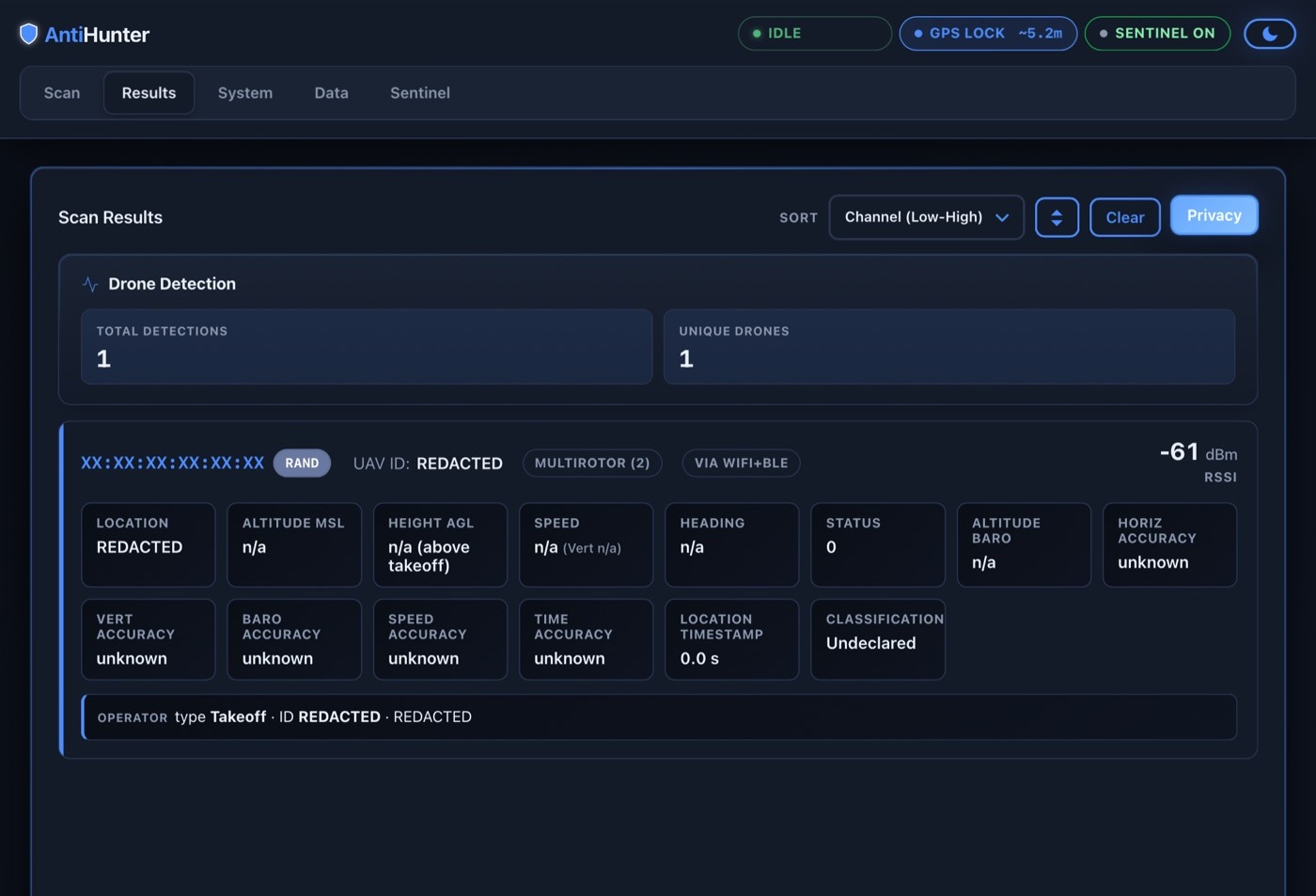
- WiFi ODID/ASTM F3411 in NAN action frames and beacons; BLE over BT4 legacy and BT5 long range, service UUID
0xFFFA; plus French drone ID - Decodes every ODID message type and prefers the serial number over the CAA registration ID
- Reports UAV ID, pilot location and flight telemetry to mesh and SD
Web UI Scan tab -> Drone RID Detection
Mesh
@ALL DRONE_START:300Settings
- RSSI floor
@ALL CONFIG_RSSI:-80
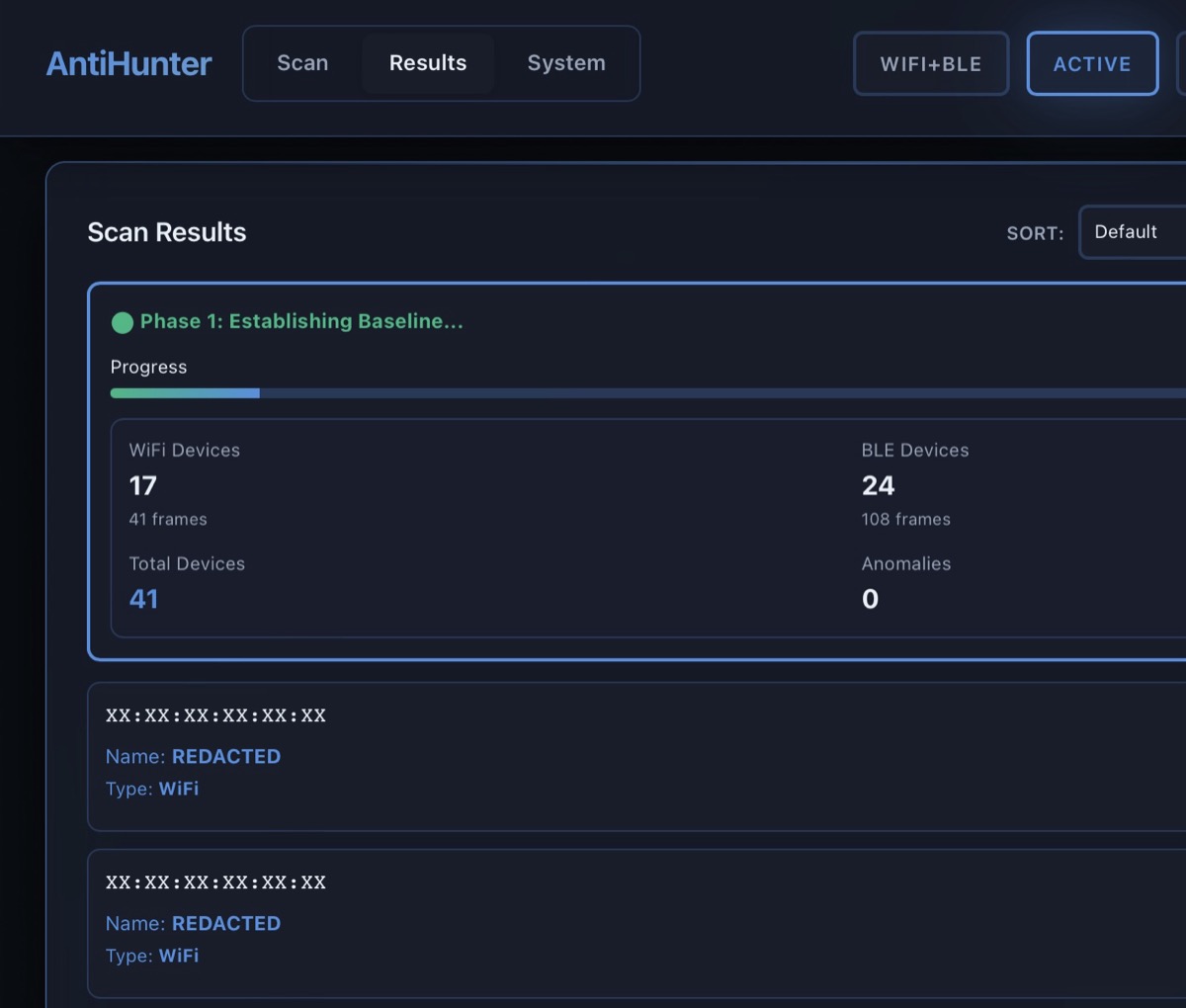
Two-phase scan: establish a baseline of known devices, then monitor for anomalies -- new devices, disappearances, reappearances, and significant RSSI changes. Persistent storage survives reboots.
- Flags devices that are new, gone, back again, or that moved closer or further
- Survives a reboot, so the baseline is not lost with power
- Holds recent devices in memory and rolls the rest to SD on its own
Important
A longer initial scan produces a more reliable baseline.
Web UI Scan tab -> Baseline Anomaly Sniffer, minimum 60s
Mesh
@ALL BASELINE_START:300Settings
- Duration is the learning phase, 60s minimum
- Progress
@ALL BASELINE_STATUS- RSSI floor
@ALL CONFIG_RSSI:-80
Watches for deauthentication and disassociation frames in real time.
- Separates broadcast floods from frames aimed at one client
- Reads the reason code, so a legitimate roam is not reported as an attack
- Feeds source MACs to randomization tracking to identify the sender
Web UI Scan tab -> Deauth Detection
Mesh
@ALL DEAUTH_START:300Settings
- RSSI floor
@ALL CONFIG_RSSI:-80- Channels
@ALL CONFIG_CHANNELS:1..11
Device-free motion sensing. The node reads the channel state of WiFi frames already in the air and alerts when a body moves through the space. Uses no baseline, for indoor use.

- Set the trigger where the node is setup. The node measures how much the WiFi signal is shifting around, shown as
sigin the status line. A body moving makes it shift more. The trigger is the line between "normal" and "someone moved", and normal is different in every room, on every channel. Watchsigwith nobody in the space, then set the trigger above the highest value you see. Two nodes in one house settled on 0.080 and 0.045. Method: WiDetect, ACM IMWUT 3(3), 2019 - Re-measure after a channel change. A node picks its channel at startup and moves on its own if that channel turns out to carry too little traffic to detect on. Watch for
STARVEDortaking ch<n> insteadin the serial log - the old trigger will not fit the new channel - Alerts need agreement. An area alert needs several access points moving at once, then 12 seconds of that inside a rolling 60-second window, then a hold before the state changes. One link crossing once raises nothing
- Signal strength is not the limit. Detections seen on links from -24 to -92 dBm in a single run; the statistic is normalized per link, so path loss divides out
- This mode transmits - see the warning below. It is the only scan in this firmware that does
- The Movement view shows live strength, the links tracked, and a session heat strip. Cells start at one minute and widen as the session runs - 5, 15, 30 minutes, then hours - so the strip always covers the whole session
Warning
CSI motion transmits. Every other scan is receive-only; this one can TX if set to.
When fewer than 15 CSI frames arrive in a second, the node sends one broadcast probe request to
pull traffic out of the air, at most once per second. On a channel with normal traffic it never
needs to. The frame is a standard 802.11 probe request with a locally-administered source
address (02:00:00:00:00:01), not the node's own MAC. tx= in the serial status line is the running count of frames sent.
To keep it silent: tick Listen only, never transmit under Advanced, or send
CSI_CFG:BROADCAST=OFF over mesh (BROADCAST=ON allows it again, and the current state comes
back in CSI_CFG_ACK). The choice persists across reboots. A silent node can only detect
movement while other traffic is already in the air.
Sending a probe request is ordinary unlicensed WiFi client behavior, not blocking or deauthentication. Rules differ by country and by site - check before deploying where transmitting is restricted.
Important
It detects movement, not presence by design and is highly sensitive.
Note
Indoor only. Coverage indoors is the whole room because multipath is rich. Outdoors there are few reflectors and the sensitive region collapses to a narrow zone on the line between node and transmitter - a tripwire, not area cover. Outdoor detection needs RadarNode (in development).
Web UI Scan tab -> CSI Motion Detection
Mesh
@ALL CSI_MOTION_START:300:CH11Settings
- Sensitivity
@ALL CSI_CFG:SENSITIVITY=MEDIUM- alsoLOW,HIGH, or a number- Add any of
MIN_MOTION=<s>(movement before it alerts),CLEAR_AFTER=<s>(stillness before all-clear),SPOTS=<n>(access points that must agree),BROADCAST=OFF(never transmit)- Trigger, hold, consecutive hits and channel
@ALL CSI_CFG:0.10:5000:3:0- Start silent
@ALL CSI_MOTION_START:0:FOREVER:LISTEN_ONLY-ALLOW_TRANSMITundoes it- Reset the trigger to the compiled default
@ALL CSI_RECAL
Full detail, including the C5 differences, is in
docs/ESP32-C5.md on feat/c5.
Important
Sentinel is not in the Stable firmware. Everything in this section - the detectors, the SENTINEL_* and GROUP mesh commands, the /api/sentinel/* endpoints and the Sentinel tab - needs a Beta build. Flash the Beta channel in the web flasher to get it.
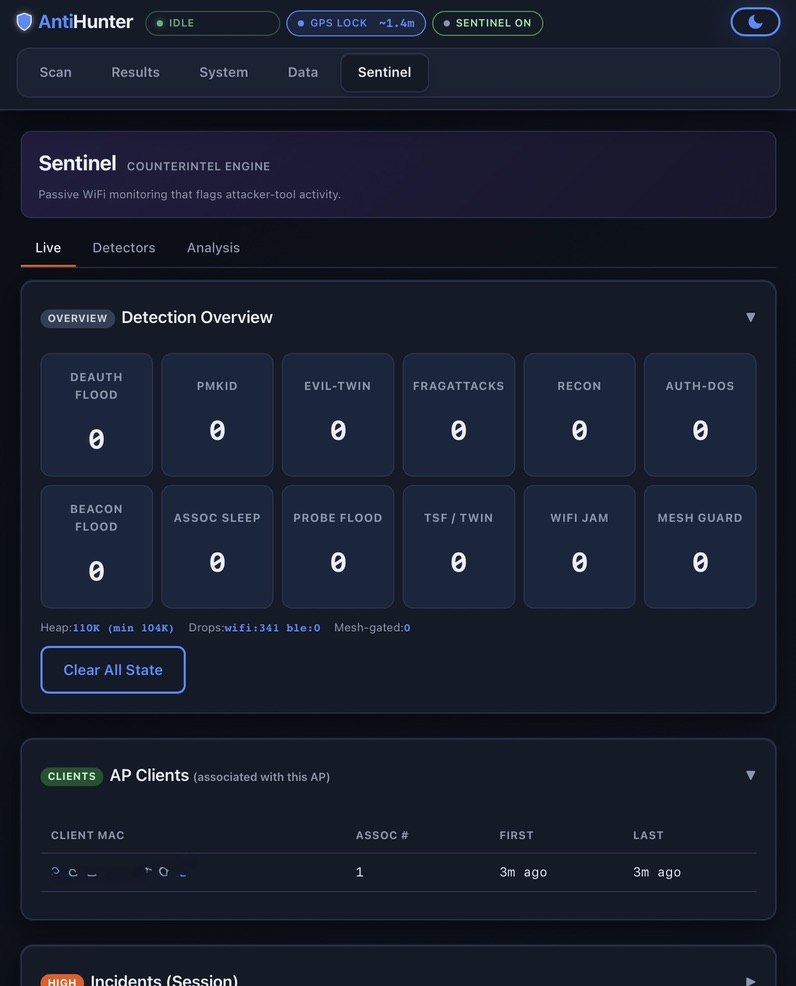
Enable and it runs in the background whenever you aren't scanning. Passive WiFi monitoring that flags attacker-tool activity by frame signatures plus behavioral fallbacks. Tuned and tested against both popular consumer ESP32 attack firmware and professional Linux tooling.
- Detectors are organized into toggleable groups. Each detection logs to serial + SD and broadcasts to mesh peers.
| Group | Detectors | How they're caught |
|---|---|---|
| DoS | Deauth flood, deauth forge, broadcast deauth, AP-targeted deauth, beacon flood, auth flood, assoc-sleep, SAE DoS | Fixed/rotated deauth seqCtrl + duration (reason codes are used for tool attribution, never on their own as an attack trigger - reasons 1/2/6/7 are all legitimate deauth causes), impersonation bursts, beacon-spam rate + static templates, open-system auth flood, assoc-req PM-bit floods, SAE commit floods (algo 3 / txn 1) |
| Rogue AP | Evil-twin, OWE abuse, Karma / MANA | Clone of our own AP (SSID/BSSID collision); OWE-transition downgrade; bait-probe answered by an AP that never beacons that SSID |
| Recon | PMKID harvest, probe flood, handshake capture | Orphaned-M1 / KDE PMKID solicitation; fixed-seq + behavioral probe spam (≥15 MACs/SSID/5s); forced & passive EAPOL M1–M4 capture |
| Physical | FragAttacks, TSF / multi-channel twin, WiFi interference | A-MSDU PN reuse / mixed-key frags; same BSSID on ≥2 channels within 5s; per-channel PDR-vs-RSSI collapse (CRC-fail flood) |
| Mesh disruption | Self-spoof, channel flood, command audit | Own node-id seen inbound; inbound rate DoS; every privileged mesh command logged with the radio id that issued it - a provenance audit trail, not an alert (injection is indistinguishable from legit ops on a shared channel, so we record the source instead of guessing) |
- Hotspot false-positive suppression: crypto and beacon detectors skip locally-administered BSSIDs, the kind phone hotspots use; flood detectors do not, since real floods spoof them.
- Outputs:
[DETECT]serial lines + per-detector SD.jsonl+ mesh broadcast to peer nodes for quorum confirmation. - AP clients: stations that associate to the node's own AP, with MAC, association count and first/last-seen age. AP Clients panel,
GET /api/apclients.json. - Mesh command audit: logs every inbound command with its sender, including ones aimed at other nodes. Mesh Commands panel,
GET /api/mesh_cmd.jsonl. - Control & boot: start and stop from the Sentinel tab. Off at boot unless you turn on Start-on-Boot, in the Flasher, the Configurator or
SENTINEL_BOOT. - Attack response: pick what runs when an attack is confirmed - triangulate, packet capture, device discovery, probe sweep, drone RID - each with its own duration. They run one at a time, and detection pauses while they do.
The mesh labels Sentinel emits, for log parsers and C2, are listed under Mesh Commands → Sentinel label reference.
Detector inventory
- Verified against: airgeddon, aireplay-ng, bettercap, wifite, mdk4, angryoxide, eaphammer, hostapd-mana, wifipumpkin3, hcxdumptool, purpose-built test scripts, and common consumer ESP32 attack firmware.
- Field-verified on hardware (confirmed firing against the live tools above): deauth (flood/forge/AP-targeted), beacon flood, auth flood, assoc-sleep, SAE DoS, karma, evil-twin, probe flood, handshake capture.
- Experimental: OWE abuse, PMKID harvest, FragAttacks, TSF multi-channel twin, WiFi interference, mesh disruption.
- Behavioral fallbacks (survive template changes): SSID-rotate forge, behavioral probe-flood, EAPOL-capture bait, broadcast-deauth-while-beaconing.
Web UI Sentinel tab
Mesh
@ALL SENTINEL_BOOT:1to arm it at power-onSettings
- Detector groups
@ALL GROUP:dos:on- Tunables
@AH01 DETECT_CFG:{"pmkid":true}- Pin or hop
@ALL SENTINEL_MODE:scan
Records raw traffic to SD as a standard pcap.
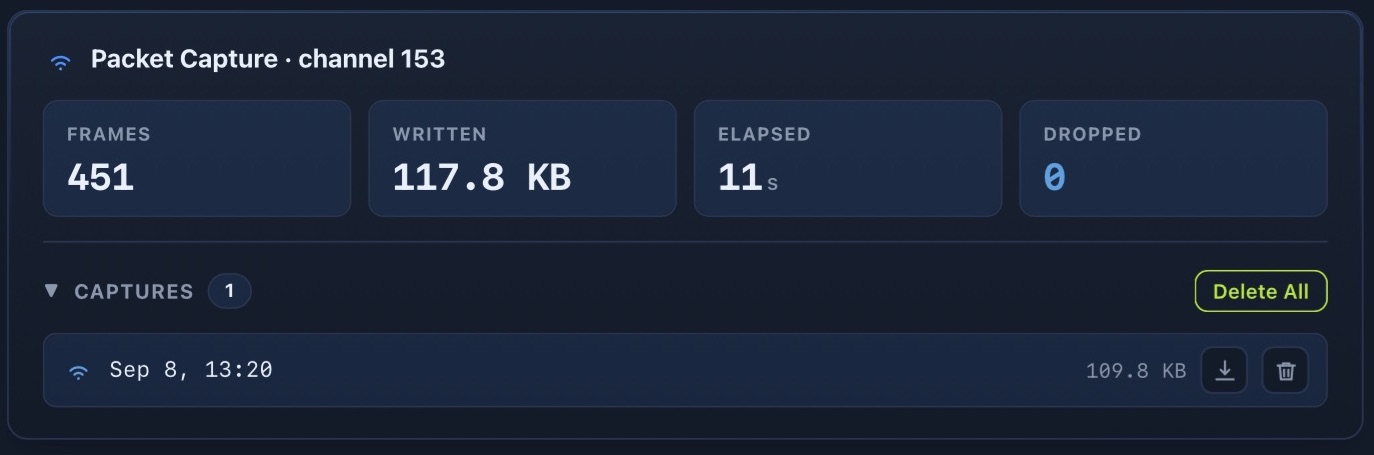
- WiFi: full radiotap header with channel, rate and RSSI. Both bands on C5
- BLE: written as Bluetooth HCI, link type 187. Wireshark shows address, event type, advertising data and RSSI. HCI carries no RF channel, so none is reported.
- Sweeps the RF Settings channels, or a channel list and dwell under Advanced. Management-frames-only filter
- Captures list on the Scan tab: download, delete, delete-all. The recording file cannot be deleted
- Started by hand or by a Sentinel attack response.
auto_captures are pruned against a size budget and free-space floor; manual captures are not
Web UI Scan tab -> Packet Capture
Mesh
@ALL PCAP_START:0:300:0Settings
- File size cap
@ALL PCAP_LIMITS:150(8-300 MB)- Channels
:CH1,6,11- Band field
02.4GHz,15GHz,2both
multiple nodes scan for a target simultaneously. Each records RSSI and GPS coordinates. Data is aggregated over mesh for weighted trilateration with Kalman filtering.
- Outputs: GPS coordinates, confidence, estimated uncertainty (m), average HDOP
- Google Maps link sent over mesh
- Per-target distance tuning multipliers (0.1x - 5.0x)
Note
Target RSSI greater than -80 produces better results for BLE devices.
RF Environment Calibration
Path loss model: distance = 10^((RSSI0 - RSSI) / (10 * n))
| Environment | WiFi n | BLE n | WiFi RSSI0 | BLE RSSI0 | Use Case |
|---|---|---|---|---|---|
| Open Sky | 2.0 | 2.0 | -23 dBm | -60 dBm | Clear LOS, minimal obstruction |
| Suburban | 2.7 | 2.5 | -24 dBm | -62 dBm | Light foliage, scattered buildings |
| Indoor | 3.2 | 2.9 | -25 dBm | -65 dBm | Typical indoor, some walls |
| Indoor Dense | 4.0 | 3.5 | -27 dBm | -69 dBm | Office spaces, many partitions |
| Industrial | 4.8 | 4.0 | -30 dBm | -73 dBm | Heavy obstruction, machinery |
Mesh
@AH01 TRIANGULATE_START:AA:BB:CC:DD:EE:FF:60Settings
- Optional
:rfEnv:wifiPwr:blePwrtune the path-loss model for the environment
Everything that configures the node is on one page, in cards.
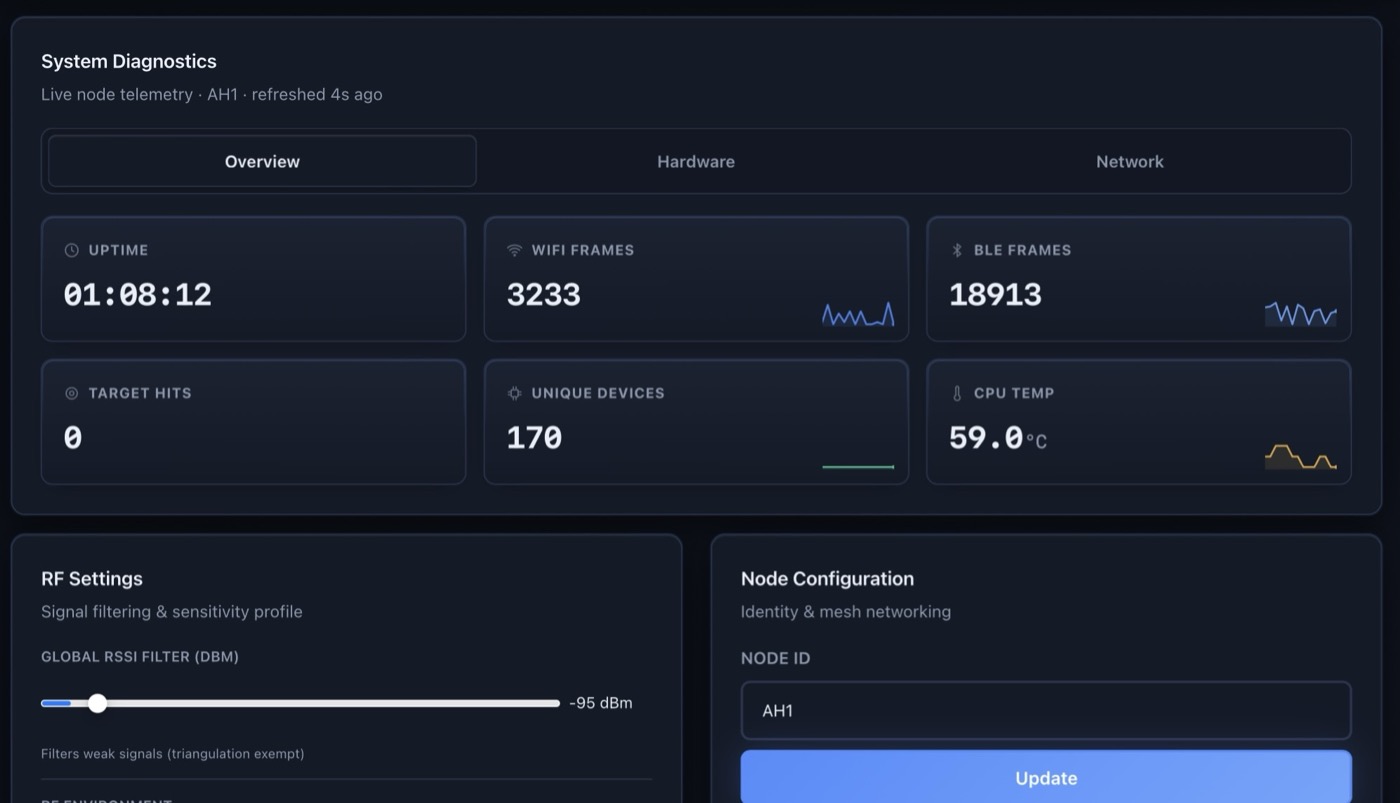
| Card | What it holds |
|---|---|
| System Diagnostics | Three subtabs, all fed from GET /diag. Overview - uptime, WiFi and BLE frame counts, target hits, unique devices, CPU temperature. Hardware - last reset and previous uptime, results restored, free and minimum-free internal heap, scan stack headroom, SD card, GPS, RTC and vibration sensor. Network - AP address, mesh state, WiFi channels |
| Fleet | Live roster of nodes and radios with mode, uptime, temperature, hits and GPS. Ping the fleet or clear the list |
| RF Settings | Global RSSI filter, RF environment preset (Relaxed, Balanced, Aggressive, Custom), WiFi channel dwell and scan interval, BLE scan duration and interval, and the channel list |
| WiFi Access Point | The node's own SSID and password, hidden-beacon toggle, and WPA2 or WPA2/WPA3 |
| Node Configuration | Node id and the mesh identity other nodes address |
| Sensor Alerts | Vibration sensing and what it triggers |
| Secure Data Destruction | Erase PSK, setup and erase delays, vibration count and window |
| Factory Wipe | Clears settings and stored data back to defaults |
| Battery Saver Mode | Drops the CPU to 80 MHz, enables light sleep, polls GPS once a minute, mesh heartbeat only |
| Accent Colors | Recolors the destructive controls and Sentinel banners. Stored in the browser |
| Data Explorer | Review findings, device logs and scan data |

Change the defaults. The AP defaults to Antihunter / antihunt3r123 - published, so treat an unchanged node as open. Set your own SSID and password in RF Settings on first boot. Set the erase PSK too if you plan to use Secure Data Destruction.
Reduce what the node emits. The AP is a beacon that identifies the device. For covert work run Headless - no AP at all, serial and mesh only. On the radio, --screen off --led off --ble off removes the visual and Bluetooth signature.
Redact before sharing. Privacy Mode blanks MACs, SSIDs and GPS in the web UI for screenshots and demos. Exported logs and SD data are not redacted - scrub those separately.
Location data is identifying. SD logs, results exports and mesh alerts can carry GPS coordinates. Review any file before posting it publicly or attaching it to a report.
Know the legal line. Passive scanning of what is already broadcast is not the same as interception, and the rules vary by country. Scan only where you have authority. See the Legal Disclaimer.
- Perimeter security and intrusion detection
- Penetration testing and wireless security auditing
- Counter-UAV operations and airspace monitoring
- Surveillance detection and OPSEC audits
- Device fingerprinting across MAC randomization
- Probe analysis and rogue device detection
- Event security and monitoring
Buy a node from the store - bare PCB, soldered core, parts kit or assembled (what each tier ships) - or build your own from the parts below.

Important
Requires regulated 5V power supply. Unregulated battery sources cause voltage instability. A 2A fast-blow inline fuse on the battery line is optional added protection.
- Seeed XIAO ESP32-S3 (minimum 8MB flash), or XIAO ESP32-C5 for 2.4 + 5 GHz - drop-in on the same board, see the C5 page (testing)
- Meshtastic board: Heltec v3.2 (recommended) or T114. Alternatives in discussions.
- GPS, SDHC, vibration, and RTC modules
- Operator's Guide - unboxing, antennas, flashing, mesh setup, deployment
- Illustrated assembly manual
- PCB welcome letter
- BOM parts links & images
Bill of Materials
CORE COMPONENTS
- 1x DIGI PCB (82mm, 2-layer)
- 1x Seeed Studio XIAO ESP32-S3
- 1x Heltec WiFi LoRa 32 V3.2 (T114 also compatible, V3.2 preferred)
- 1x ATGM336H GPS Module
- 1x Micro SD SDHC TF Card Adapter Reader Module
- 1x SD Card (FAT32, 8GB shipped with every built tier; 32GB+ not recommended)
- 1x SW-420 Vibration Sensor
- 1x DS3231 Real Time Clock Module
CONNECTORS & FASTENERS
- 5x JST 2.54 2-Pin Terminals
- 10x M3 Mounting Inserts
- 4x M2 Mounting Inserts (power board)
- 2x M3x15mm Brass Standoffs
- 1x 1/4" Tripod Insert
- 2x JST Power Male Cable (switch, power board)
- 8x M3x4-6mm Flat Top Screws (for enclosure lids, max 6mm heads)
- 6x M3x4-6mm Screws (for PCB and front/rear covers)
- 4x M2x4-6mm Screws (for power board; or M3x4-6mm straight into the plastic without inserts)
- 2-4x M2.5 13-15mm Screws (for fan)
ANTENNA & CABLING
- 3x U.FL to SMA Pigtail Cable (SMA bulkhead, 10-20cm)
- 1x 6dBi Antenna 2.4GHz (WiFi/BLE)
- 1x 6dBi Antenna LoRa (region-dependent: 868MHz EU / 915MHz US / 923MHz Asia)
- 1x Active GPS Antenna (L1, SMA)
POWER & THERMAL
- 1x 30mm 5V Fan (7-10mm) - JST 2.54
- 1x 3-Pin Mini On/Off Switch
- 1x KSD9700 Normally Open Thermal Wire Sensor (30-40C)
- 1x Type-C Female Chassis Jack, waterproof (2-pin, 22 AWG leads, 14mm panel nut, dust cap)
- 1x Type-C 15W 3A 5V Fast Charge UPS Power Supply (2S 18650 Charger Module DC-DC Step Up Booster Converter, 88x41x22mm)
- 2x 18650 cells, protected flat-top (not supplied with any tier)
ENCLOSURE
- 1x Weatherproof Enclosure (3D printable)
- STL files: hw folder
- 1x TPU Seal Kit (housing, USB-C, GPS antenna)
FAN NOTES
- The sticker side is not always the exhaust side. Run the fan for a second and feel which way it blows before you screw it down. Assembled units ship with the fan set to exhaust.
- Shorting the two THERMO pins bypasses the thermal switch and runs the fan whenever the node is powered.
Pinout Reference
XIAO ESP32S3 Pin Diagram
Pin assignments may evolve. Verify compatibility with your board revision.
| Function | GPIO | Description |
|---|---|---|
| Vibration Sensor | 2 | SW-420 tamper detection (interrupt) |
| RTC SDA | 3 | DS3231 I2C data |
| RTC SCL | 6 | DS3231 I2C clock |
| GPS RX | 44 | NMEA data receive |
| GPS TX | 43 | GPS transmit (unused) |
| SD CS | 1 | SD card chip select |
| SD SCK | 7 | SPI clock |
| SD MISO | 8 | SPI MISO |
| SD MOSI | 9 | SPI MOSI |
| Mesh RX | 4 | Meshtastic UART receive |
| Mesh TX | 5 | Meshtastic UART transmit |
The Web Flasher is the simplest path. Use the options below to flash from a terminal or build from source.
No firmware is shipped on it: you flash AntiHunter yourself, for integrity and regulatory purposes.
Soldered Core PCB and Assembled tiers ship the Heltec radio on the latest stable Meshtastic, already configured for the node: serial module on, TEXTMSG at 115200 on the board's pins, screen blanks after 1s, status LED off, Bluetooth on with the default pairing pin. LoRa region is UNSET, so the radio receives but does not transmit until you set it, and it is on the public default channel - set the region, the pin and your own channel on every tier. Bare PCB and Parts Kit builds flash and configure the radio themselves.
| Tier | What ships | What you supply |
|---|---|---|
| Bare PCB (note) | One unpopulated 82mm board | Everything: source the BOM, solder per the assembly manual, flash and configure Meshtastic on the radio, fit a FAT32 SD card |
| Soldered Core PCB (note) | The core of the node - a fully populated PCB: XIAO ESP32-S3, Heltec LoRa radio, GPS, RTC, vibration sensor, SD reader, 8GB card fitted, radio flashed and serial-configured. Factory U.FL whip antennas only | Optional: Enclosure, regulated 5V power, external antennas |
| Parts Kit (note) | Every part on the BOM as loose components - PCB, modules, 8GB card, enclosure and TPU seals, 6dBi 2.4GHz and 6dBi LoRa antennas, U.FL→SMA pigtails and bulkheads, fan, thermal switch, power switch, waterproof USB-C panel jack, UPS board, fasteners. Nothing soldered, nothing flashed. No GPS antenna | Soldering and assembly per the manual, Meshtastic on the radio, 2x 18650 cells, active GPS antenna |
| Assembled (note) | Built, sealed and bench-tested. 8GB card fitted, GPS helix antenna, radio flashed and serial-configured | 2x 18650 cells |
Then, on every tier:
- Attach all three antennas before powering on - on soldered PCB tier: ceramic is GPS, the labeled 2.4GHz one is the ESP32, the third is LoRa on the Heltec. All other tiers use SMA antennas.
- Flash AntiHunter - web flasher (Chrome or Edge), the CLI installer, or PlatformIO. See below.
- Finish the radio - set your LoRa region, change the pairing pin, make your own encrypted channel primary and turn the public one off: Radio Setup. Bare PCB and Parts Kit builds flash Meshtastic and set the serial module here too.
- Set your node ID and AP password - web UI at
http://192.168.4.1, or over mesh.
curl -fsSL -o flashAntihunter.sh https://raw.githubusercontent.com/lukeswitz/AntiHunter/beta/Dist/flashAntihunter.sh
chmod +x flashAntihunter.sh
./flashAntihunter.sh
The script first asks for a release channel (Stable or Beta), then Full or Headless. Stable pulls from main, Beta from beta.
Use -c to configure device parameters during flash, -e to erase flash first, -l to list available firmware.
Post-flash:
- Full firmware: Connect to
AntihunterWiFi AP (password:antihunt3r123), openhttp://192.168.4.1. Configure RF settings, detection modes, and change the AP credentials in RF Settings. - Headless firmware: Serial monitor or mesh commands only.
Prerequisites: PlatformIO, Git, USB cable. Optional: VS Code with PlatformIO extension.
git clone https://github.com/lukeswitz/AntiHunter.git
cd AntiHunter
pio device list # list connected devicesNow pick which firmware you want. Full gives you the web UI; headless is serial and mesh only. Both go on the same board, so run one of these, not both.
pio run -e AntiHunter-full -t upload # full firmware: web UI, SoftAP dashboardpio run -e AntiHunter-headless -t upload # headless firmware: serial + mesh onlypio device monitor -e AntiHunter-full # watch the node's serial outputErasing wipes the whole flash chip, saved settings and all, and leaves the board with nothing on it. Only reach for it when you want to start clean, and upload again afterwards.
pio run -e AntiHunter-full -t erase # erase the entire flash chipBuild environments (same firmware sources; differ only in features/board):
AntiHunter-full-- Web UI/SoftAP dashboard (ESPAsyncWebServer + AsyncTCP);AntiHunter-headless-- serial + mesh only, no web deps.- ESP32-C5 (2.4 + 5 GHz, testing): envs
AntiHunter-c5-full/-c5-headlesson thefeat/c5branch -- see the ESP32-C5 page. - RadarNode (24GHz radar, experimental): flashed from the web flasher's Experimental channel -- see the RadarNode page.
Note
During the Web Flash process, choose "Erase Device" if upgrading from pre v0.9.2 firmware or to clear saved settings. Preferences are also saved and synced to/from SD storage; if corrupted, settings self-heal. The Web Flasher's Sentinel & Detectors section configures the full detection engine (Start-on-Boot, radio mode, every detector toggle, mesh flags, thresholds) - full parity with the web UI's Detectors tab. Anything left on Default keeps the firmware setting.
Configure via the web interface at http://192.168.4.1 or the API. All settings persist to NVS and SD.

| Preset | WiFi Chan Time | WiFi Scan Int | BLE Scan Int | BLE Scan Dur | RSSI Threshold | Use Case |
|---|---|---|---|---|---|---|
| Relaxed | 300ms | 5000ms | 6000ms | 3000ms | -80 dBm | Low power |
| Balanced | 160ms | 3000ms | 4000ms | 2000ms | -95 dBm | General use (default) |
| Aggressive | 110ms | 1500ms | 2000ms | 1000ms | -100 dBm | Fast detection, high coverage |
| Custom | User-defined | User-defined | User-defined | User-defined | User-defined | Fine-tuned |
Parameter Tuning
- WiFi Channel Time: Passive dwell per channel (50-300ms). This is the primary WiFi knob now - it must clear the ~100ms beacon interval to catch every AP on a channel; shorter = faster channel coverage but risks missing beacons.
- WiFi Scan Interval: Cadence of the all-channel AP discovery scan (1000-10000ms). Between scans, target frames are captured passively while hopping channels.
- BLE Scan Interval: Time between BLE cycles (1000-10000ms).
- BLE Scan Duration: Active scanning per cycle (1000-5000ms). Longer improves BLE discovery but keeps the shared radio on BLE longer, pausing WiFi channel-hopping.
WiFi and BLE share one 2.4 GHz radio and the scan loop is single-threaded: a BLE scan holds the radio for its full duration, during which WiFi promiscuous capture is off-air. So BLE Scan Duration is the fraction of each cycle WiFi is dark. The presets set BLE Scan Duration to half the BLE Scan Interval - an even 50/50 radio split.
- RSSI Threshold: Global signal filter (-100 to -10 dBm). Triangulation is exempt.
- WiFi Channels: Comma-separated (e.g. 1,6,11) or range (1..14). Default: 1,2,3,4,5,6,7,8,9,10,11 (US 2.4 GHz channels).
[!TIP] Lower intervals = faster detection, higher power. Higher intervals = reduced power, may miss brief transmissions.
Tamper detection and emergency data wiping.
- Auto-erase on tampering: Vibration-triggered destruction (disabled by default)
- Setup delay: Grace period after enabling for deployment
- Manual secure wipe: Via web interface, requires the erase PSK
- Remote force erase: Mesh-commanded, answered with an HMAC of a challenge keyed by the erase PSK (5-min expiry)
- Obfuscation: Plants a dummy IoT weather config after wipe
Warning: Data destruction is permanent and irreversible.
Each node generates a random erase PSK on first boot and prints it on the USB console at every boot ([ERASE] PSK: ...). Every erase command needs a credential: send @<NODE> ERASE_REQUEST, take the ERASE_TOKEN: challenge from the reply, and answer with the hex HMAC-SHA256 of that token keyed with the PSK, e.g. printf %s "<token>" | openssl dgst -sha256 -hmac "<psk>". Mesh forms: ERASE_FORCE:<hmac>, ERASE_CANCEL:<hmac>, AUTOERASE_ENABLE:<setup>:<erase>:<vibs>:<window>:<cooldown>:<hmac>, AUTOERASE_DISABLE:<hmac>, CONFIG_ERASE_PSK:<new>:<hmac> (key 1-64 chars, no :). Web: the wipe, abort and auto-erase controls take the PSK in the Authorization field (confirm=<psk>), and POST /erase/psk (confirm=<psk>, key=<new>) changes it.
Auto-Erase Configuration
| Parameter | Range | Description |
|---|---|---|
| Setup delay | 30s - 10min | Grace period before auto-erase activates |
| Vibrations required | 2-5 | Movement count to trigger |
| Detection window | 10-60s | Time frame for vibration detection |
| Erase delay | 10-300s | Countdown before destruction |
| Cooldown period | 5-60min | Minimum time between tamper attempts |
Usage:
- Enable auto-erase via web interface with setup delay
- Configure thresholds for your environment
- Deploy and walk away during setup period
- Monitor mesh alerts for tamper events
- Remote erase:
@NODE ERASE_REQUESTreturns a challenge, then@NODE ERASE_FORCE:<hmac>
- Privacy Mode - one-click redaction of MACs, GPS, and SSIDs for screenshots (web UI button).
- Battery Saver - stops WiFi/BLE scanning, drops CPU to 80MHz, enables light sleep, polls GPS once per minute; mesh UART stays active. Started via mesh command.
- Allowlist - global device allowlist, used by Target Scan and Baseline (web UI / API).
- Accent Colors - recolors the destructive controls and Sentinel banners. System tab, stored in the browser.
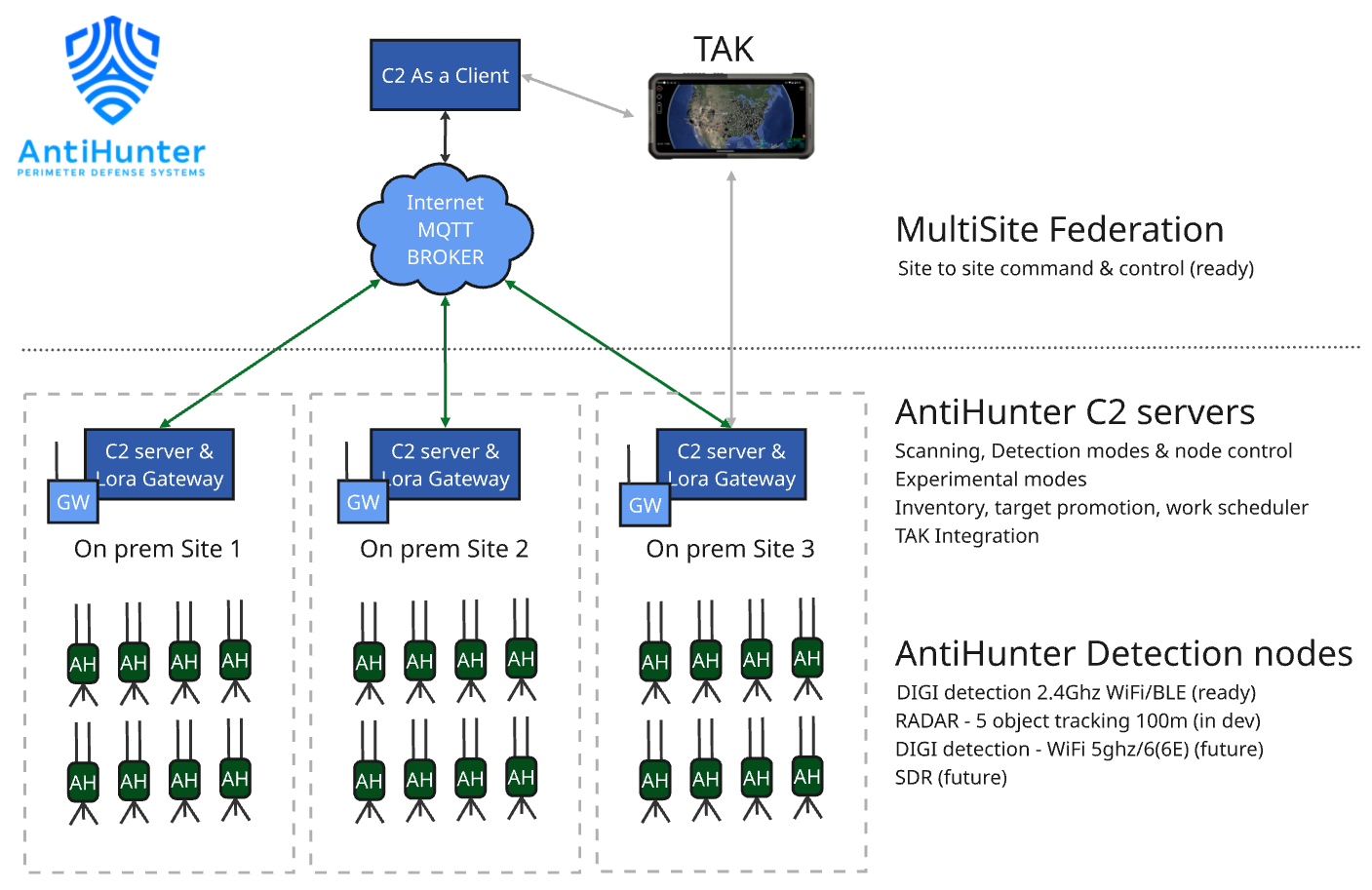
Nodes function independently and coordinate via Meshtastic mesh networking.
Workflow: Detection -> Data collection (RSSI, GPS, timestamp) -> Mesh broadcast -> Command center aggregation
Node types. All of these share this PCB and mesh:
| Board | Sensor | Firmware | Status | |
|---|---|---|---|---|
| DIGI | ESP32-S3 | WiFi + BLE, 2.4 GHz | AntiHunter-full / -headless |
stable |
| DIGI C5 | ESP32-C5 | WiFi + BLE, 2.4 and 5 GHz | AntiHunter-c5-full / -c5-headless |
testing |
| RadarNode | ESP32-C5 | 24GHz radar, WiFi/BLE on trigger | web flasher, Experimental | experimental |
The C5 is a drop-in replacement for the S3 on the same board - same pads, same peripherals, and it adds 5 GHz scanning. A RadarNode detects a moving target on radar, then sweeps WiFi and BLE to record which devices were present at that moment; it tags its STATUS reply with TYPE:RADAR, which the RadarNode UI and the Command Center use to type peers. Both are flashed from the web flasher under the Experimental channel, which asks you to acknowledge that these are test builds before it will flash.
AntiHunter Command Center: Aggregates data from all nodes with real-time mapping and visualization.
Same firmware, same detectors, same mesh commands, same scan engine. Full adds a WiFi AP hosting the web UI and API.
| Full | Headless | |
|---|---|---|
| Control | Web UI and API over its own AP, plus serial and mesh | Serial and mesh |
| WiFi discovery | Active all-channel sweep plus promiscuous capture on Device Scan, Target Scan, Baseline and Triangulation | Identical |
| Results | /results, rendered as cards in the browser |
Same text at /last_results.txt on SD |
| Device database | /devicedb.jsonl |
Not written |
| Fleet roster | Fleet tab and /api/mesh |
Not tracked |
| RF footprint | AP beacons continuously | Never beacons |
Karma bait is the only detector that transmits, a probe request every 8s. Off by default, enable with GROUP:rogue:on. Sentinel defend has no AP to pin to on Headless, so use scan.
Meshtastic LoRa mesh via UART for long-range distributed sensing. Optional - a single node runs fully standalone without it.
- Connection: TEXTMSG mode, 115200 baud. Pins:
10 RX / 9 TX(T114),19 RX / 20 TX(Heltec V3) - Protocol: Standard Meshtastic serial, public and encrypted channels
- Rate limiting: 3s intervals (configurable)
- Addressing:
@ALL COMMANDfor broadcast,@AH01 COMMANDfor a specific node. Node IDs: 2-5 alphanumeric chars. - Sender names: emoji/non-ASCII short names are stripped and still dispatch. A radio short-named the same as a node's own ID is dropped as a self-echo — keep them distinct.
Soldered Core PCB and Assembled tiers ship this already applied - serial on, TEXTMSG 115200 on the board's pins, screen 1s, LED off, BLE on with the default pin. Region and channel are still yours to set. Bare PCB and Parts Kit builds do all of it.
Flash the radio with stable Meshtastic, connect it on its own, then run scripts/meshtastic_config.py. One config group per call, each value read back afterwards.
options:
  --port PORT           serial port (auto-detected if omitted)
  --board {heltec-v3,t114}
                        board type, sets the serial-module pins (default heltec-v3)
  --screen on|off|SECS  'off' blanks after 1s, 'on' stays lit, or give seconds
  --led {on,off}        status LED heartbeat
  --ble {on,off}        Bluetooth on or off
  --pin NNNNNN|none|random
                        BLE pairing: 6-digit fixed pin, 'none', or 'random'
  --serial {on,off}     AntiHunter serial module (TEXTMSG, 115200, board pins)
  --region REGION       LoRa region, e.g. US. UNSET means receive only
python3 scripts/meshtastic_config.py                     # print current settings
python3 scripts/meshtastic_config.py --serial on         # node link, pins per --board
python3 scripts/meshtastic_config.py --region US         # UNSET = RX only, no TX
python3 scripts/meshtastic_config.py --pin 481920 --screen off --led off
python3 scripts/meshtastic_config.py --board t114 --serial on --ble off
No flags on a terminal gives an interactive menu.
The same settings can be applied from the Meshtastic app or web client - Serial: enabled, TEXTMSG, 115200, pins per board.
Before deployment: set the region, change the BLE pairing pin, make your own encrypted channel primary and turn the public channel off in the Meshtastic app.
You do not need line of sight to every node. Nodes in between relay for you - 3 hops by default, 7 max.
A Meshtastic radio on its own, in the ROUTER or REPEATER role, extends the line further. AntiHunter radios stay on the default CLIENT role.
Node commands and detections travel as standard Meshtastic text messages on public or encrypted channels. Any Meshtastic client or integration that reaches the radio reaches the node:
- Meshtastic client - pair the radio to any client over Bluetooth, WiFi or USB, then send
@node COMMANDto run scans and read detections from anywhere in mesh range. No AP, no Command Center. Quick chat puts your usual commands on a button. - TAK / ATAK - set the radio's role to
TAK, install the Meshtastic ATAK plugin for your ATAK version, and leave the Meshtastic app running. CoT then travels over the mesh; node alerts still arrive as text.TAK_TRACKERsends the radio's own position without ATAK running. - MQTT - a Meshtastic MQTT gateway node forwards mesh traffic to a broker for logging, Home Assistant, or Node-RED.
Mesh TX Architecture
Scan tasks (sniffer/baseline/drone/randdet/blueteam) are pure producers. They enqueue device-broadcast messages and exit immediately when the scan ends. A background consumer task (meshTxTask) drains at the LoRa airtime cap through the token-bucket rate limiter (SerialRateLimiter, ~167 B/s sustained). Three priority queues hold 256 entries total - CTRL 16, EVENT 32, BULK 208 - drained in that order, so a STOP never waits behind a device dump. Device rows are packed into frames up to 230 B (under Meshtastic's 237 B text-payload cap).
Consequences:
- Starting a new scan never waits on prior scan's mesh TX. Drain happens in background.
/stop(web UI or mesh STOP command) flushes the queue immediately (cancels pending TX).- Header badge
Mesh TX K/Nshows live drain progress; auto-hides when queue empty.
Cross-Scan Dedup
To save airtime on repeated scans of the same RF environment, broadcast DEVICE: messages are deduplicated by MAC address with a configurable TTL.
| Setting | Effect |
|---|---|
meshDedupTtl = 0 (disabled) |
Every scan broadcasts every observed device. No skip. |
meshDedupTtl = 300 (5 min, default) |
If a MAC was broadcast in the last 5 min, skip it on subsequent scans within that window. |
meshDedupTtl = 3600 (1 hr max) |
Hourly per-MAC airtime cap. Tightest savings. |
Applies only to: sniffer + baseline DEVICE: broadcasts. Never applied to triangulation (T_F:/T_C:/T_D: need multi-RSSI), anomaly alerts (ANOMALY:, DEVICE_DISAPPEARED:, etc.), drone alerts (DRONE:, DRONE_LOST:), attack alerts (DEAUTH_FLOOD:, ATTACK:), summaries (SCAN_DONE:, BLUE_DONE:, etc.), or randomization identities (IDENTITY:).
SCAN_DONE reporting: with dedup enabled, TX=N DUP=M reflects N MACs broadcast this scan window and M MACs skipped due to dedup. Total unique devices observed = U=N+M (approximately).
Configure via:
- Web UI: Network Settings → Mesh Dedup TTL
- HTTP:
POST /mesh-dedup-ttl?ttl=Nwhere N is seconds (0=disable) - Mesh:
@ALL CONFIG_DEDUP_TTL:N(sec) - Clear cache:
POST /mesh-dedup-clear(forces all MACs to re-broadcast on next scan)
- Mesh Commands - every command a node accepts over the mesh, with parameters and examples.
- API Reference - the Full firmware's HTTP endpoints.
Original concept and hardware design by @TheRealSirHaXalot. Get involved -- PRs, issues, and docs contributions welcome.
This project includes code from opendroneid-core-c, licensed under the Apache License 2.0. Copyright (C) Intel Corporation and OpenDroneID contributors
Full Disclaimer
# Legal Disclaimer

AntiHunter ("AH", the "Project") comprises open-source firmware, source code, hardware designs, and associated documentation distributed for lawful, authorized defensive use only. You may operate the Project solely on infrastructure, networks, devices, radio spectrum, and datasets that you own or for which you hold explicit, written permission to assess. By downloading, compiling, flashing, assembling, energizing, or otherwise using the Project you agree to the following conditions:

- **Authorization & intent.** Use is limited to security research, blue-team training, regulatory-compliant monitoring, event security, network auditing, and other defensive activities. Offensive operations, targeted surveillance, stalking, harassment, or tracking of individuals without their informed consent are strictly prohibited. Detection, correlation, and triangulation capabilities are provided to characterize an environment you are authorized to assess, not to identify or follow persons.

- **Radio & telecommunications compliance.** You are responsible for abiding by every jurisdictional regulation governing radio frequency use, including FCC Part 15 and Part 97, CE/RED, Ofcom, and equivalent national rules; LoRa/ISM band allocations, power limits, and duty-cycle restrictions; and any licensing conditions applicable to your operating class. LoRa firmware is region-locked (868 MHz EU / 915 MHz US / 923 MHz Asia); operating a build outside its intended regulatory region may be unlawful. You must not use the Project to cause harmful interference or to interfere with authorized radio communications.

- **Interception & wiretap law.** Passive reception of radio emissions is regulated separately from network access in many jurisdictions. Depending on your location and the mode in use, capturing, storing, decoding, or disclosing frame contents, payloads, or identifiers may implicate the U.S. Wiretap Act (18 U.S.C. § 2511), the Electronic Communications Privacy Act, state two-party-consent statutes, the UK Investigatory Powers Act, or equivalent law. Determine the lawfulness of each capture mode in your jurisdiction before enabling it.

- **Privacy & data protection.** MAC addresses, device identifiers, probe request contents, BLE advertisements, and Remote ID broadcasts may constitute personal data under GDPR, UK GDPR, CCPA/CPRA, ePrivacy, and similar regimes. Collect telemetry only with a lawful basis. Obtain consent where required, minimize collection, apply retention and destruction schedules that match applicable law, and honor data-subject rights. The maintainers do not process, receive, or host your data.

- **Drone Remote ID.** Reception of broadcast Remote ID is permitted in most jurisdictions, but using Remote ID data to locate, approach, confront, or interfere with an aircraft or its operator may violate aviation, harassment, or anti-stalking law, including 18 U.S.C. § 32. Remote ID reception is not an authorization to act on what you receive.

- **Computer misuse laws.** Scanning, probing, or accessing third-party networks without permission may violate the Computer Fraud and Abuse Act, the UK Computer Misuse Act, EU Directive 2013/40, or similar statutes. Always obtain written authorization before interfacing with systems you do not control.

- **Export & sanctions.** You must ensure distribution and use complies with the U.S. EAR (including controls applicable to cryptographic and telemetry functionality), EU dual-use regulations, applicable sanctions regimes, and any contractual restrictions. The maintainers make no export classification representations and grant no export approvals.

- **Hardware, assembly & safety.** Kits, bare PCBs, and assembled units are supplied for use by persons competent in electronics assembly and operation. You are responsible for correct assembly, soldering, ESD control, antenna selection and attachment, and supply of regulated 5 V power. Operating the transceiver without a properly matched antenna may damage the hardware. Lithium cells are not supplied; sourcing, protection circuitry, charging, storage, transport, and disposal of any battery are your responsibility and carry fire and injury risk. The hardware is not certified for, and must not be used in, life-safety, medical, aviation, automotive, industrial-control, or other applications where failure could result in death, injury, or environmental damage. It is not a substitute for a certified security, alarm, or life-safety system, and detection results are advisory only, subject to false positives and false negatives.

- **Units, kits, and builds supplied by the maintainers.** These terms apply in full to units the maintainers assembled, kits and bare boards they shipped, firmware flashed with tools they published, and builds produced by following their documentation, BOM, wiring diagrams, or flashing instructions. Assembly, sale, or instruction by the maintainers creates no warranty, no certification, no fitness-for-purpose representation, and no assumption of responsibility for how a unit is later configured, deployed, or used. Once the unit is in your hands, operation and compliance are yours alone. Flashing the firmware - by the web flasher, the shell script, or any other means - is acceptance of these terms.

- **Experimental features.** Modes designated beta or experimental - including Sentinel, Triangulation, and MAC Randomization Correlation - are unvalidated, may produce inaccurate or misleading output, and must not be relied upon for operational, evidentiary, investigative, or safety decisions.

- **Operational safeguards.** Run the Project on hardened, access-controlled infrastructure. You are responsible for segregation of duties, credential management, network isolation of nodes and mesh links, and preventing unauthorized access to captured telemetry or command functions.

- **Forks and modifications.** The firmware is licensed under the GNU Affero General Public License v3.0; hardware and documentation are licensed as stated in their respective files. If you fork, redistribute, modify, manufacture, or resell the Project, you are solely responsible for supporting your derivative work, for its regulatory compliance and certification, and for any representations you make about it. The original authors and contributors are not liable for defects or legal issues introduced by third-party changes, packaging, integrations, or manufacture.

## No Warranty / Limitation of Liability

THE PROJECT - INCLUDING SOFTWARE, FIRMWARE, HARDWARE DESIGNS, AND DOCUMENTATION - IS PROVIDED "AS IS" AND "AS AVAILABLE," WITHOUT WARRANTY OF ANY KIND, EXPRESS OR IMPLIED, INCLUDING BUT NOT LIMITED TO WARRANTIES OF MERCHANTABILITY, FITNESS FOR A PARTICULAR PURPOSE, TITLE, NON-INFRINGEMENT, ACCURACY, DETECTION EFFICACY, OR UNINTERRUPTED OPERATION. THIS DISCLAIMER SUPPLEMENTS AND DOES NOT LIMIT THE WARRANTY DISCLAIMER AND LIABILITY LIMITATION SET OUT IN SECTIONS 15 THROUGH 17 OF THE GNU AFFERO GENERAL PUBLIC LICENSE V3.0.

TO THE MAXIMUM EXTENT PERMITTED BY LAW, THE AUTHORS, DEVELOPERS, MAINTAINERS, AND CONTRIBUTORS SHALL NOT BE LIABLE FOR ANY DIRECT, INDIRECT, INCIDENTAL, SPECIAL, EXEMPLARY, PUNITIVE, OR CONSEQUENTIAL DAMAGES (INCLUDING, WITHOUT LIMITATION, LOSS OF DATA, PROFITS, GOODWILL, EQUIPMENT, OR BUSINESS INTERRUPTION, OR DAMAGES ARISING FROM FAILURE TO DETECT, FALSE DETECTION, OR REGULATORY ENFORCEMENT ACTION) ARISING FROM OR RELATED TO YOUR USE OF THE PROJECT, EVEN IF ADVISED OF THE POSSIBILITY OF SUCH DAMAGES. WHERE LIABILITY CANNOT BE FULLY DISCLAIMED, TOTAL AGGREGATE LIABILITY SHALL NOT EXCEED THE GREATER OF (A) THE AMOUNT PAID, IF ANY, FOR THE COPY OR UNIT THAT GAVE RISE TO THE CLAIM OR (B) USD $0.

NOTHING IN THIS DISCLAIMER EXCLUDES OR LIMITS LIABILITY THAT CANNOT LAWFULLY BE EXCLUDED OR LIMITED, INCLUDING LIABILITY FOR DEATH OR PERSONAL INJURY CAUSED BY NEGLIGENCE, FOR FRAUD, OR ANY NON-EXCLUDABLE STATUTORY CONSUMER RIGHTS. SOME JURISDICTIONS DO NOT ALLOW THE EXCLUSION OF IMPLIED WARRANTIES OR THE LIMITATION OF INCIDENTAL OR CONSEQUENTIAL DAMAGES, SO SOME OF THE ABOVE MAY NOT APPLY TO YOU.

## Responsibility for Compliance

You alone are responsible for ensuring your build, deployment, and operation comply with all applicable laws, regulations, licenses, permits, equipment authorizations, organizational policies, and third-party rights. No advice or information, whether oral or written, obtained from the Project, its maintainers, or its community channels creates any warranty or obligation not expressly stated in this disclaimer. Continued use signifies your agreement to indemnify and hold harmless the authors, developers, maintainers, and contributors from claims arising out of or related to your activities with the Project.

If you do not agree to these terms, do not build, flash, assemble, deploy, or operate AntiHunter.