An innovative educational game that teaches programming fundamentals through interactive space-themed puzzles. Students learn programming concepts by controlling a space drone using visual blocks that generate real C# code.
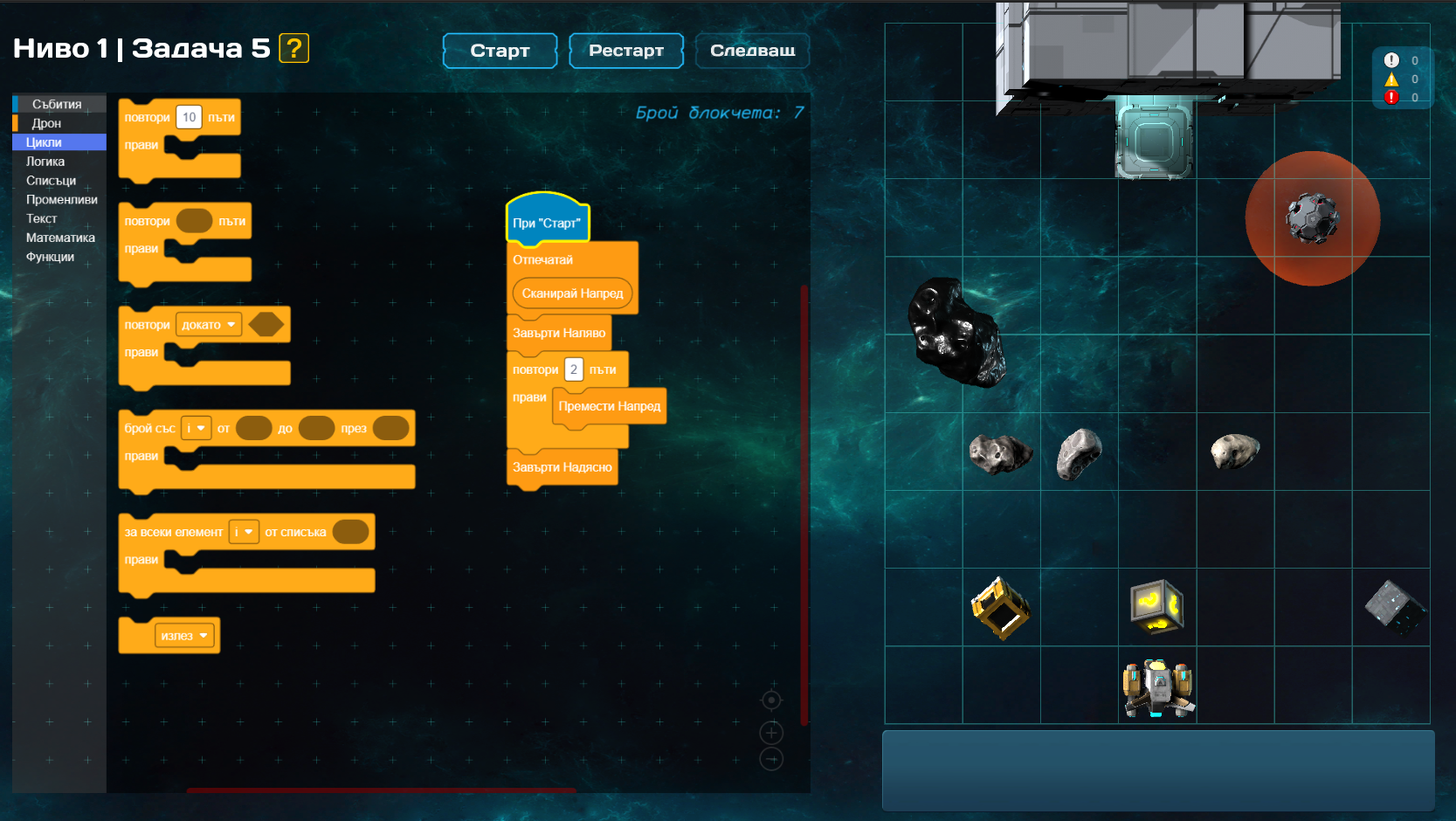
This R&D project explores the integration between browser-based visual programming (Google Blockly) and Unity game engine. Students drag and drop code blocks to control their spaceship, learning programming concepts like loops, conditionals, variables, and functions in an engaging game environment.
- Visual Programming: Drag-and-drop Blockly interface generates real C# code
- Progressive Learning: Each level introduces fundamental programming concepts
- Space-Themed Puzzles: Navigate asteroids, collect objects, and complete missions
- Real-time Code Execution: Generated code runs directly in Unity engine
- Browser-Unity Communication: Seamless integration between web interface and game
- Runtime Code Compilation: Dynamic C# script execution using Roslyn
- Save/Restore System: Persistent block workspace and progress tracking
- Event-Driven Architecture: Modular system for objectives and game mechanics
- Grid-Based Movement: Structured navigation system
- Objective System: Dynamic challenge tracking and completion
- Cargo Management: Collect and manage space objects
- Collision Detection: Realistic space physics and interactions
- Achievement System: Progress tracking and rewards
- Unity 2020.3.21f1 - Game engine (LTS version)
- Google Blockly - Visual programming interface
- ZFBrowser - Embedded browser component for Unity
- Microsoft.CodeAnalysis.CSharp.Scripting - Runtime C# compilation
- UniTask - Async/await support for Unity
- Odin Inspector - Enhanced Unity editor tools
- Sequential Execution - Basic command sequences
- Loops - Repetitive actions and iteration
- Conditional Statements - Decision-making logic
- Variables - Data storage and manipulation
- Functions - Code organization and reusability
- Advanced Concepts - Complex programming patterns
Assets/
├── Scripts/
│   ├── Systems/          # Core game systems
│   ├── Commands/         # Player command interfaces
│   ├── Objectives/       # Challenge and goal tracking
│   ├── GameEvents/       # Event management system
│   └── SpaceObject/      # Game object definitions
├── Scenes/               # Game levels and menus
├── BrowserAssets/        # Web interface files
└── Documentation/        # Design documents
- Unity 2020.3.21f1 or later
- Modern web browser with JavaScript support
- Visual Studio or compatible C# IDE
- Clone the repository
- Open project in Unity Hub
- Install required packages via Package Manager
- Build and run to test browser-Unity communication
The project includes comprehensive unit tests for:
- Player movement and collision detection
- Command execution and error handling
- Objective completion tracking
- Game state management
Development Stage: Early R&D Phase
- ✅ Core browser-Unity communication working
- ✅ Basic gameplay mechanics implemented
- ✅ Visual programming interface functional
- 🔄 Content creation and level design in progress
- 🔄 UI/UX polish and educational content expansion
- Content Expansion: More levels and programming challenges
- UI Enhancement: Improved visual design and user experience
- Performance Optimization: Code compilation and execution improvements
- Analytics Integration: Learning progress tracking and insights
- Accessibility Features: Support for diverse learning needs
This project is currently in early development and research phase. It is not intended for production use or cloning outside of the development environment without proper setup and configuration.
Educational research project - see documentation for usage guidelines.
Combining the power of visual programming with immersive gameplay to make learning programming fun and accessible.