








Hit Claude Code's 5-hour quota mid-feature? Or watching Cursor / Codex slow to a crawl after 150k tokens of context rot?
Vicem compacts your active coding session by 85.6–92.4% net effective tokens (Measured Eval — via Personalized PageRank + Submodular context selection, deterministic AST code skeletonization with
[pure]/[effects: ...]tags, and SHA-256-checked MCP rehydration), masks verboseBash/Readtool outputs in real time (PostToolUse), and hands off a hardened.vicem/BATON.mdacross Claude Code, Cursor, Codex CLI, Gemini CLI, Windsurf, Antigravity IDE, and Web AI in 3 seconds — with0npm dependencies and0network calls.⭐ Tip: Click Star (top-right) to bookmark this repo for the next time your coding agent hits a 5-hour quota limit or context rot.

🎬 15s Relay Overview — Watch in 1080p60 with sound (MP4) · All Links & Quick Copy
# Launch the local Handoff GUI (3-step guided handoff, preview confirmation & manual recovery)
npx -y vicem-cli gui

# Or pack a compressed baton from your current repo & hand off in 1 command
npx -y vicem-cli codex
npx -y vicem-cli claude
npx -y vicem-cli cursor

# Or auto-configure global `vicem` CLI + MCP servers across all installed agents
npx -y vicem-cli setup# Install the Agent Skill globally (Claude Code, Cursor, Codex, Antigravity, Windsurf)
npx skills add RAKKUNN/vicem -g
# Claude Code MCP Server
claude mcp add vicem -- npx -y vicem-cli mcp
# OpenAI Codex CLI MCP Server
codex mcp add vicem -- npx -y vicem-cli mcpCursor / Windsurf / Claude Desktop (mcp.json config)
Add to ~/.cursor/mcp.json, ~/.codeium/windsurf/mcp_config.json, or claude_desktop_config.json:
{
  "mcpServers": {
    "vicem": {
      "command": "npx",
      "args": ["-y", "vicem-cli", "mcp"]
    }
  }
}
🌐 Try Zero-Install Browser Sandbox (GitHub Pages) · 📦 npm (vicem-cli / @rakkunn/vicem) · 📊 Cache Hit Rate & Break-Even Eval · 🔒 Security & Zero-Network Proof
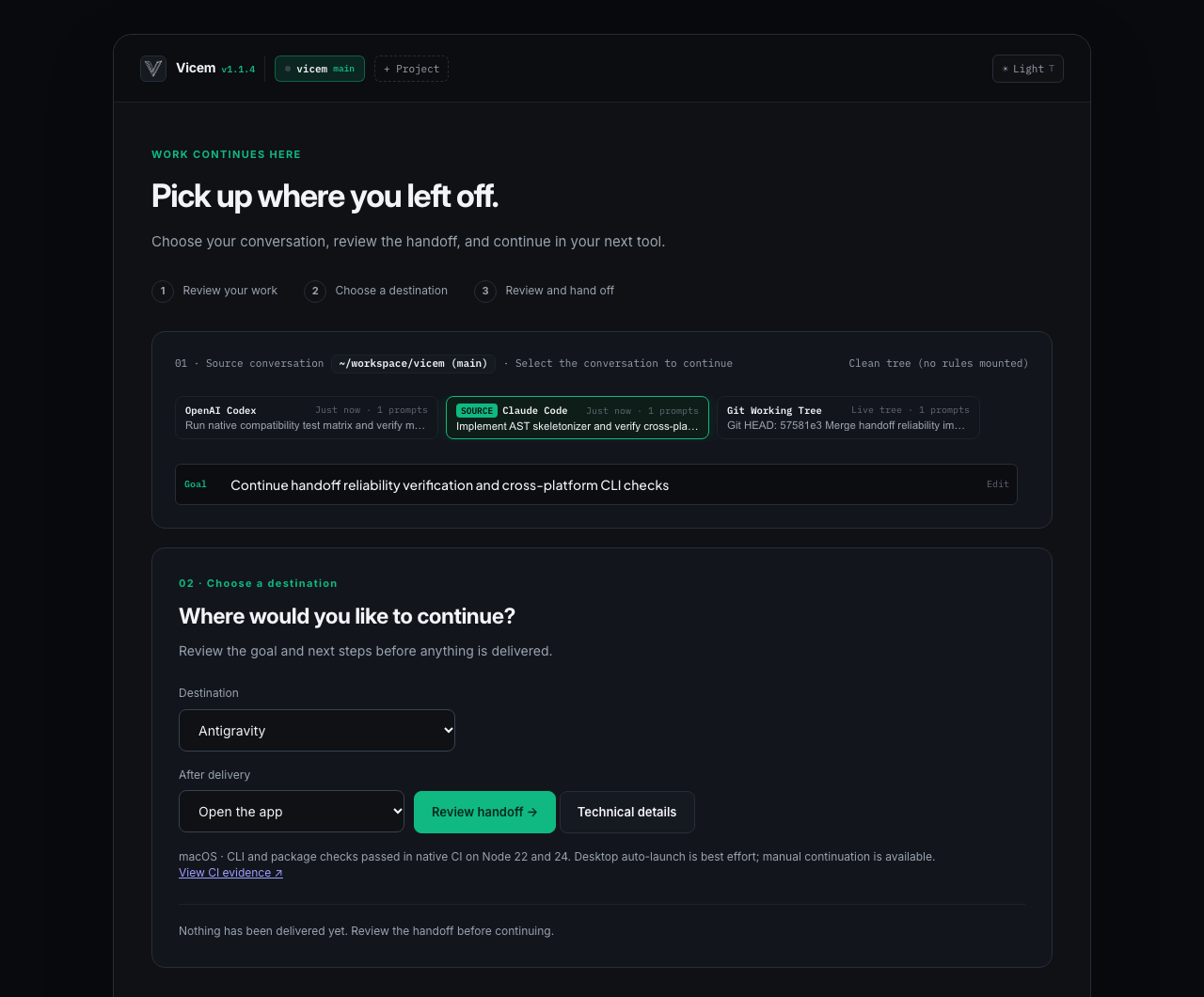
- Review your work (
01 · Source conversation): Select the active project and source conversation, and inspect or edit the extracted handoff goal. - Choose a destination (
02 · Choose a destination): Pick the target agent (Claude Code,OpenAI Codex,Cursor,Antigravity,Gemini CLI,Windsurf,VS Code,Web Chat) and delivery action (Open the app,Open in terminal, orPrepare handoff only). - Review and hand off (
03 · Review handoff): Inspect the exact.vicem/BATON.mdsummary before anything is written or launched. If automatic launch is unavailable, copy the savedBATON.mdpath, shell continuation command, and start prompt directly from the recovery panel.
$ npx -y vicem-cli codex

  ╭─ VICEM CONTEXT BATON & DIET RECEIPT ──────────────────────────────────╮
  │ Source Session : Claude Code (sess-9f3a2c · 42 turns harvested)       │
  │ Context Diet   : 184,200 tok ($2.76) ──► 14,800 tok ($0.22) [-91.9%]  │
  │ Code Skeletons : 18 files compressed (31 bodies indexed in ledger)    │
  │ Security Guard : 2 secrets redacted (OPENAI_KEY, AWS_ACCESS_KEY)      │
  │ Relay Target   : OpenAI Codex CLI (interactive TTY handoff ready)     │
  ╰───────────────────────────────────────────────────────────────────────╯
[OK] [Vicem] Baton written to .vicem/BATON.md (182ms). Launching codex...
Instead of lossy LLM summarization that forgets exact type contracts or hides side effects, Vicem keeps all imports, types, and signatures intact inside .vicem/BATON.md, annotates every elided body with deterministic AST purity & side-effect tags ([pure] vs [effects: fs-write, proc, net, state, fs-read, throws, async] with 1-hop intra-file propagation), and indexes raw bodies in .vicem/ledger.json:
// What the receiving agent sees in .vicem/BATON.md (disk file untouched):
export interface JwtPayload { sub: string; exp: number; role: 'admin' | 'user'; }
export function normalizeBearerHeader(rawHeader: string): string { /* ... [pure] */ }
export async function verifySessionToken(rawToken: string, secret: string): Promise<JwtPayload> { /* ... [effects: fs-read, throws, async] */ }
When the receiving agent actually needs to edit verifySessionToken, it calls the MCP tool vicem_rehydrate("src/auth.ts", "verifySessionToken") (optionally with include_callees: true) for SHA-256-checked, secret-redacted AST rehydration on demand — while .vicem/metrics.json (vicem stats) tracks your live Skeleton Cache Hit Rate (CHR) and Net Token Reduction (NTR) (see full benchmark & break-even curve).
| Pipeline Stage | Before Vicem (Raw Session) | After Vicem Baton & Diet (v1.3.0) | Measured Impact |
|---|---|---|---|
| 1. Session Handoff | 40+ turns of raw JSONL / SQLite history locked in one tool | Extracts Goal, Done, Failed Attempts, Immediate NEXT & git diff into .vicem/BATON.md |
< 3s handoff across 12+ CLI, IDE & Web AI agents |
| 2. Side-Effect AST + PPR/Submodular Engine | Full source files with unchanged function bodies (~71,400 tok) |
Personalized PageRank + Submodular Greedy file selection; signatures + [pure] / [effects: ...] tags; bodies in .vicem/ledger.json |
91.8–100% cache hit rate, -85.6% to -92.4% net tokens (eval) |
| 3. Real-Time Observation Masker & Slimmer | Verbose Bash test logs & huge Read outputs (~45,000 tok) |
PostToolUse hook (vicem hook observe / vicem mask) archives raw to .vicem/raw/ & returns slimmed errors/skeletons |
-95% log noise (every turn) |
| 4. Data & Noise Gate | Lockfiles, build bundles, and huge JSON / CSV / SQL dumps | Lockfiles dropped; data files reduced to inferred schema + 2 sample rows | -98% data bloat |
| 5. 4-Pillar Safety & Injection Guard | Plaintext .env keys, skeleton stub writes, or indirect prompt-injection in logs |
Regex + Shannon-entropy secret scrubbing, BatonInjectionGuard (Unicode Trojan / fence-escape / hijack defanging) & SkeletonWriteGuard |
4-layer defense & 0 npm dependencies |
Measured on Apple M2 Pro (darwin-arm64, Node v25.9.0, /usr/bin/time -l median of 5 runs, OpenAI o200k_base BPE tokenizer) on a polyglot JS/TS/Python/JSON repository (87,460 total tokens / 70,682 code-only tokens, containing an inline test secret and an untrusted prompt-injection comment):
| Tool (Anonymized) | Install Footprint (Deps) | Median Time | Peak RSS | Output (o200k_base) |
Reduction | Reversible Bodies (rehydrate) |
Secret / Injection Defense |
|---|---|---|---|---|---|---|---|
Vicem v1.4.0 (diet — Task Baton + Hot-Expand) |
0.47 MB (0) |
133 ms | 55 MB | 1,051 tok | -98.8% | Yes (active fn inline, 0 RPC) | Redacted / Defanged |
Vicem v1.4.0 (vicem map — Whole-Repo Map) |
0.47 MB (0) |
161 ms | 77 MB | 8,678 tok | -90.1% | Yes (221 symbols via MCP) | Redacted / Defanged |
Vicem v1.4.0 (--compact-all Full Baton) |
0.47 MB (0) |
219 ms | 77 MB | 9,721 tok | -88.9% | Yes (221 symbols via MCP) | Redacted / Defanged |
Tool A (AST Packer, --compress Full) |
~102 MB (84) |
333 ms | 208 MB | 18,587 tok | -78.7% | No (one-way deletion) | Secrets only / Injection leaked |
Tool A (AST Packer, --compress Code-Only) |
~102 MB (84) |
331 ms | 207 MB | 9,844 tok | -86.1%* | No (one-way deletion) | Secrets only / Injection leaked |
| Tool B (Python Repo Ingestor) | ~25 MB | 419 ms | 145 MB | 79,650 tok | -8.9% | Full raw dump | Leaked / Leaked |
| Tool C (XML Repo Packer, Default) | ~102 MB (84) |
274 ms | 164 MB | 79,934 tok | -8.6% | Full raw dump | Leaked / Leaked |
| Baseline (Raw File Concatenator) | ~0.2 MB | 36 ms | 18 MB | 87,537 tok | 0% | Full raw dump | Leaked / Leaked |
xychart-beta
    title "Output Tokens on 87.5k-Token Repo (Lower is Better)"
    x-axis ["Vicem diet", "Vicem map", "Tool A (AST)", "Tool B (Py)", "Tool C (XML)", "Baseline"]
    y-axis "Tokens (o200k_base)" 0 --> 90000
    bar [1051, 8678, 18587, 79650, 79934, 87537]
*Code-only comparison (70,682 raw code tokens, excluding JSON fixtures): vicem map produces 8,583 tok (-87.9%) in 160 ms while keeping all 221 elided functions restorable on demand via vicem_rehydrate. See docs/BENCHMARK.md for the reproducible CHR/NTR evaluation and break-even curve.
# 1. Launch the interactive Desktop Utility GUI
vicem gui

# 2. Compact current bloated session in-place (Context Rot Rescue)
vicem self

# 3. Pass baton to any CLI, IDE, or Web AI target
vicem codex | vicem claude | vicem gemini | vicem cursor | vicem windsurf | vicem vscode | vicem web

# 4. Return baton to previous agent & auto-unmount temporary rules
vicem back

# 5. Extract & smart-patch code blocks from a Web AI clipboard reply
vicem land

# 6. 5-sec AI-readiness X-Ray, reversible repo map, decision pinning & live Claude hooks
vicem xray
vicem map
vicem decide "Keep zero npm dependencies and preserve backward-compatible API"
vicem init --agent-hooks   # Installs PreCompact, Stop & PostToolUse (ObservationMasker)

# 7. Inspect Skeleton Cache Hit Rate (CHR), NTR, live Masked Obs & run diagnostics
vicem stats
vicem doctor
npm run bench
Offline / Air-Gapped Source Clone Installer (No npm required)
git clone https://github.com/RAKKUNN/vicem.git && cd vicem
./vicem.mjs setup   # or double-click setup.command (macOS/Linux) / setup.bat (Windows)
For browser-only air-gapped environments without Node.js, open index.html directly in Chrome, Edge, Brave, or Safari (enforced by connect-src 'none' CSP).
Verify zero third-party dependencies and cryptographic artifact integrity in one command:
# 1. Confirm zero npm dependencies
node -e "console.log(JSON.parse(fs.readFileSync('package.json')).dependencies ?? '0 dependencies')"

# 2. Verify SHA-256 checksums of all core artifacts
shasum -a 256 -c SHA256SUMS

# 3. Run the 778-test automated suite
node --test test/*.test.mjsStart the local interface with node vicem.mjs gui. Select the project and source conversation, edit the goal, choose the destination and launch mode, then review before delivery. Technical telemetry is available under details.
node vicem.mjs codex --preview: preview without saving handoff artifacts or launching an app.node vicem.mjs codex --preview --json: structured preview for automation.node vicem.mjs status --json/node vicem.mjs history --json: inspect recorded outcomes.node vicem.mjs undo <handoff-id>: restore instruction changes for that handoff only. If those instructions have since changed, recovery refuses to overwrite them. This does not undo agent edits to source code.
The GUI rejects a reviewed handoff if its content changes before delivery. Delivery and application launch do not establish that an agent has read the context: reception remains unconfirmed. The preview token is a consistency check, not authentication. Legacy --dry-run still writes handoff artifacts; use --preview for a read-only preview.
Validation: automated unit/integration tests and local macOS browser checks. Windows/Linux real-agent launch and actual target-agent reception are not certified by these tests. GUI and CLI share preparation, rule mounting, outcome history and instruction recovery; platform launch adapters remain distinct.
See compatibility verification for tested operating systems, actual agent read proofs, and limitations.
Windows CLI/package behavior is verified in native CI on Node 22 and 24. Windows desktop integration remains Preview; desktop auto-launch on every OS is best effort. View the passing CI run and the precise support scope.
If automatic launch fails, the handoff stays saved. The GUI provides Copy command, Copy start prompt, and the saved file path. Open the destination manually, select your project, and paste the start prompt. CLI failures provide the same guide. Successful delivery does not confirm that an agent read it.