Your photos. Your computer. Nobody else's business.
A fast, private photo viewer and organizer for Mac, Windows and Linux that finds faces, searches your photos, edits without touching your originals, and never uploads a single pixel.





Website · Download · Install guide
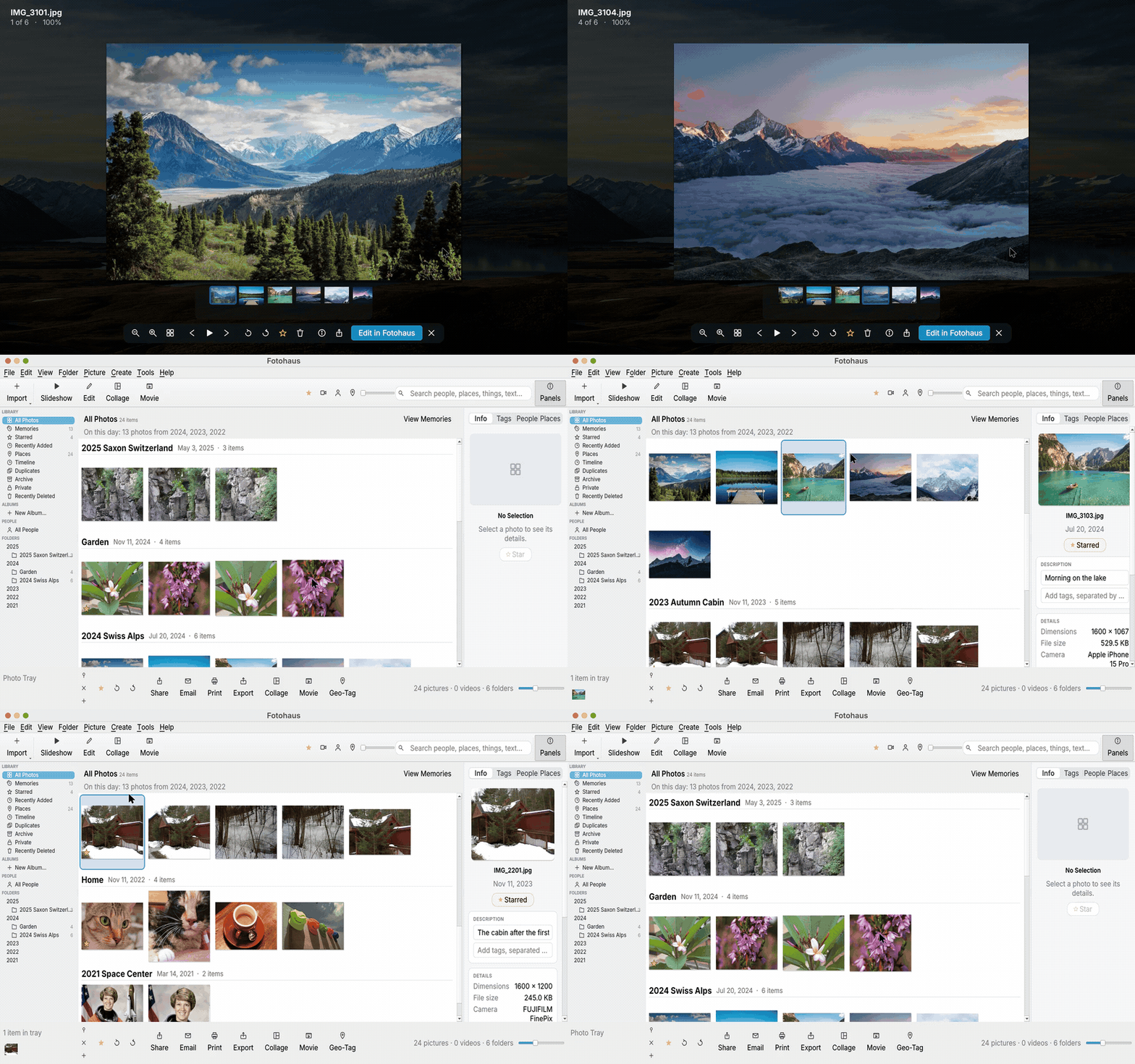
Fotohaus: one home for every picture you've ever taken.
Point it at the folders already on your computer, and in a few minutes years of photos are sorted, searchable and easy to show off. Nothing is copied into a hidden library and nothing leaves your computer. Your files stay exactly where they are.
- Private by design. Face recognition, search and editing all run on your computer. No account, no cloud, no tracking.
- Your folders, untouched. No import into a hidden library. Fotohaus works on the folders you already have, and every edit is reversible.
- Fast. Open a photo from Finder or File Explorer and it appears instantly over your desktop, with the rest of the folder one arrow key away.
- Clever where it counts. Search for "dog on the beach", "receipt" or a friend's name and get answers, not filenames.
- One app, three systems. The same Fotohaus runs on Mac, Windows and Linux, so your library habits move with you.
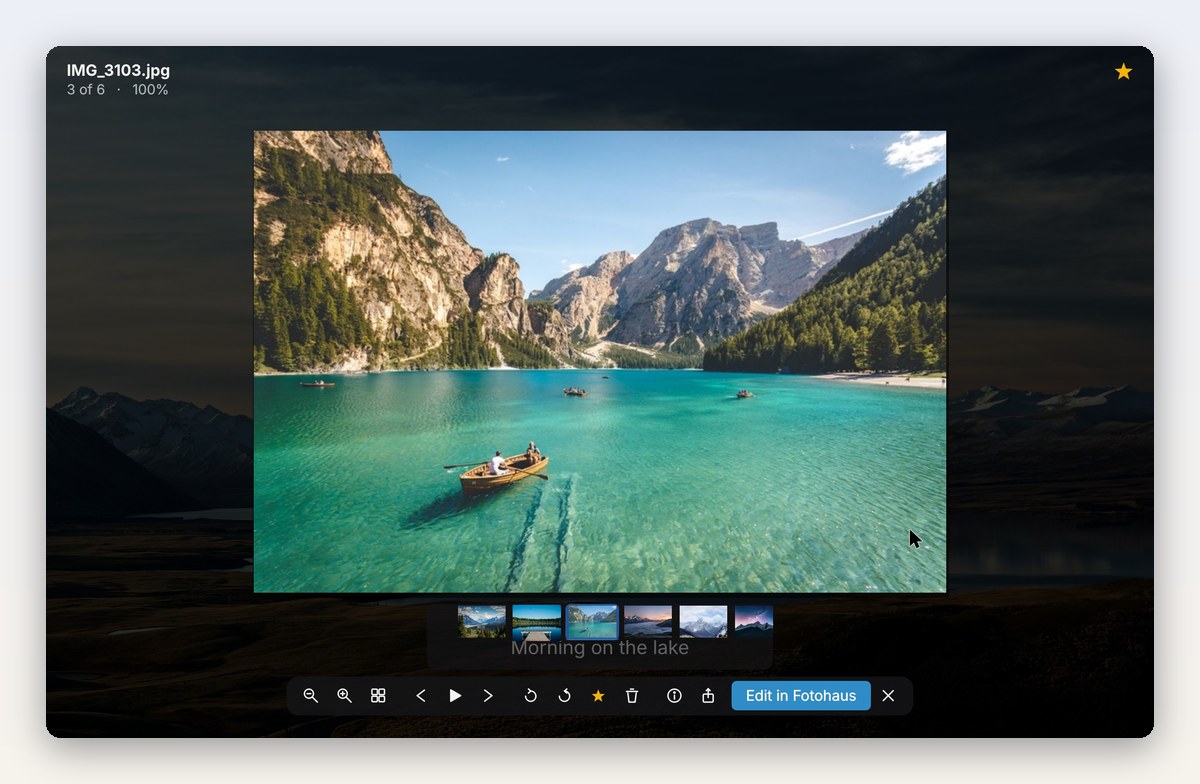
Double-click any photo in Finder or File Explorer and it opens instantly over your desktop. Then just press ← and → to glide through every other photo in the same folder. No importing, no waiting, no library to set up first. Zoom with the scroll wheel, star or rotate as you go, and press Esc to get back to what you were doing.
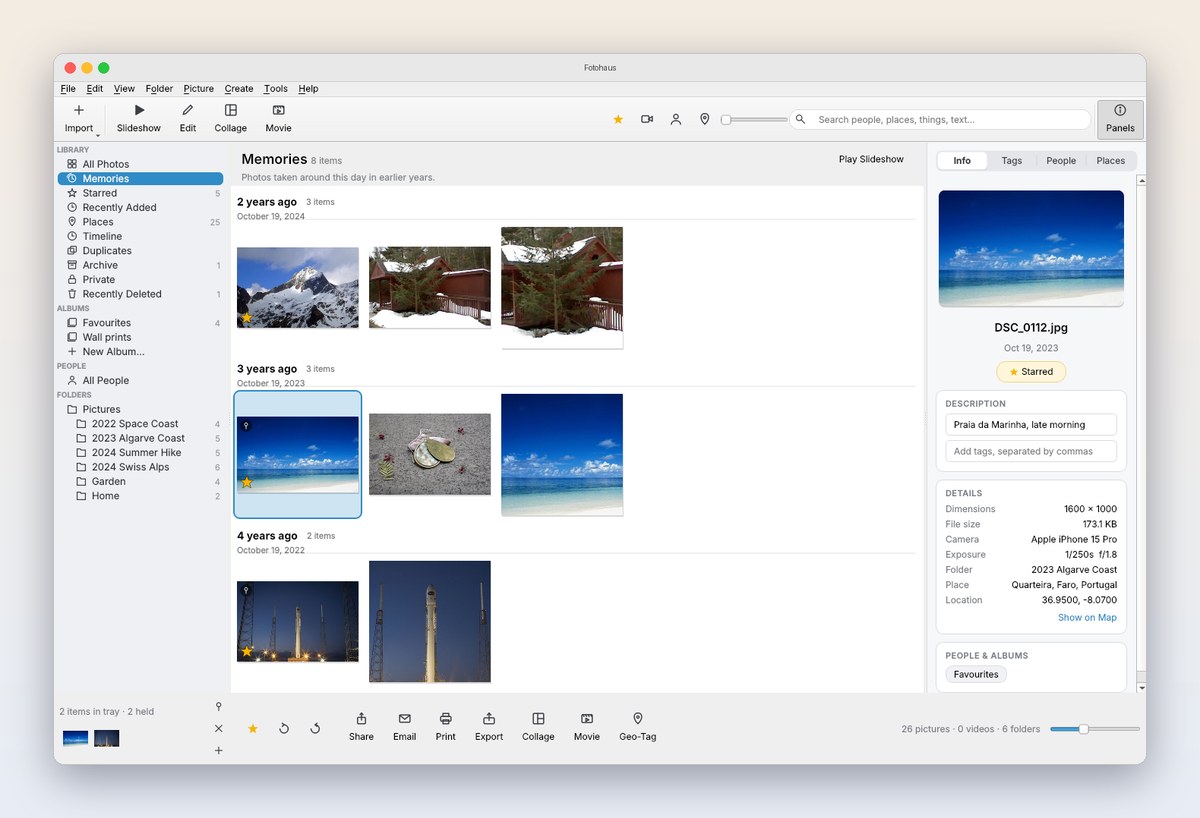
Each day Fotohaus looks back through your library for pictures taken on today's date in earlier years, and gathers them into Memories: "2 years ago", "3 years ago", ready to play as a slideshow. Each photo also knows where it was taken ("Lauterbrunnen, Bern, Switzerland"), worked out on your computer from a built-in atlas, so you can simply search for a town.
Select pictures and choose Move to Private. They vanish from the library, search, Memories, People and Places, and the Private collection opens only with Touch ID on a Mac, Windows Hello on Windows, or a password you set on Linux. It locks again when you quit.
Two quieter places help keep the library tidy:
- Archive tucks away screenshots, receipts and the photos you want to keep but not see every day. They stay on disk and come back with one click.
- Recently Deleted holds anything you delete in the library for 30 days, so a slip of the finger is never final. Only then do files move to the Trash (the Recycle Bin on Windows). In the Photo Viewer, Delete sends the photo straight there, with a moment to Undo.
Name a face once and Fotohaus suggests the same person across the years, all on your computer.
Search understands people, places, tags and dates (person:anna place:zermatt year:2019) and,
with the optional search model, plain descriptions like "kids playing in the snow". On a Mac it
also knows the objects and scenes in a photo ("dog", "beach") and the words in it: type
"invoice" or a street sign and find the picture.
A burst of twelve near-identical shots, the RAW and JPEG of the same moment, the short video behind an iPhone Live Photo: Fotohaus folds each into one stack with a small badge, so the library shows moments, not clutter. Open a Live Photo and press L to see it move.
Have folders an older photo organizer has looked after for years? Fotohaus reads the .picasa.ini
files sitting next to your photos, so your stars, captions, albums, face tags and edits come
straight back. It keeps writing them too, so nothing is locked in.
|
|
|
|
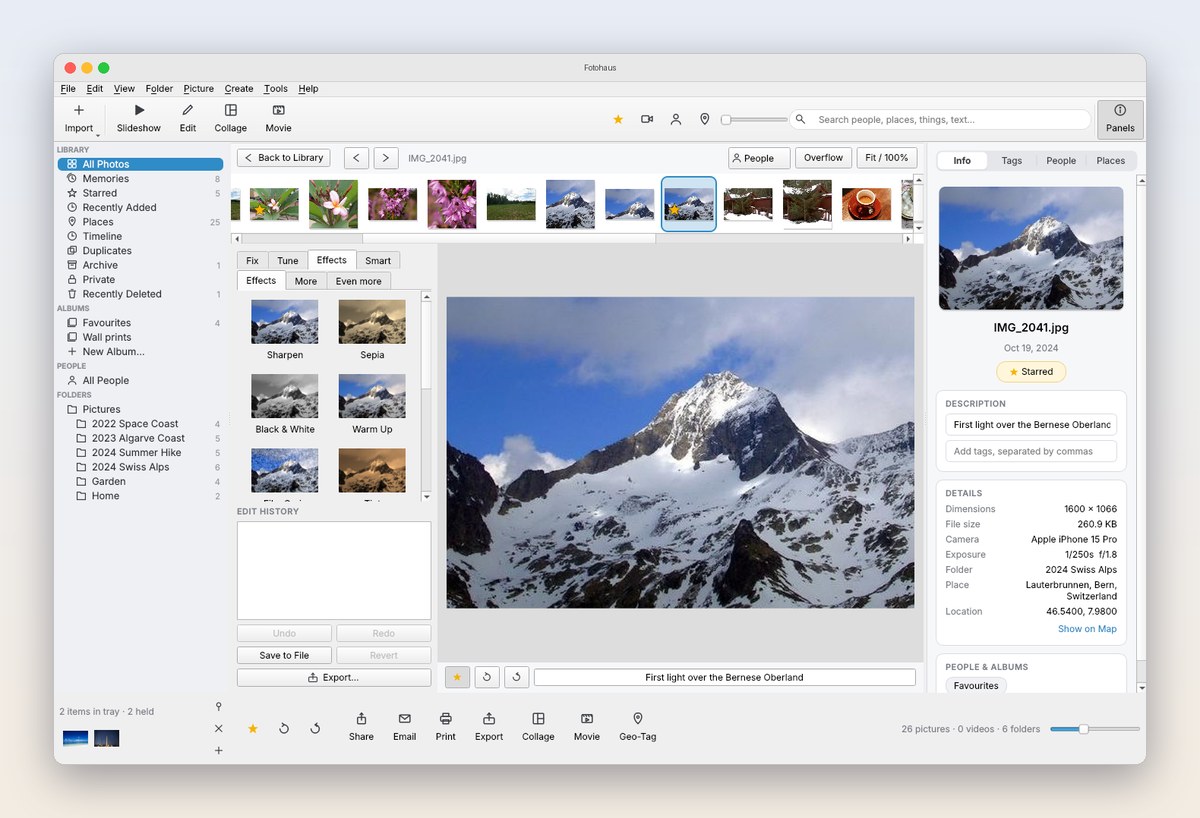
Reads what your camera writes: JPEG, HEIC/HEIF, AVIF, PNG, TIFF, WebP, GIF, PSD, camera RAW (CR2, CR3, NEF, ARW, DNG, RAF and more) and common video formats, colour-managed for accurate display. Captions and tags can be written into the files themselves, so other apps see them too.
Comes with a command line, too. fotohaus-cli search "beach 2019" searches from the Terminal,
and fotohaus-cli mcp lets AI assistants that support MCP search and organize your library.
Download the latest version from Releases. The step-by-step guide for each system, including the command line, the Claude (MCP) setup and how to uninstall, is in INSTALL.md.
| System | Download | Needs |
|---|---|---|
| Mac | Fotohaus-1.0.3-arm64.dmg |
Apple Silicon (M1 or newer), macOS 14 Sonoma or newer |
| Windows | Fotohaus-1.0.3-Setup.exe |
64-bit Windows 10 or 11 |
| Linux | Fotohaus-1.0.3-x86_64.AppImage |
64-bit, glibc 2.28 or newer (Ubuntu 20.04, Debian 10, Fedora 29 and later) |
With Homebrew (opens without the first-launch warning, and adds fotohaus-cli):
brew install --cask aelnagish/tap/fotohausOr from the disk image: open it and drag Fotohaus into Applications. Fotohaus isn't notarized by Apple yet, so macOS blocks it the first time:
-
If macOS says it "is damaged and can't be opened", click Cancel (not Move to Trash). Nothing is wrong with the app. Open Terminal, run this once, then open Fotohaus again:
xattr -cr /Applications/Fotohaus.app
-
If it says it "could not verify" Fotohaus, open System Settings ▸ Privacy & Security, scroll down and click Open Anyway.
Run the installer. It needs no administrator rights. Until the installer is code-signed, Windows shows "Windows protected your PC" the first time: click More info, then Run anyway.
Make the AppImage executable (chmod +x Fotohaus-*.AppImage, or Properties ▸ Allow executing as
program) and double-click it.
To open photos in Fotohaus when you double-click them, on any system, use Tools ▸ Options ▸ Photo Viewer.
./run.sh                     # first run sets everything up, then opens the app
# or manually:
python3 -m venv .venv && source .venv/bin/activate
pip install -r requirements.txt
python -m fotohaus            # app
python -m fotohaus.cli --help # command line
Python 3.11 or newer (3.12 is what the builds use) works on all three systems (on Windows, use py -m venv .venv and
.venv\Scripts\activate). The library database lives in ~/Library/Application Support/Fotohaus
on a Mac, %LOCALAPPDATA%\Fotohaus on Windows and ~/.local/share/fotohaus on Linux (set
FOTOHAUS_HOME to use a different place). Run the tests with pip install -r requirements-dev.txt, then python tests/test_fotohaus.py and
python tests/test_review.py. To build the apps yourself, see
packaging/build_mac_app.py, packaging/build_windows.py and packaging/build_linux.py.
Fotohaus is free, built to make everyday things a little easier. If it saved you an afternoon of sorting photos, you can buy me a coffee ☕.
Bug reports and ideas are welcome in Issues. Pull requests are covered by CONTRIBUTING.md.
Fotohaus is free software, licensed under the GNU General Public License, version 3 or later (see LICENSE). You may use, study, share and change it; if you distribute it, modified or not, you must pass on the same freedoms and the source code. Copyright © 2026 Abdullah Yusuf.
The apps bundle third-party software and data under their own licenses, listed in
packaging/THIRD_PARTY_NOTICES.md and in the Licenses folder
that comes with each app. Among them: place names from GeoNames
(CC BY 4.0), map tiles from OpenStreetMap contributors,
and face models from OpenCV Zoo. The source code of the GPL
libraries inside the apps (such as FFmpeg, x264 and x265) is attached to each release as
fotohaus-1.0.3-gpl-sources.tar.
Fotohaus is an independent project and is not affiliated with or endorsed by Apple, Google or Microsoft. All product names mentioned are trademarks of their owners.
Screenshots and the demo use sample images from the imageio and Pillow projects and landscape photos from Unsplash, used under the Unsplash License.