NeuroDump is a local-first macOS memory app for capturing thoughts, tasks, files, and chat context without turning every conversation into permanent memory. It is built with SwiftUI, AppKit, Swift Package Manager, SQLite, attachment extraction, embeddings, and a guarded retrieval layer.
The product goal is simple: capture what matters, retrieve it naturally, and answer with relevant local evidence instead of guessing or surfacing unrelated memories.
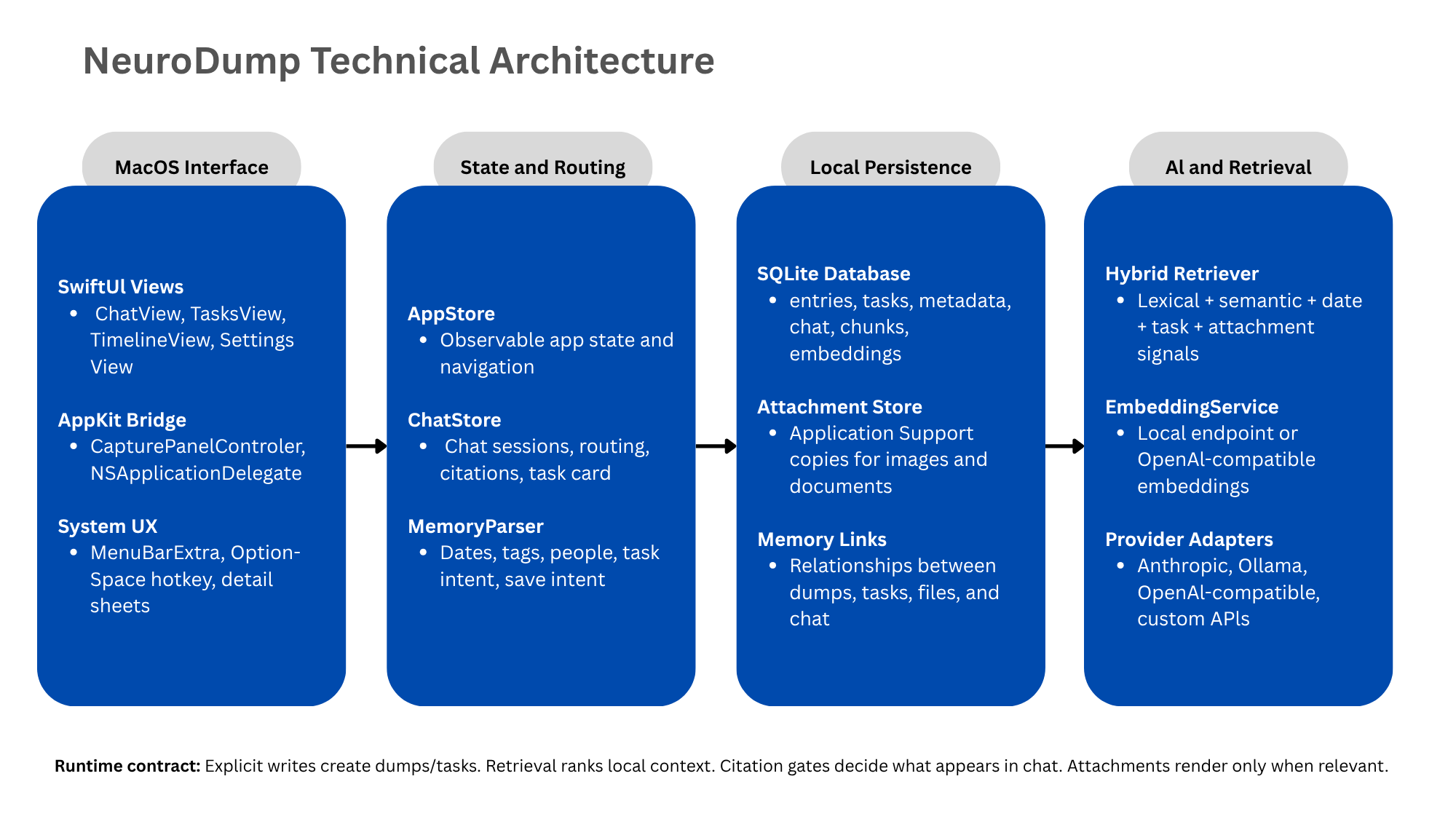
SwiftUIandAppKitpower the macOS interface, quick capture, menu bar, hotkey, and detail sheets.AppStore,ChatStore, andMemoryParsercoordinate state, intent routing, citations, and task cards.SQLite, Application Support attachments, embeddings, andmemory_linksform the local memory core.- Provider adapters connect Anthropic, Ollama, OpenAI-compatible APIs, custom endpoints, and local embeddings.
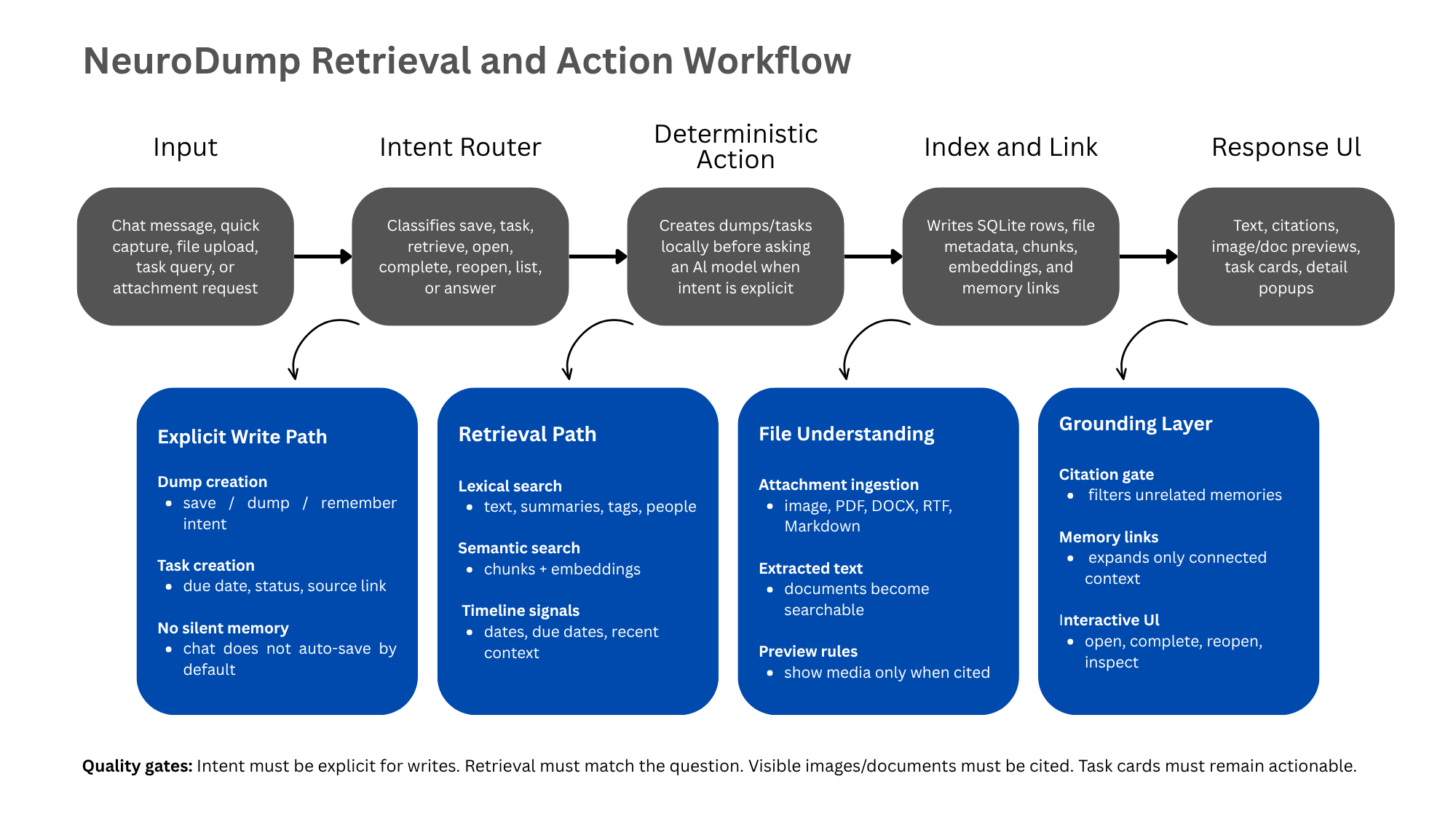
- The intent router separates explicit writes, retrieval, task operations, file requests, and general answers.
- Dumps and tasks are created through deterministic local actions before any model response.
- Retrieval combines lexical search, semantic embeddings, timeline signals, file metadata, and linked context.
- The citation gate controls which images, documents, task cards, and detail popups are visible in chat.
Personal memory tools break down when they treat every note, task, chat message, and file as the same thing. NeuroDump is designed around stricter workflows:
- A dump is captured knowledge.
- A task is actionable work with status.
- An attachment is a real file that should preview when relevant.
- A chat answer should cite only the memories it actually used.
- A memory link connects related context without forcing unrelated items into every reply.
The assistant can use local context, but it should not silently create tasks, silently save dumps, or randomly show old images.
- Native macOS app built with SwiftUI and AppKit.
- Global quick capture with
Option-Space. - Local SQLite persistence for dumps, tasks, metadata, attachments, chunks, embeddings, chat messages, and memory links.
- Dumps with images, PDFs, text files, Markdown, RTF, DOC, DOCX, JSON, and CSV attachments.
- Attachment previews in chat, dump detail sheets, and task detail sheets.
- Explicit chat-driven dump creation when the user asks to save, dump, or remember something.
- Explicit chat-driven task creation with task cards that can be marked complete or reopened.
- Task detail popups with source dump and attachment previews.
- Memory links connecting chat-created context, related dumps, related tasks, and source files.
- Hybrid retrieval across lexical search, embeddings, dates, task state, attachment intent, and linked context.
- Citation gating so unrelated images or dumps are not shown just because they were nearby in retrieval.
- Chat history persistence for text, task cards, and cited memory IDs.
- Provider support for Anthropic, Ollama, OpenAI-compatible APIs, and custom endpoints.
- Local embedding server for multimodal retrieval experiments.
- Import/export support for NeuroDump JSON archives and Markdown sources.
NeuroDump is an active desktop app prototype. It runs as a local macOS app bundle through the build script. A signed and notarized DMG installer is planned as future distribution work.
NeuroDump is intentionally layered so user data stays local while AI providers remain replaceable.
SwiftUI/AppKit UI
  -> AppStore and ChatStore
  -> Intent routing and deterministic actions
  -> SQLite database and Application Support attachments
  -> Retrieval, embeddings, and memory-link expansion
  -> Provider clients and local embedding server
  -> Grounded reply with visible citations and action cards
| Layer | Files | Responsibility |
|---|---|---|
| App entry | Sources/NeuroDump/App |
macOS app lifecycle, menu bar integration, and global app setup |
| Models | Sources/NeuroDump/Models |
Memory, task, chat, and navigation value types |
| Views | Sources/NeuroDump/Views |
SwiftUI UI for chat, dumps, tasks, settings, capture, previews, and detail sheets |
| Stores | Sources/NeuroDump/Stores |
Observable app state, SQLite access, chat orchestration, and retrieval coordination |
| Services | Sources/NeuroDump/Services |
AI providers, embeddings, attachment ingestion, parser, hotkey, HTTP, and local server |
| Scripts | script/ |
Build/run automation and local embedding server startup |
| Tests | Tests/NeuroDumpTests |
Parser, database, and intent regression coverage |
NeuroDump stores user data locally in SQLite under the user's Application Support directory.
Core tables include:
entries: canonical dumps and task-backed entries.metadata: people and tags extracted from captured text.attachments: copied file attachments and extracted document text.tasks: actionable task records, status, due dates, priority, and completion state.chunksandembeddings: retrieval chunks and vectors.memory_links: durable relationships between related dumps, tasks, and chat-created context.settings: reserved local settings table.
Attachments are copied outside the repository into the app support folder. They are intentionally ignored by Git.
The chat layer routes important workflows before it calls an AI model:
- Detect explicit dump save requests.
- Detect contextual task creation requests.
- Detect direct task creation requests.
- Detect visual or document retrieval requests.
- Detect task list and task status requests.
- Fall back to a grounded AI response with retrieved local context.
This keeps critical actions local and explicit. The assistant should not create dumps or tasks unless the user asks.
Retrieval combines several signals:
- Lexical matches over dump text, summaries, tags, people, attachment names, and extracted document text.
- Embedding similarity from text chunks.
- Image-aware embedding fallback through the local multimodal endpoint.
- Timeline and date cues.
- Task status and related task state.
- Attachment type intent, such as image or document requests.
- Durable memory links from
memory_links.
The app separates hidden retrieval context from visible citations. The model can receive useful context, but the UI should only show cards and previews that are relevant to the user's current request.
NeuroDump is local-first:
- Dumps, tasks, attachments, chat sessions, and embeddings are stored locally.
- API keys are entered through the app settings and are not part of the repository.
- SQLite files, app support folders, attachment folders, app bundles, logs, local embedding caches, and common secret formats are ignored by
.gitignore. - AI provider calls happen only when chat, task generation, model testing, or embedding workflows require them.
Before publishing or sharing a fork, verify that you have not manually placed private data inside the repository.
- macOS 14 or newer.
- Xcode Command Line Tools or Xcode with a Swift 5.10 compatible toolchain.
- Python 3 for the optional local embedding server.
- Optional: Ollama for local chat and embedding models.
- Optional: Anthropic or OpenAI-compatible API key for cloud chat models.
Clone and run:
git clone https://github.com/d-sanoj/NeuroDump.git
cd NeuroDump
./script/build_and_run.sh
The script:
- Builds the SwiftPM executable.
- Creates
dist/NeuroDump.app. - Starts the local embedding server unless
NEURODUMP_SKIP_EMBEDDING_SERVER=1is set. - Launches the macOS app bundle.
To build without launching:
swift buildTo run the test suite:
swift testIf swift test reports no such module 'XCTest', fix the local Xcode or Command Line Tools installation. The app target may still build successfully.
Open Settings -> AI inside the app.
Choose one of:
AnthropicOllamaOpenAI CompatibleCustom Endpoint
Set:
- Endpoint
- Model
- API key when required
Then click:
Save ChatTest Chat
Choose one of:
Custom Endpointfor the bundled local embedding server.Ollamafor local Ollama embeddings.OpenAI Compatiblefor hosted embedding APIs.
Default local embedding settings:
Endpoint: http://127.0.0.1:8754/v1
Model: jinaai/jina-clip-v2
Then click:
Save EmbeddingsTest EmbeddingsBuild IndexorRebuild
API keys are entered in the app Settings screen. Do not commit keys into source files, shell scripts, .env files, README examples, or test data.
Recommended setup:
- Open the app.
- Go to
Settings -> AI. - Select a chat provider.
- Paste the API key into the secure field.
- Save and test the provider.
- Configure embeddings separately if needed.
For local-only usage, use Ollama for chat and either Ollama embeddings or the local embedding server.
The local embedding server lives in script/embedding_server.py and is started by:
./script/start_embedding_server.shThe script creates a Python virtual environment in .local/, installs dependencies from script/embedding_requirements.txt, downloads model files into .local/huggingface, and serves an OpenAI-compatible endpoint on port 8754.
These generated folders are ignored by Git.
Useful environment variables:
NEURODUMP_EMBEDDING_MODEL=jinaai/jina-clip-v2
NEURODUMP_EMBEDDING_DIM=512
NEURODUMP_EMBEDDING_PORT=8754
NEURODUMP_SKIP_EMBEDDING_WARMUP=1
NEURODUMP_SKIP_EMBEDDING_SERVER=1Use the Capture tab or global Option-Space.
Example dump text:
Call Sarah tomorrow at 7 PM
Idea: build a better local-first personal memory graph
Remember that I liked the darker UI direction
The chat can create a dump only when explicitly asked.
User message:
Save this: I should explore a DMG release flow for NeuroDump
Expected behavior: creates a new dump from that sentence.
User message:
Dump this idea: add a graph view for memory links
Expected behavior: creates a new dump and indexes it for retrieval.
User message:
Remember that I prefer concise task cards
Expected behavior: saves that preference as a dump.
User message:
Save this
Expected behavior: saves the recent conversation context and links it to related retrieved dumps or tasks.
Tasks are created only when the user asks for a task or clearly turns context into an action.
User message:
Create a task to call Michael tomorrow at 5 PM
Expected behavior: creates a task and shows an interactive task card in chat.
User message:
Create a task for this image
Expected behavior: creates a task using the current cited image or selected dump context.
User message:
Turn this dump into a task
Expected behavior: creates a task linked back to the source dump.
User message:
Show my tasks
Expected behavior: lists relevant tasks with cards that can be opened, completed, or reopened.
Supported capture attachments include:
- Images
- PDFs
- Plain text
- Markdown
- RTF
- DOC
- DOCX
- JSON
- CSV
User message:
Show me the image attached to my sketch idea
Expected behavior: retrieves the relevant dump and renders the actual image preview, not just the filename.
User message:
Open the document from my lease notes
Expected behavior: retrieves the relevant document attachment and opens the detail popup with file context.
User message:
Do I have anything about meeting Emily this week?
Expected behavior: searches dumps, tasks, chat-linked context, dates, and people metadata without pulling unrelated images by default.
Common commands:
swift build
swift test
./script/build_and_run.sh
./script/build_and_run.sh --logs
./script/build_and_run.sh --verify
Project-generated artifacts:
.build/: SwiftPM build output.dist/: generated app bundle..local/: local embedding server virtual environment, logs, PID, and model cache.
All of these are ignored by Git.
The .gitignore excludes:
- SwiftPM build output.
- Generated app bundles and future DMG/pkg artifacts.
- Local runtime logs and embedding caches.
- SQLite databases and sidecar files.
- Attachment folders and app support data.
- Common API key, certificate, and secret file formats.
- Editor-local settings.
Before pushing, run:
git status --short
git diff --cached --stat- Signed and notarized DMG distribution.
- CI build and release pipeline.
- Hardened Keychain storage for API keys.
- Rich visual memory graph UI backed by
memory_links. - Better document OCR and image understanding.
- Local-only mode presets for Ollama plus local embeddings.
- Import/export format for complete portable memory packages, including attachments.
- Product screenshots and release images for the README.
- Crash reporting and privacy-preserving diagnostics.
- Automated UI tests for chat, capture, task cards, and attachment previews.
This project is licensed under the MIT License. See LICENSE for details.