An unofficial, native client for Spotify, built with NSH.
If this helps you, please sponsor me.
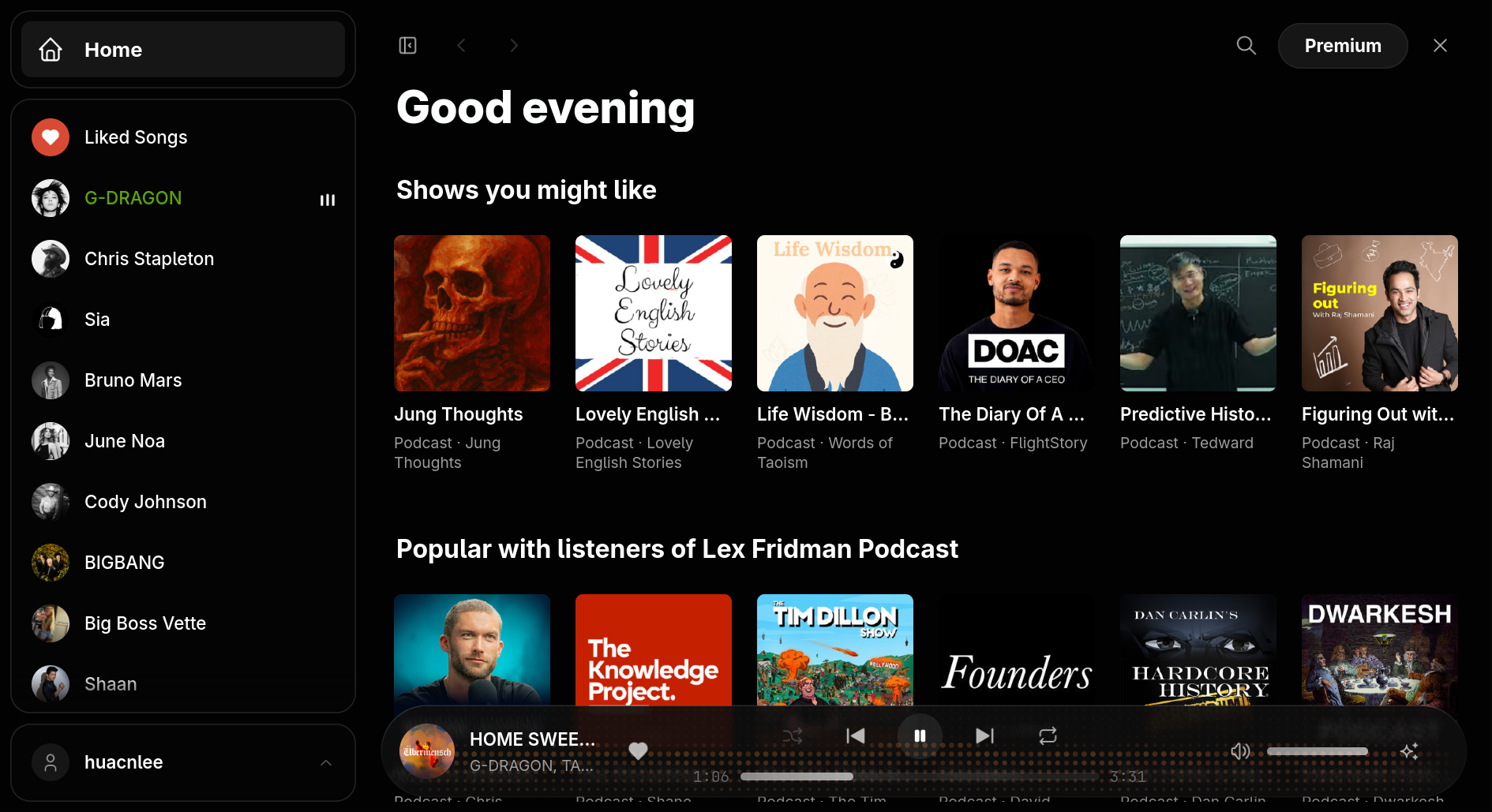
Spotish is a lightweight, native desktop app that works with your Spotify account. Instead of running Spotify's web app in a full browser window, it runs Spotify's own web player out of sight in a browser you already have installed, and drives it from a fast, native interface drawn by NSH. Your Spotify account, free or Premium, does the playing, so the catalogue, your library and Spotify's ads all work exactly as Spotify intends.
Unofficial — not affiliated with, endorsed by or sponsored by Spotify. Spotify is a trademark of Spotify AB. All music and artwork belong to their rights holders. A Spotify account is required, and your use of Spotify through this app is subject to Spotify's Terms of Use.
Spotish never blocks or skips Spotify's ads. Spotify Premium is how you remove them, play any track on demand, and support the artists you listen to.
macOS / Linux — run in Terminal:
curl -fsSL https://huacnlee.github.io/spotish/install.sh | bashWindows — run in PowerShell:
irm https://huacnlee.github.io/spotish/install.ps1 | iexThe installer downloads the latest release and verifies its checksum. Run the same command to update. You can also download a release manually.
Supported builds: Apple silicon with macOS 14 or later, x86_64 Linux with GTK 4.14 and glibc 2.39 or later (such as Ubuntu 24.04), and x86_64 Windows. Playback requires a supported browser and a Spotify account. On macOS, the app is not notarized; the first launch may need approval in System Settings → Privacy & Security.
Spotish has no nightly channel yet. Every build is a tagged release; to run the latest unreleased code, build from source.
Install Rust through rustup and the nsh CLI built from the NSH commit the app's crates are
locked to (the nightly tag while it still points there; see CONTRIBUTING.md).
On Linux, also install the GTK 4.14+ development packages listed in NSH's
installation guide. Then clone the repository and run it:
curl -fsSL https://nsh.dev/install.sh | NSH_VERSION=nightly sh
git clone https://github.com/huacnlee/spotish.git
cd spotish
nsh run
On Windows, install the CLI in PowerShell instead:
$env:NSH_VERSION="nightly"; irm https://nsh.dev/install.ps1 | iexSee CONTRIBUTING.md for details.
NSH (Native Shell) is a Rust UI framework that renders one app through each platform's own native views — on macOS, Windows, Linux, iOS, Android, the web and even the terminal. Spotish is an experiment that proves out NSH's cross-platform ability on a real, non-trivial app: one Rust engine and one TSX interface, drawn natively, not in a web page.
| Platform | Status |
|---|---|
| Linux, macOS | Plays music |
| Windows | Plays music through Microsoft Edge |
| Terminal (TUI) | Plays music, through the same engine as the desktop |
| Web, iOS, Android | Demo with sample data; a remote control for your desktop Spotish is planned |
Spotify's free tier plays only in Spotify's web player, with DRM (Widevine), in a real desktop browser. Web pages and mobile apps cannot start that browser, and Spotify's mobile and web SDKs are for Premium only — so on those platforms Spotish is a demo.
- An installed Google Chrome, Chromium, Microsoft Edge or Brave. Widevine, the DRM module that decodes Spotify's
audio, cannot be bundled with Spotish; it comes with your browser (Chromium downloads it on first run). Set
SPOTISH_BROWSERto the browser's executable to choose one. - A Spotify account (free or Premium).
- The engine (
src/spotify/, Rust) starts your browser without a window, loads Spotify's web player, and drives it over the Chrome DevTools Protocol. - A small bridge (
src/bridge/bridge.js) runs inside the web player. It reads what the player itself uses to talk to Spotify, so the app can show the same data, reports the player's state, and presses its controls. - The interface (TSX, from
App.tsx) is native NSH: a sidebar workspace that adapts from a desktop layout to a phone layout, a player bar, a full-screen Now Playing view, library, search and collection pages.
See CONTRIBUTING.md for the layout of the code.
You need the nsh CLI matching the locked NSH commit and Rust; see From source. nsh run builds the Rust engine, bundles
the TSX interface and runs it on this machine. nsh check runs cargo check and tsc, nsh test runs the Rust and
TSX tests, and nsh build describes the crate and bundles the interface.
nsh run
nsh check
nsh test
nsh build
SPOTISH_DEMO=1 nsh run runs on recorded sample data, with no browser and no account.
On first launch, press Log in and sign in to Spotify in the window that opens (with your Spotify account, or
Google, Apple or Facebook). Spotish keeps the login in its own browser profile across restarts. To reuse a browser you
are already signed in to, set SPOTISH_PROFILE to that browser's profile directory (for example ~/.config/chromium);
close that browser while Spotish runs.
Spotify Free can shuffle-play playlists, albums and artists but cannot play a chosen track on demand, so tapping a song shuffles its playlist, as Spotify's web player does. Ads play as Spotify serves them. Premium plays any track on demand and has no ads.
Spotish counts which pages are opened (/home, /search, /album, never which album) and which errors people run into,
with NsMetry. It sends no account, track, playlist or search text, and no cookies.
Each install has a random id, kept in the app's own storage, that the server hashes before storing. Demo mode sends
nothing.
Measured on Linux (Chromium, x86_64) with music playing, summing the app's whole process tree. PSS splits pages shared between processes among them, so it is the real footprint; RSS counts every shared page once per process, which is why a system monitor that adds up RSS shows 600–800 MB.
| Part | PSS | RSS |
|---|---|---|
| Spotish itself (NSH, the Rust engine, the TSX interface) | 77 MB | 95 MB |
| Spotify's web player page (Chromium renderer) | 219 MB | 294 MB |
| Other Chromium renderers (service worker, frames) | 32 MB | 207 MB |
| Chromium's browser, GPU, network, audio, storage and CDM processes | 52 MB | 210 MB |
| Total | 381 MB | 806 MB |
Most of the memory belongs to the headless browser that plays Spotify, mainly the web player's own JavaScript and page. The native interface stays under 100 MB.
TODO: startup and frame numbers.
Apache-2.0. As a special grant, Spotify AB may use this project freely, with no conditions and no attribution required — see NOTICE.md.