A persistent, mouse-driven desktop for Pixel apps, inside your terminal.
Floating windows, independent shells, desktop launch icons, a taskbar, and real graphical applications. The desktop and Pixel Studio use Pixel's native Rust renderer through React; they do not start Chromium. Browser/editor windows do.
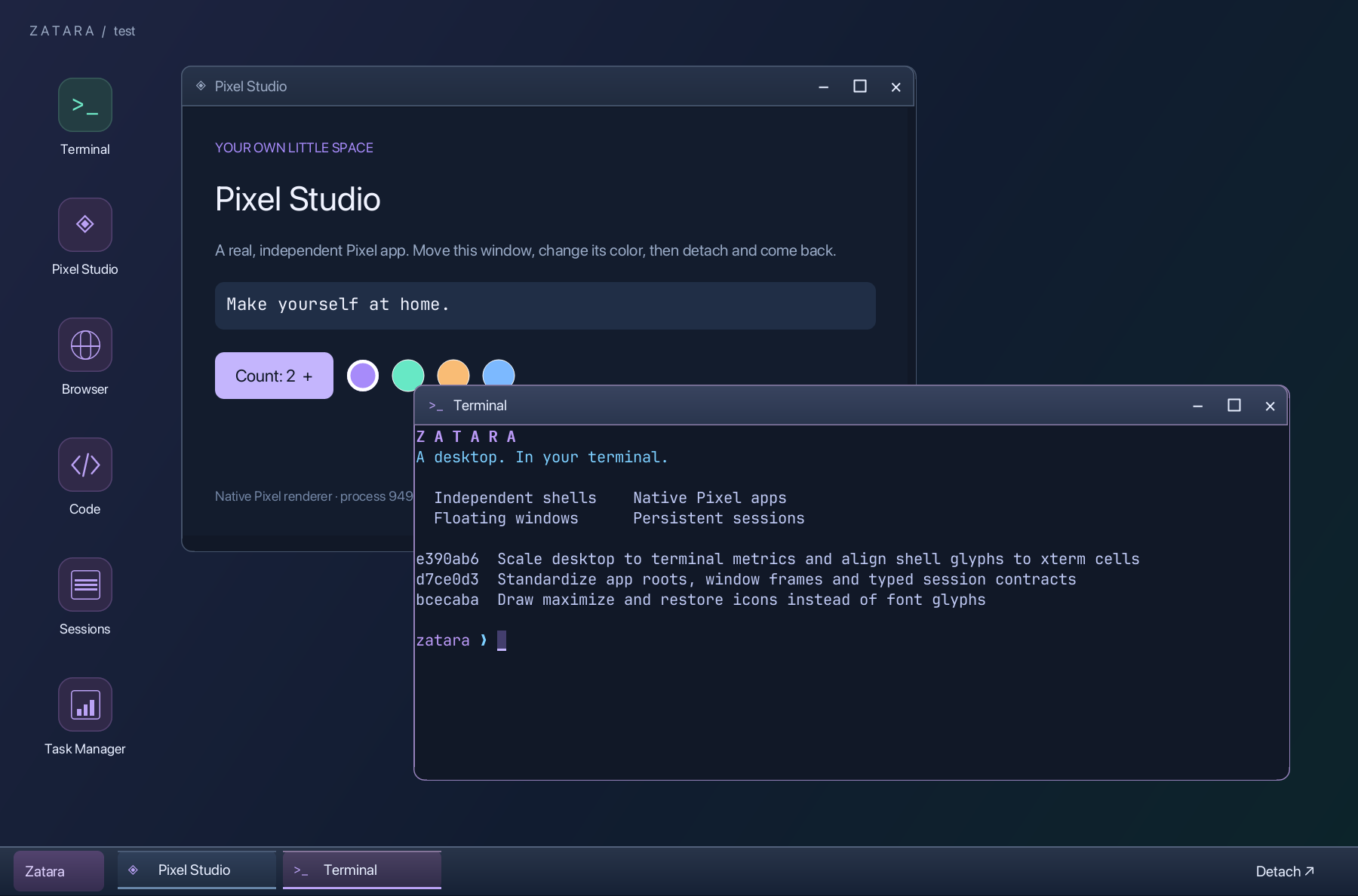
Your terminal, with room to move. Drag, resize, overlap, and switch between real processes. Detach the desktop and come back to the same running apps.
Requires Node 22+ and a Kitty-graphics terminal such as Ghostty or Kitty. macOS arm64 is tested; Linux support is experimental. Apple Terminal and plain serial/text consoles cannot display the desktop. The direct Linux display backend is planned, not included in this release.
Install from npm:
npm install -g @zatara-dev/desktop
zatara
Or build from source:
npm ci
npm run build
npm start
For a Linux server, install Node 22+ and npm on the server, install Zatara
there, then use Ghostty or Kitty on your Mac to run ssh -t linuxmacan zatara.
The desktop, shells and Pixel apps execute on the server. Linux native runtime
dependencies still need validation; report launch failures rather than assuming
the macOS acceptance results cover Linux.
Linux installation workaround: If npm fails with
EXDEV: cross-device link not permitted, rename during Pixel's postinstall,
this is a bug in @zenbu-labs/pixel (present in version 0.0.15). Its Electron
installer tries to rename files from the system temporary directory into the
package directory, which fails when they are on different filesystems or mounts.
Retry with a temporary directory on the same filesystem as the global npm packages:
pixel_tmp="$(npm root -g)/.pixel-tmp"
mkdir -p "$pixel_tmp"
TMPDIR="$pixel_tmp" npm install -g @zatara-dev/desktop
Run these commands as the same user you use for the global npm installation;
that user needs write access to the global npm directory. This also works with
nvm without hardcoding a Node version. For a source install, use a temporary
directory inside the checkout instead: mkdir -p .tmp followed by
TMPDIR="$PWD/.tmp" npm ci.
Double-click a desktop icon. Drag a title bar or resize an edge. Double-click a title bar to maximize/restore. Right-click a title bar or taskbar item for window actions. Click a taskbar item to restore/focus it. Detach or Ctrl+Alt+D leaves applications alive; closing a window ends that application.
zatara attach main
zatara list
zatara detach main
zatara launch main shell
zatara launch main demo
zatara inspect main
zatara kill main
These commands use the globally installed CLI. From a source checkout without
a global install, replace zatara with node dist/cli.js after building.
One attachment per session. A second attachment reports an error; detach the first explicitly before switching. Sessions survive attachment crashes and terminal hangup, but not service crashes or machine restarts.
The bundled download script supports macOS arm64 only. For a global npm installation, run:
node "$(npm root -g)/@zatara-dev/desktop/scripts/setup-apps.cjs"
zatara launch main browser
zatara launch main code
From the source checkout, use npm run setup:apps instead. The script writes
inside its package/checkout directory, which must be writable. On Linux or other
architectures, provide compatible platform binaries using ZATARA_BROWSER and
ZATARA_CODE; this download script cannot install them and their operation is
not yet verified. Set overrides before starting a fresh session service.
The optional setup downloads terminal-browser 0.11.1 and terminal-code/tode
0.3.4 from their official releases into the package/checkout’s
.artifacts/apps, without replacing installed binaries. These downloads are not included in the Git repository.
Start a new session after installation. Tode downloads code-server on first use
and keeps its own data under the standard XDG directories.
Terminal-code 0.3.4 uses a browser app-mode API removed in browser 0.11.1. Zatara's small launch adapter hosts the actual editor in a Pixel WebView, retaining its code-server and preload/theme bridge. Each editor window has an independent Chromium profile. This is not a substitute editor or screenshot mock.
Override launchers with ZATARA_BROWSER and ZATARA_CODE. Browser 0.8.1, which
was installed on this machine, does not support this hosting arrangement.
Tode's shared code-server outlives individual windows; its --shutdown command
stops that upstream service when no editor windows need it.
Install the project on the remote host and run zatara attach main
inside an ordinary interactive SSH session. Only the graphics-capable terminal
is required locally. The persistent service and guest connections stay on the
remote host. Reconnect with the same command after an SSH disconnect.
Direct SSH transmits encoded graphics, so active dragging and scrolling can be bandwidth-intensive. There is no optional local-rendering client yet. Linux, tmux nesting, Sixel, and arbitrary graphics applications inside the shell window are outside the verified target. Shell ANSI/TUI applications and Pixel guests use different rendering paths.
Set ZATARA_APPS to an absolute path to a JSON array:
[
  { "id": "my-app", "name": "My App", "icon": "M", "command": ["/absolute/path/to/pixel", "/absolute/path/to/app"] }
]
Applications run as separate processes. Zatara supplies PIXEL_TTY, registers a
Pixel pane owner, and owns the guest connection until the window closes. Native
apps can also use ZATARA_HOST/ZATARA_PANE, as the Pixel Studio example does.
Commands are argument arrays, not shell strings. External apps must implement
the compatible Pixel guest protocol; registration alone does not adapt another
GUI framework. GUI compatibility with non-Pixel apps is an explicit non-goal.
runAppWindow and the presentation components in src/primitives.tsx are
source-internal helpers for built-in apps. The npm package ships compiled
runtime files, not these sources or TypeScript declarations; it is not a
published application SDK. See DEVELOPMENT.md for architecture,
constraints, and planned work.
Run these developer commands from a source checkout with dev dependencies installed:
npm test                  # real PTYs, native rendering and mouse integration
npm run check
npm run test:apps         # optional official browser/editor releases required
npm run bench             # native process CPU/RSS and input-to-frame timings
npm run bench:transport   # actual Kitty stream through a simulated terminal PTY
See verification and measurements for tested behavior,
measured costs, and unverified boundaries. Screenshots and raw measurement JSON
are written to .artifacts/. Runtime sockets and logs live in the private
zatara-<uid> directory beneath the OS temporary directory; ZATARA_RUNTIME
overrides it for tests. Existing custom directories are not chmod-enforced;
use a private, user-owned directory. Session/app logs have no rotation or size cap. No network listener is opened by Zatara's session service.
The taskbar uses stable application labels, instance numbers, hover titles, and
an overflow menu. Long window titles truncate before the controls. Decoration
uses a compact shaded taskbar, bordered headers, rounded corners, and no shadows.
See polish results for captures, rendering fixes, and
measurement limits. From a source checkout, reproduce the native viewport captures after building with
npx tsx scripts/polish-captures.ts.
To terminate a session and its applications:
zatara list
zatara kill main       # substitute the session you want to end
Use detach to preserve applications instead. create <name> starts an empty,
detached session without requiring a terminal attachment.
Double-click Sessions or Task Manager on the desktop, or launch them:
zatara launch main sessions
zatara launch main tasks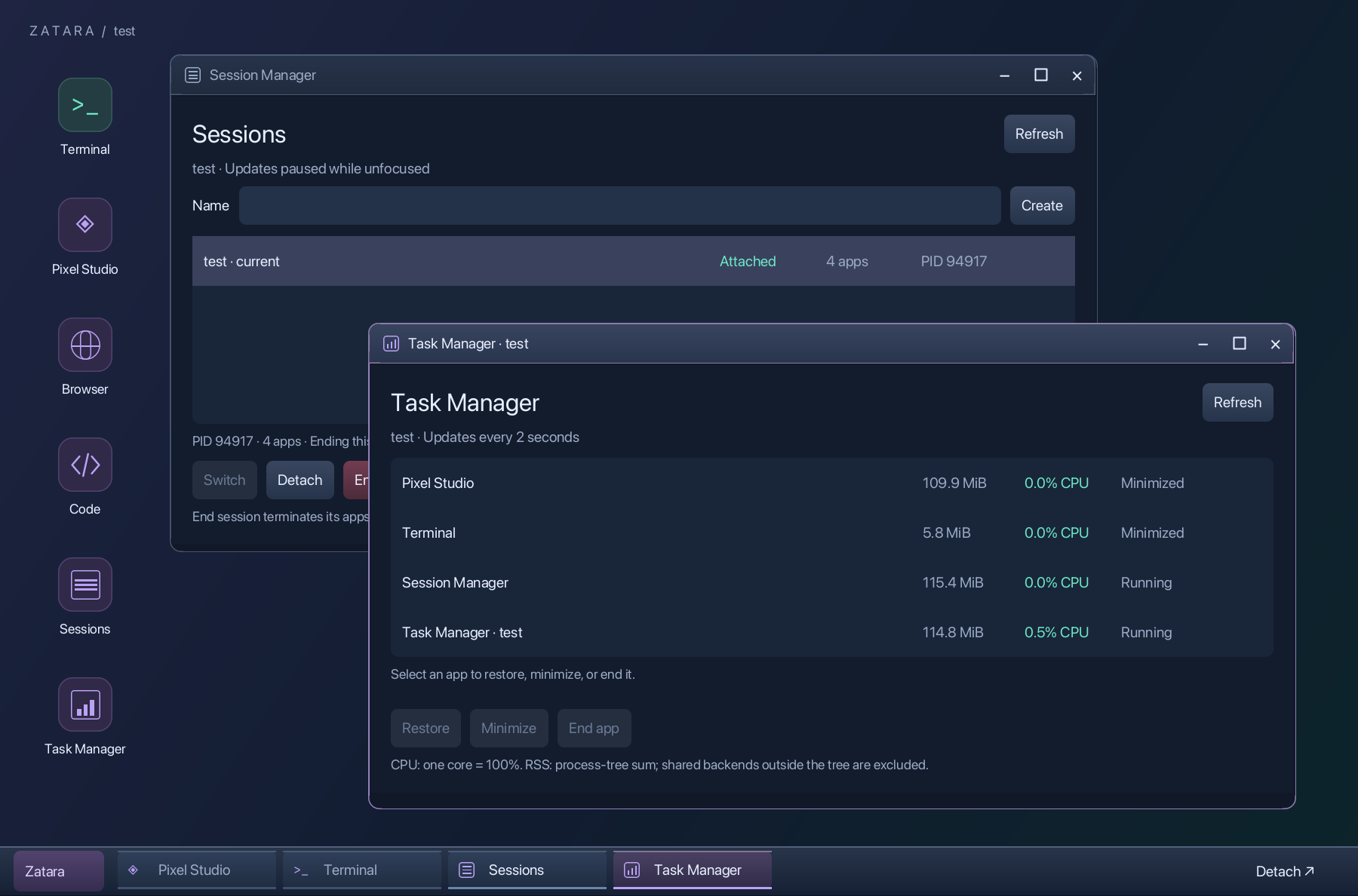
Both are independent native Pixel applications. Sessions lists this host's sessions, creates new ones, switches the current desktop, detaches attachments, and ends sessions after an in-app confirmation. Switching preserves the old session and refuses to take over a destination that already has an attachment.
Task Manager shows this session's apps, status, launcher/guest PIDs, process count, RSS, and sampled CPU. Select an app to restore, minimize, or end it. Ending an app uses the normal window-close path, with confirmation. CPU uses 100% per core; RSS sums may double-count shared memory. Shared backends outside the app's process tree are excluded. It is an application manager, not a list of every OS process. Both managers refresh every two seconds while focused and pause automatic refresh when unfocused; Refresh is always available.
Existing session services keep their loaded code and app registry. After a
build, create a fresh session to get new apps without disturbing existing work:
zatara attach managers. End old sessions explicitly when finished.
See manager implementation and validation.
Edit ~/.config/zatara/config.json (create it with zatara config init).
UI font size, desktop heading size, desktop icon size, and icon label size are
independent. Changes reload automatically without restarting apps. See the
configuration reference for examples, color overrides,
validation, and custom paths.
When developing inside this repository, use runAppWindow for built-in native
Pixel apps and WindowFrameProps for desktop frame changes. These are internal
contracts, not supported SDK exports from the installed npm package. See the window contracts guide for a
minimal app, registration, typed actions, focus handling, and compiler checks.
The App SDK guide describes the in-tree app API, private
session-local messaging, host-controlled permissions, and delivery semantics.
The images above are native compositor captures at 1800×1188 with 12×27 terminal cells. They show real application processes, captured through the isolated test host; they are not mockups or captures of a live Ghostty window.
From a source checkout:
npm run build
npx tsx scripts/readme-captures.tsBSD-3-Clause. Copyright (c) 2026 Jagtesh Chadha. See LICENSE. Third-party dependencies retain their own licenses.