Kill what Claude Code left behind.
Claude Code sessions end. The dev servers, watchers and emulators they started don't. seshka is a free macOS menu bar app that finds them and kills them.
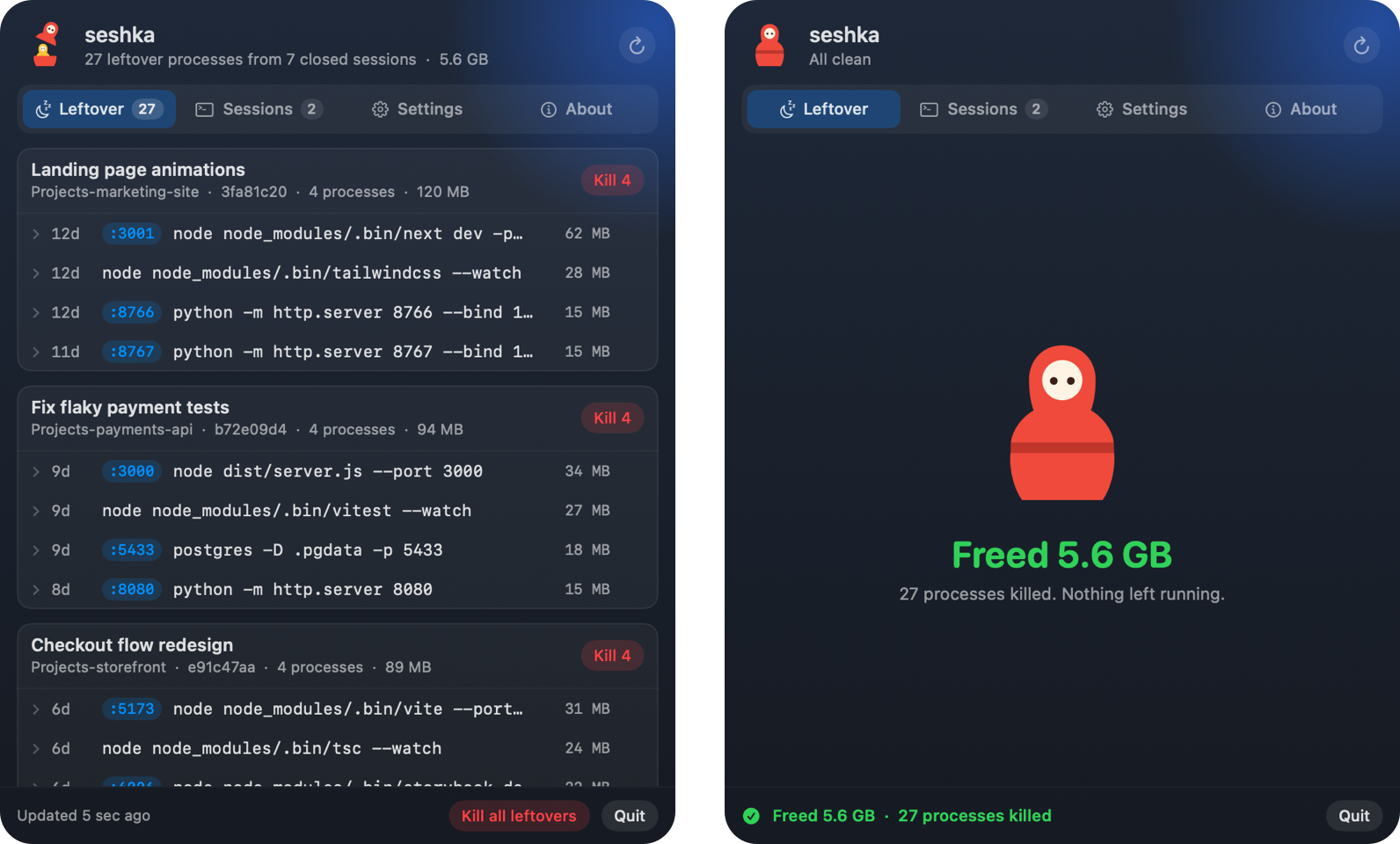
Download for macOS · Documentation · Questions and answers
Download the disk image, open it and drag Seshka to Applications. It needs macOS 14 or later, on Apple silicon or Intel.
The app is signed and notarized, and keeps itself up to date: it downloads a new version in the background, tells you with a notification and a red dot on its icon, and installs it when you click Restart now or the next time it quits.
The doll in the menu bar is open while something is left behind, and closed when your Mac is clean. The first time it runs, a short tour shows where it lives and what each tab does.
Leftover processes
- Finds every process started by a Claude Code session that has since closed, and groups them by session, with their ports, memory and age. A session that worked in several git worktrees gets a group for each.
- Catches browsers left open by Playwright and other automation, each as one row, and what lost its parent on the way:
a script that detached itself, an ssh tunnel, a
tail -f. - Kills one process, one session's worth, or all of them, and tells you how much memory came back.
- Skips what you protect. A process whose command contains one of your protected words is never killed in bulk.
Open sessions
- Shows every open session: whether it is working or idle, for how long, and what it has running.
- Ends idle sessions in one click, or on its own once they have waited longer than you allow (two hours unless you change it; off until you turn it on).
- Brings back a session it ended. Each one stays listed with a Resume button that opens a terminal in its folder with
claude --resumerunning.
Disk
- Shows what sessions left on disk and removes it when you click: the worktrees Claude Code made for its agents, the scratch files of closed sessions, and caches that fill up again by themselves (Gradle, pnpm, Yarn, Homebrew downloads and others). Only caches a tool refills on its own are offered, so clearing one never leaves something broken.
Lid closed
- Keeps the Mac awake with its lid closed while a session is working, and lets it sleep when the last one finishes. Off until you turn it on.
History
- Lists what it killed in the last 14 days and why: you clicked, a session sat idle past your limit, or a session ended and its leftovers went with it. Each entry names the process, its port and the session it belonged to, and is marked AUTO when seshka acted on its own.
The week in numbers
- Keeps count of what it cleaned up over the last week and makes a picture of it to share: memory freed, processes killed, sessions ended, disk cleaned. Only the numbers are on it.
seshka works on its own. With its plugin, Claude Code and seshka also talk to each other:
- A session's leftovers are killed when it ends. Claude Code tells seshka which session has just ended, and seshka kills what that session left running, except what you protected. This is a switch in Settings, off until you turn it on.
- Claude knows what was left behind. When a session starts in a folder where earlier sessions left something running, Claude is told: which process, on which port, for how long. It no longer wonders why port 3000 is taken.
- Two commands.
/seshka:statuslists what closed sessions left running, and/seshka:cleankills it. Addherefor this project only.
Install it from inside Claude Code:
/plugin install seshka --marketplace jigjoy-ai/seshka
or from a terminal:
claude plugin marketplace add jigjoy-ai/seshka
claude plugin install seshka@seshka
The plugin is three small shell scripts in claude-plugin. When a session ends it leaves an empty
file named after the session in ~/Library/Application Support/Seshka/ended, which seshka watches. When one starts it
reads the list seshka writes after every scan. The commands run seshka's own command line. It needs seshka 0.6.0 or
newer.
A session ended by kill -9, or by Claude Code crashing, never gets to say so. What it left is found the way seshka
has always found it, and waits on the Leftover tab.
Claude Code sets CLAUDECODE=1 in the environment of everything it starts, along with the ID of the session
and of its own process. seshka reads those from your running processes. A process is a leftover once the
Claude Code process that started it is gone.
Some apps keep their environment unreadable, Chrome among them. So seshka also counts whatever a marked process started: a browser opened by Playwright shows up next to the Playwright process that opened it. An app's helper processes are folded into one row with the app, and go when you kill it.
macOS hides the environment of its own programs too (/bin/bash, /usr/bin/ssh, /usr/bin/tail). For those,
seshka goes by two other traces. Claude Code sends each command's output to a file in a folder named after the
session, so a process still writing there says whose it is. And the marker is handed down from parent to child,
so a parent whose child shows it had it too: the script that keeps restarting a server is listed with the server.
The last trace is the process group. Claude Code starts every command in a group of its own, and whatever the
command starts stays in it, even with no parent, no marker and its output sent elsewhere. seshka asks macOS to
say when an open session starts a command, notes the group then, and knows the process later. This only works
for commands started while seshka is running, and not for a program that leaves its group on purpose, as
ssh -f and other daemons do. Those cannot be told from any other process, and are not listed.
On disk, nothing is removed without a click, and nothing that is in use is offered: not a worktree a session or a process runs in, not the scratch files of a session that is open or wrote to them within the hour. A worktree with uncommitted changes goes to the Trash instead of being deleted, and removing a worktree never removes its branch.
Closing the lid puts a Mac to sleep whatever is running, and the one setting that changes that, pmset disablesleep,
takes root. So the first time you turn on "Keep working with the lid closed", seshka asks for your password and adds
a rule to sudo, in /etc/sudoers.d/seshka-lid, that allows exactly pmset disablesleep 1 and pmset disablesleep 0
without one. It switches sleep off only while a session is working, and back on about a minute after the last one
stops, when the battery falls below the level you set, when the Mac runs hot, and when seshka quits. A Mac whose lid
is closed at that moment is then put to sleep. If seshka is killed while sleep is off, it puts it back the next time
it starts; a restart of the Mac does too. Settings has a button that removes the rule again.
What seshka cleans up is counted per day in ~/Library/Application Support/Seshka/history.json. Only numbers are
kept there, never a name, a command or a path. The picture made from them stays on your Mac until you share it.
What it killed and why is kept next to it, in cleanups.json, for the History tab: the command, its port and memory,
the title of the session it belonged to, the time and the reason. Entries older than 14 days are dropped, the file is
readable by you alone, and Clear on the History tab empties it.
Nothing about your sessions leaves your Mac. The only thing seshka fetches is its own update.
Will it kill something I still need? Only what you click, unless you turn on one of the two automatic switches. Nothing an open session is running is ever on the Leftover tab, and protected processes are skipped by every bulk kill. Whatever it does kill is listed on the History tab with the reason.
Is a killed session lost? No. The conversation stays where Claude Code keeps it. The Resume button, or
claude --resume, brings it back.
Does it work with Codex, Cursor or other agents? No, only with Claude Code.
How do I remove it? Quit it and drag it to the Trash. If you used "Keep working with the lid closed", remove its rule first with the button in Settings.
More in the documentation.
scripts/build.sh
open build/Seshka.app
MIT. Copyright (c) 2026 JigJoy. See LICENSE.
Built by the JigJoy team · Issues: github.com/jigjoy-ai/seshka/issues · X: @lotus_sbc