


Where the token budget actually went. token-furnace reads your local Claude Code, Codex, OpenCode and Antigravity (agy)
transcripts, finds token leaks, and shows the result in your terminal, as JSON for agents, and in a
local dashboard. Transcript data never leaves your machine.
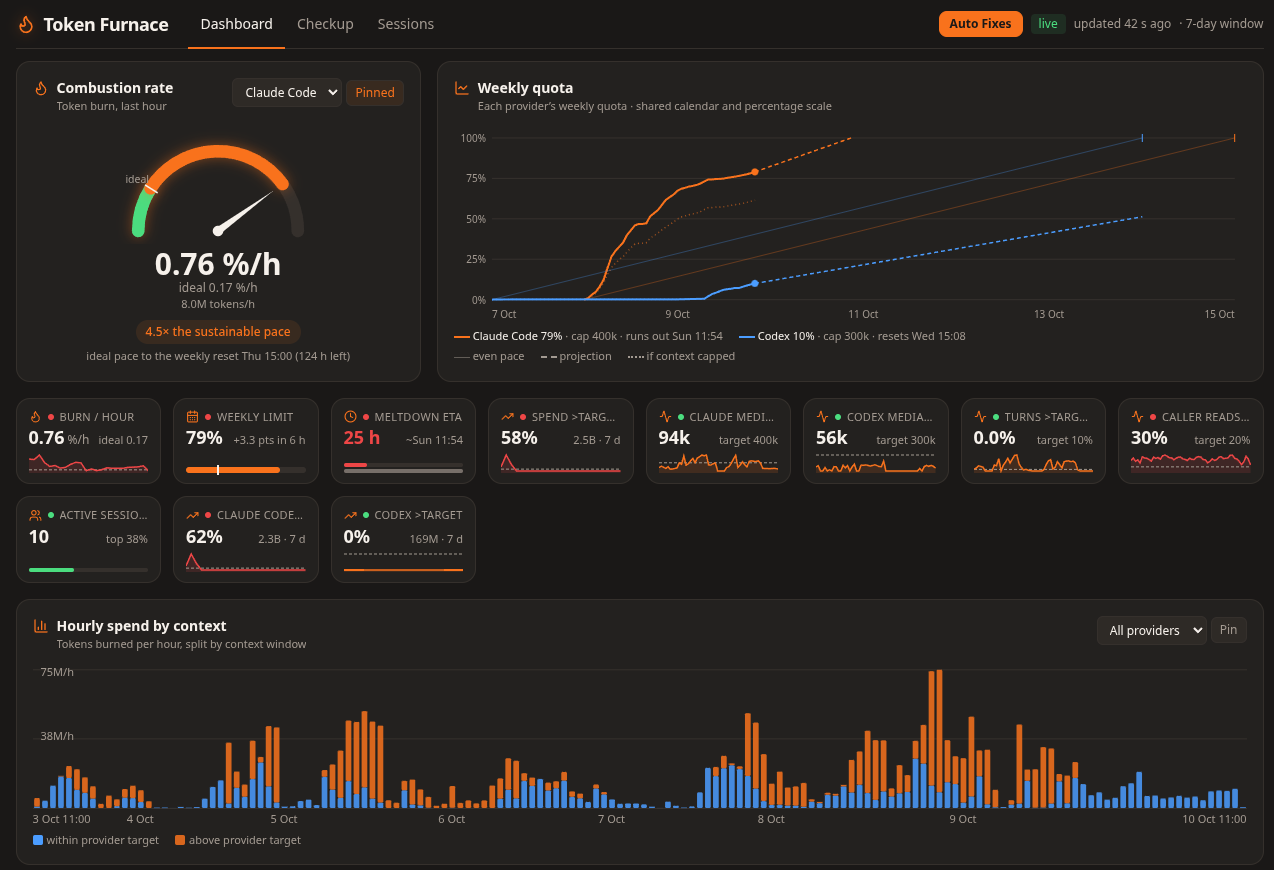
Each card has a target. A red dot means the target is missed and a green dot means it is met.
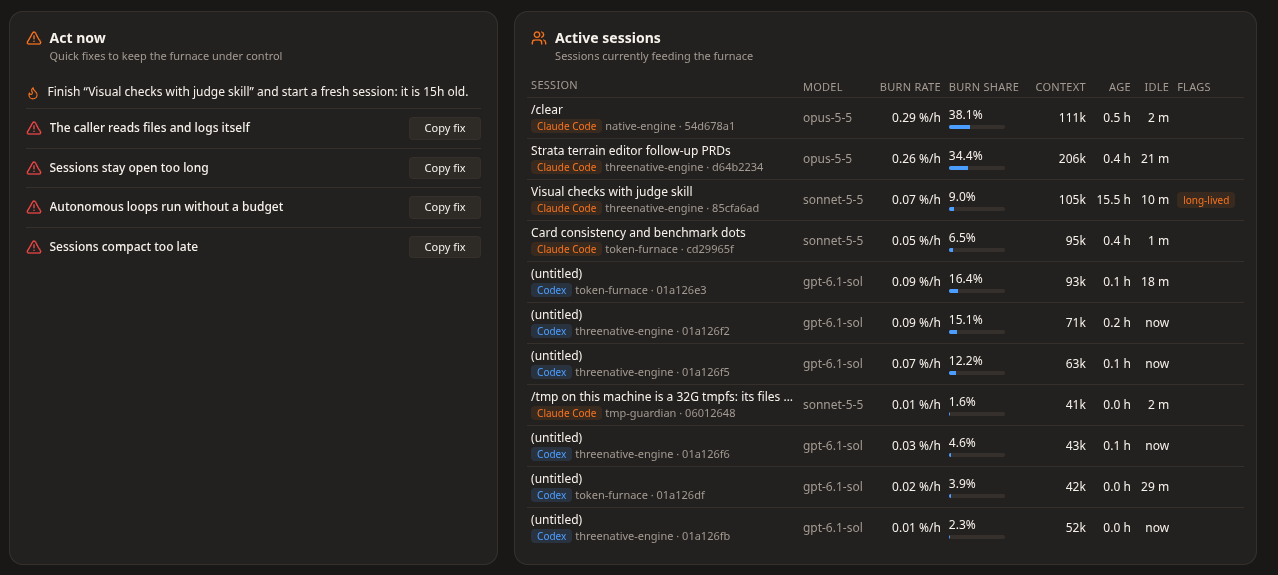
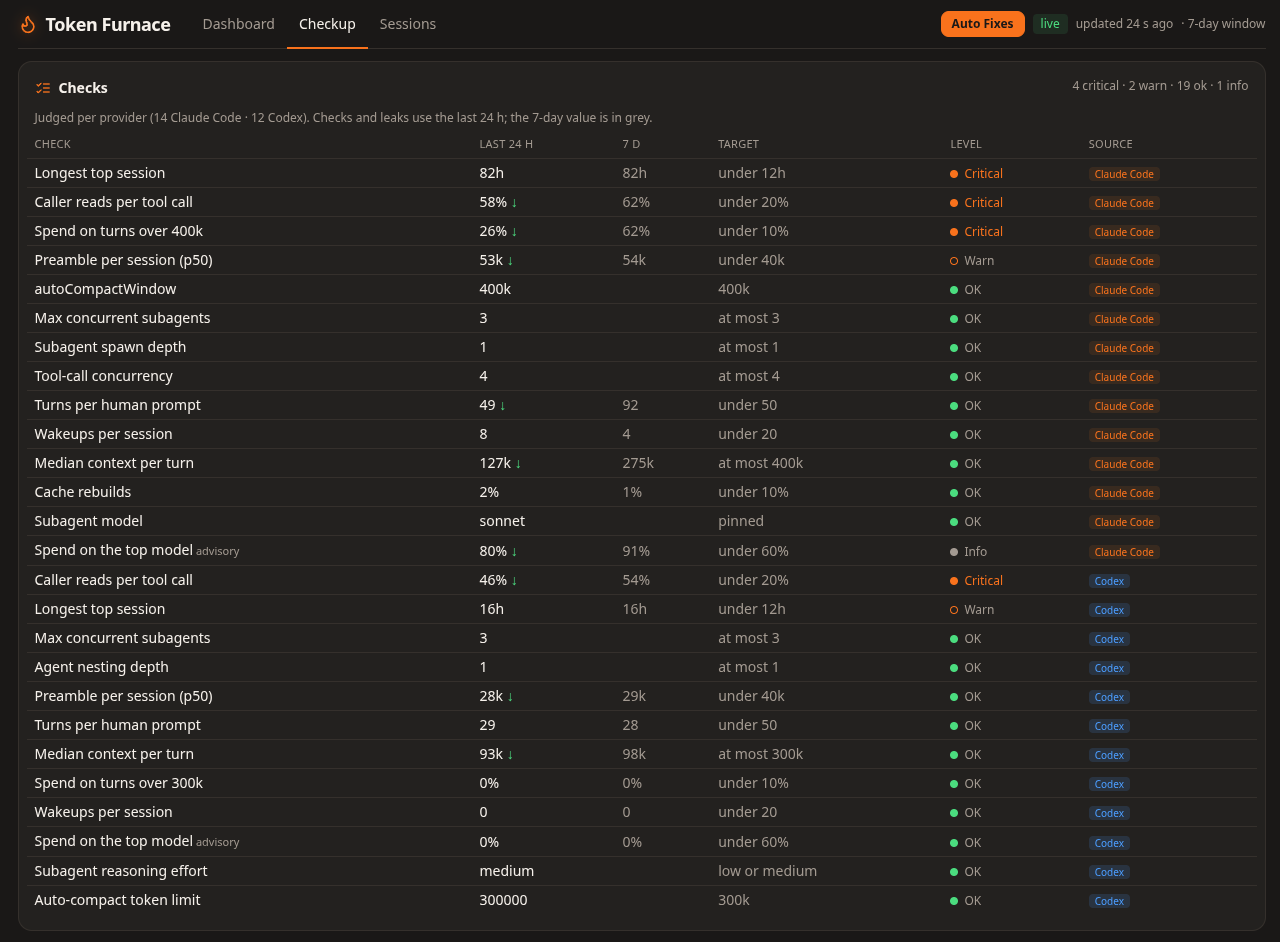
| Act now and active sessions | Checkup |
|---|---|
 |
 |
Requires Node.js 22.13 or newer and local Claude Code, Codex, OpenCode or Antigravity (agy) transcripts.
The CLI and local dashboard use Node.js APIs on Linux, macOS and Windows. Setup and
configuration repair use the OS home directory when HOME is unset; custom agent directories
are respected. Windows setup uses directory junctions on NTFS. Use setup --rollback to restore
backups on any platform; the generated restore.sh additionally requires Bash.
Platform CI is configured to run the tests and installed-package smoke checks on Linux, Windows and macOS, with Node 22.13 and 24. Live agent hooks and macOS Keychain access need separate verification.
Run it without installing:
npx token-furnace@latestOpen the live dashboard:
npx token-furnace@latest serveVisit http://127.0.0.1:8765. The first scan measures local usage; later scans reuse a metadata cache. Choose Claude Code, Codex, OpenCode or Antigravity independently for each chart, and pin a selection to remember it on reload.
Export a report for scripts or sharing:
npx token-furnace@latest --json --no-plan-usage
npx token-furnace@latest --html report.html
Reports include session titles and file paths. Review an exported report before sharing it.
With no transcripts, the CLI exits 1; run npx token-furnace@latest --list-sources to see where it looks.
Or install it globally:
npm install -g token-furnace| Command | Result |
|---|---|
token-furnace [days] [--source claude|codex|opencode|agy] |
Ranked verdict on stdout. days defaults to 7. Exits 1 on leaks or no data. |
token-furnace --full |
Full text report. |
token-furnace --json |
The Report JSON on stdout, for agents and scripts. Exits 0 even when leaks are present. |
token-furnace --html <path> |
Writes a static HTML report with the report JSON inlined. It does not change the exit code. |
token-furnace --list-sources |
Each agent, its path, and its transcript count. |
token-furnace serve [--port 8765] |
Live dashboard on http://127.0.0.1:<port>. It serves the last scan and refreshes it in the background. |
token-furnace setup [--apply] [--verify] [--rollback] [--aggressive] |
Installer. Dry run unless --apply. |
token-furnace fix-config |
Repairs context and worker settings; backs up changed files first. Optional --include-depth. |
token-furnace hook churn |
Claude Code PostToolUse churn hook. Reads the payload on stdin. Never blocks. |
token-furnace mcp |
Read-only MCP server on stdio. One tool, banked_resets, answering the same snapshot as GET /api/banked-resets. |
Options:
--weekly-budget <M>— weekly budget in millions of weighted tokens.TOKEN_FURNACE_WEEKLY_BUDGETsets the same value.--no-cache— parse every file and write no cache.--no-plan-usage— never fetch Anthropic, OpenCode Go or Google AI usage. A saved reading is still used.-h,--help— usage text.
Personal banked reset credits — the unused resets a Claude or Codex account still holds and when
each one expires — are read-only and reachable three ways: the Resets tab of the dashboard,
GET /api/banked-resets (also on report.bankedResets from GET /api/report and
token-furnace --json), and the MCP tool banked_resets from token-furnace mcp. Nothing here
redeems a credit; that stays in the provider's own surface. OpenCode Go and Antigravity report
unsupported because those providers issue no account credits.
Current SQLite sessions are read from $XDG_DATA_HOME/opencode/opencode.db (default
~/.local/share/opencode/opencode.db). Set OPENCODE_DATA_DIR to override that directory.
The database is opened read-only, including live WAL updates. Legacy JSON session stores
are not supported. Assistant message usage counts once; step-finish usage is not added again.
OpenCode Go reads the local auth.json entry for opencode-go (or OPENCODE_API_KEY)
and fetches the real weekly utilization and reset from https://opencode.ai/zen/go/v1/usage.
The weekly dashboard uses that reading to calibrate local weighted tokens; burn projections
are estimates, not billed dollars. OpenCode sessions from other providers are included in
local totals; only opencode-go sessions calibrate the Go quota. The 5-hour and monthly meters
are not displayed. Unknown models keep the existing unpriced-model warning.
No OpenCode configuration is changed by Auto Fixes.
The Antigravity CLI keeps one SQLite file per conversation in ~/.gemini/antigravity-cli/conversations
(set AGY_HOME to override ~/.gemini/antigravity-cli). Each model call is one turn; files are opened read-only.
The Google AI plan (Pro or Ultra) meter comes from agy's own /usage (agy -p /usage, no model call),
at most once every 5 minutes. The weekly quota shows the most-used weekly group (Gemini models, or Claude and GPT models).
The 5-hour limits are not displayed.
The analysis targets context sizes of Claude Code 400k and Codex 300k, with a 128k OpenCode and 256k Antigravity diagnostic target (not a model context limit). Checkup, session flags, dashboard KPIs, hourly spend charts, benchmark estimates, and configuration repair all use these values. A turn exactly at its provider target is within target. Mixed-provider charts compare each turn against its own provider target.
In the live dashboard, click Auto Fixes in the page header, review the changes, and select Back up and apply. Cancel closes the modal without changing files.
The Auto Fixes button opens a checklist with every repair checked by default. Uncheck any
setting to leave it unchanged; only selected repairs are applied. Backups are always made first.
The CLI defaults still exclude depth limits unless --include-depth is supplied.
Both providers get a concurrent worker cap of 3; Claude gets tool concurrency capped at 4
and Sonnet workers if no worker model is pinned. Codex worker reasoning is set to medium
unless already medium or lower. Existing lower caps and pinned models are preserved.
Use token-furnace fix-config --include-depth or keep the modal depth checkboxes selected to also cap
nesting at 1. This is optional because some agent versions may reject it or block spawning.
Session age, caller reads, wakeups and unbounded loops require workflow changes; configuration
repairs cannot rewrite those historical measurements.
Run token-furnace fix-config to set Claude Code's autoCompactWindow to 400000 and
Codex's model_auto_compact_token_limit to 300000. Checks warn when these settings differ.
The command respects CLAUDE_CONFIG_DIR and CODEX_HOME, preserves unrelated settings,
and saves each existing changed file beside the original as .token-furnace-backup
(with a numbered suffix when needed). No backup is needed for a newly created file.
Invalid or unsupported configuration exits 1 before editing either file. Repeated runs make
no changes once targets match. Restore by copying the printed backup path over its original.
Restart agents after repair. A shell CLAUDE_CODE_AUTO_COMPACT_WINDOW override must be unset
in the shell; the command reports it when present.
token-furnace setup prints the planned changes and changes no file. Add --apply to write them.
Existing values and comments are preserved. Invalid or unsupported Codex settings are skipped
with a warning.
--verify checks an existing install and exits 1 on any failure. --rollback restores the most
recent backup. --aggressive also sets the flagged-risky subagent spawn depth; verify that
subagents still spawn after any Claude Code upgrade.
token-furnace hook churn is the PostToolUse hook. It counts edits per file per session and
injects an escalation prompt at the 4th, 7th, and 10th edit.
- Transcript data stays on this machine. The tool sends no telemetry.
- The local cache stores metadata only: session titles, token counts, timestamps, models, tool names, and file paths. It never stores message text.
- Plan usage can contact Anthropic with a local Claude Code login, the OpenCode Go usage endpoint with a local Go key, or run
agy -p /usage(agy contacts Google with its own login). Keys go only to their own provider;--no-plan-usagedisables network calls. - The server binds to
127.0.0.1only. It rejects aHostheader that is not loopback.
The cache lives at:
$XDG_CACHE_HOME/token-furnace/whenXDG_CACHE_HOMEis set.$HOME/.cache/token-furnace/otherwise.
It holds cache.sqlite (parsed sessions) and usage.json (the last plan reading). To clear it:
rm -rf "${XDG_CACHE_HOME:-$HOME/.cache}/token-furnace"
Use --no-cache to skip the cache for one run. The cache is disposable; a schema change rebuilds it.
A terminal gets a redrawn progress line on stderr. Set TOKEN_FURNACE_WORKERS=0 to parse on the
main thread, or a positive number to set the worker count.
0— no leaks found. The--jsonand--fullreports also exit 0 when leaks are present.1— leaks found, or no transcripts found.2— a rejected value fordays,--source, or--port.
An unknown option does not exit 2. node:util parseArgs throws, so that run exits 1 with a stack
trace.
Bug reports and focused pull requests are welcome. For a bug, include your Node.js version, the command you ran, and a redacted error or minimal transcript example. Keep credentials and private transcript content out of issues.
git clone https://github.com/jonit-dev/token-furnace.git
cd token-furnace
npm ci
npm run typecheck
npm test
npm run smoke
npm test builds the CLI and dashboard before running the suite. npm run smoke packs and installs
the package into a temporary project, then checks the installed CLI, HTML export and live server
against synthetic transcripts. npm pack and npm publish rebuild the distributable automatically.
The dashboard is self-contained: no CDN scripts, fonts or styles are needed.
Report a bug · Browse the source
MIT © Joao Paulo Furtado