A dark Emacs theme that revives the palette of the early graphical web and the
X11 rgb.txt colour list: a DarkSlateGray canvas, wheat text, sea greens,
burlywood, and a jolt of pure cyan for links and strings.
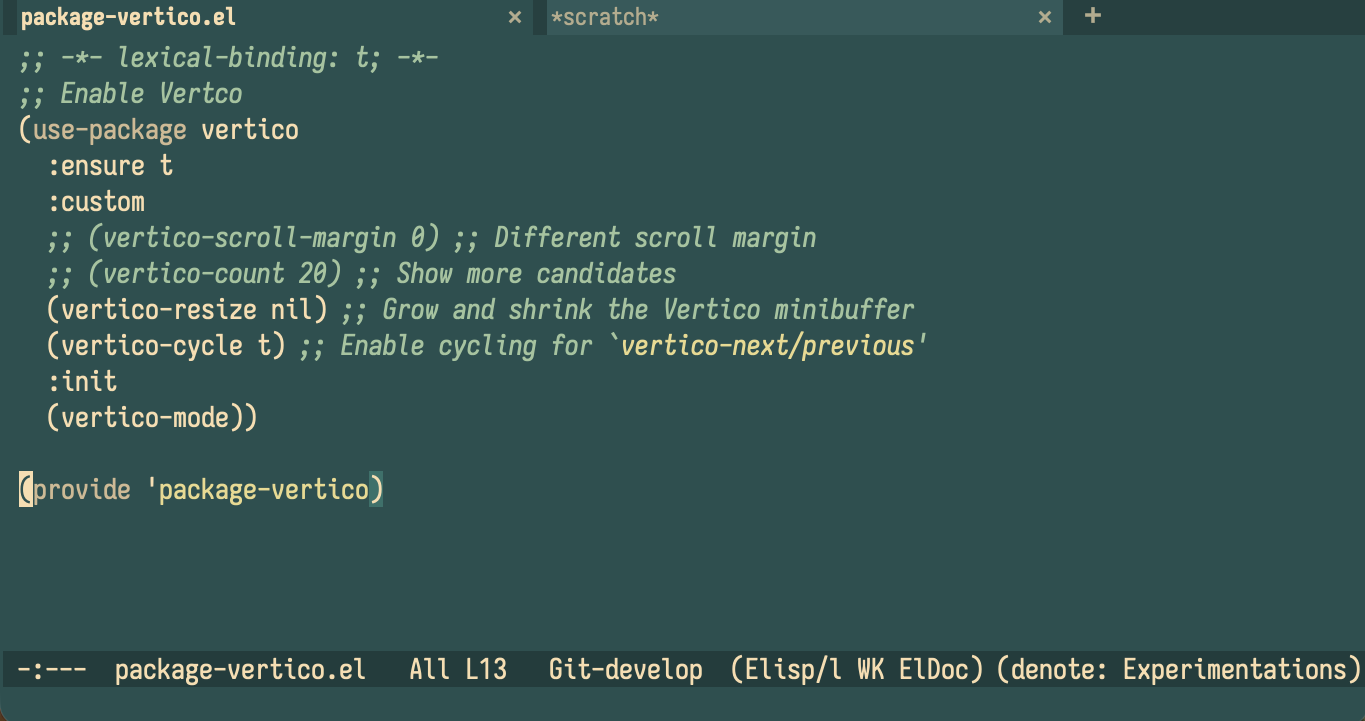
The internal architecture follows the Modus themes by Protesilaos Stavrou:
- a palette of named colours —
(wheat "#f5deb3") - a layer of semantic mappings —
(string cyan-cooler),(comment green-faint)
A mapping value may be a hex string, the name of another palette colour, or the name of another mapping (resolved recursively).
Put nostalgy-theme.el on your custom-theme-load-path, then:
(load-theme 'nostalgy :no-confirm)With use-package and a local file:
(use-package nostalgy-theme
  :load-path "~/path/to/emacs-nostalgy-theme"
:config (load-theme 'nostalgy :no-confirm))Default (understated). Most code stays wheat; cyan is reserved for
strings and links, comments are a quiet sea-green. Mirrors the minimalist
reference screenshot.
Colourful. Keywords, types, constants and functions get their own hues,
matching the busier nostalgia.png reference. Enable it before loading:
(setq nostalgy-palette-overrides nostalgy-preset-overrides-colorful)
(load-theme 'nostalgy :no-confirm)The theme is colour-only: it sets no bold weights and no :height scaling
anywhere (headings included). Distinctions are carried by hue alone. Add your
own emphasis with custom-set-faces if you want it.
Shadow any palette entry — a named colour or a semantic mapping — via
nostalgy-palette-overrides:
(setq nostalgy-palette-overrides
      '((bg-main "#294545")          ; darker canvas
        (comment green-cooler)       ; point a mapping at another colour
        (string  "#7fffd4")))        ; Aquamarine strings
Retrieve a resolved value in your own code:
(nostalgy-get-color-value 'fg-heading-1)or run code with every palette entry bound as a lexical variable:
(nostalgy-with-colors
  (set-face-attribute 'my-face nil :foreground cyan-cooler :background bg-dim))
nostalgy-after-load-theme-hook runs after the theme is loaded.
| Role | Colour | Hex |
|---|---|---|
| background | DarkSlateGray |
#2f4f4f |
| foreground | wheat |
#f5deb3 |
| strings | toned cyan | #4fd0d0 |
| links | cyan / aqua |
#00ffff |
| comments | soft sea-green | #a6c3a0 |
| types | DarkSeaGreen |
#8fbc8f |
| keywords | faint wheat/gold | #cdba96 |
| constants | pale gold | #e8d994 |
| warnings | gold | #e8d994 |
| errors | DarkSalmon |
#e9967a |
| success | MediumSeaGreen |
#3cb371 |
Core faces, font-lock (incl. Emacs 29+ faces), isearch/occur,
show-paren, line numbers, mode line, tab-bar/tab-line, the built-in
completion UI plus orderless, vertico, marginalia, consult, corfu,
company, which-key, dired, diff-mode, ediff, magit, smerge,
git-gutter/diff-hl, flymake/flycheck/flyspell, compilation,
eshell/term/ansi-color, org (agenda included), outline, markdown,
whitespace-mode, rainbow-delimiters, hl-todo, widgets/customize,
info, and message/gnus essentials.
The same palette is available for two more tools, so the terminal side of your setup matches Emacs:
- WezTerm —
wezterm/nostalgy.toml - Midnight Commander —
mc/nostalgy.ini
mkdir -p ~/.config/wezterm/colors
cp wezterm/nostalgy.toml ~/.config/wezterm/colors/
-- wezterm.lua
config.color_scheme = 'Nostalgy'That covers the terminal grid, cursor, selection, scrollbar, split lines
and the copy_mode/quick_select overlays.
Tab bar and window frame. A colour-scheme file cannot style them.
The default fancy tab bar and the frame around it are driven by
window_frame, which only exists in Lua — so wezterm/nostalgy.lua
carries that piece:
local wezterm = require 'wezterm'
local config = wezterm.config_builder()

-- point Lua at wherever you cloned this repo
package.path = wezterm.home_dir
  .. '/src/emacs-nostalgy-theme/wezterm/?.lua;' .. package.path

require('nostalgy').apply(config)          -- scheme + window_frame + tabs
-- require('nostalgy').apply(config, { retro_tab_bar = true })  -- classic text tabs

return config
apply sets color_scheme, the window_frame colours (title bar, its
border, the +/x buttons) and the per-tab colours. Pass
{ retro_tab_bar = true } to switch off the fancy bar and get the full
palette rendered in text cells.
mkdir -p ~/.local/share/mc/skins
cp mc/nostalgy.ini ~/.local/share/mc/skins/
Then Options → Appearance → nostalgy, or mc -S nostalgy.
The skin uses true colour, so it needs mc ≥ 4.8.19 on a true-colour
terminal — launch as COLORTERM=truecolor mc if mc doesn't pick it up.
On 256-colour terminals mc maps each hue to the nearest xterm colour;
on 16-colour terminals use the bundled default skin instead.
Covers the panels, drop-down menus, dialogs, error dialogs, the
button/status bars, filehighlight (per file-type colours matching
dired), the internal editor and viewer, and mcdiff.