








ASTRA is an open-source platform designed for developing agents utilizing large language models. With ASTRA, you can easily create lightning fast, multimodal AI agents, even without any coding knowledge.
ASTRA is a versatile platform capable of building a wide range of agents. Here, we showcase an impressive Voice Agent powered by ASTRA, demonstrating its ability to create intuitive and seamless interactions.

Of course, you are more than welcome to run the example voice agent locally. We have a Docker image ready for you to build and run the agent on both macOS and Windows.
To start, make sure you have:
- Agora App ID and App Certificate(Read here on how)
- Azure's speech-to-text and text-to-speech API keys
- OpenAI API key
- Docker
# run the pre-built agent image
docker run --restart=always -itd -p 8080:8080 \
        -v /tmp:/tmp \
        -e AGORA_APP_ID=<your_agora_appid> \
        -e AGORA_APP_CERTIFICATE=<your_agora_app_certificate> \
        -e AZURE_STT_KEY=<your_azure_stt_key> \
        -e AZURE_STT_REGION=<your_azure_stt_region> \
        -e OPENAI_API_KEY=<your_openai_api_key> \
        -e AZURE_TTS_KEY=<your_azure_tts_key> \
        -e AZURE_TTS_REGION=<your_azure_tts_region> \
        --name astra_agents_server \
agoraio/astra_agents_server:latestYou will need to uncheck "Use Rosetta for x86_64/amd64 emulation on apple silicon" option for Docker if you are on Apple Silicon.

This should start an agent server running on port 8080.
You can use the playground project to test with the server you just started.
The Playground project is built on NextJS 14, hence it needs Node 18+.
# set up an .env file
cp ./playground/.env.example ./playground/.env
cd playground

# install npm dependencies & start
npm i && npm run dev
🎉 Congratulations! You now have our ASTRA powered voice agent running locally.
Our voice agent is a great place for you to start with, it uses following Extensions:
- agora_rtc / Agora for RTC transport + VAD + Azure speech-to-text (STT)
- azure_tts / Azure for text-to-speech (TTS)
- openai_chatgpt / OpenAI for LLM
- chat_transcriber / A utility ext to forward chat logs into channel
- interrupt_detector / A utility ext to help interrupt agent
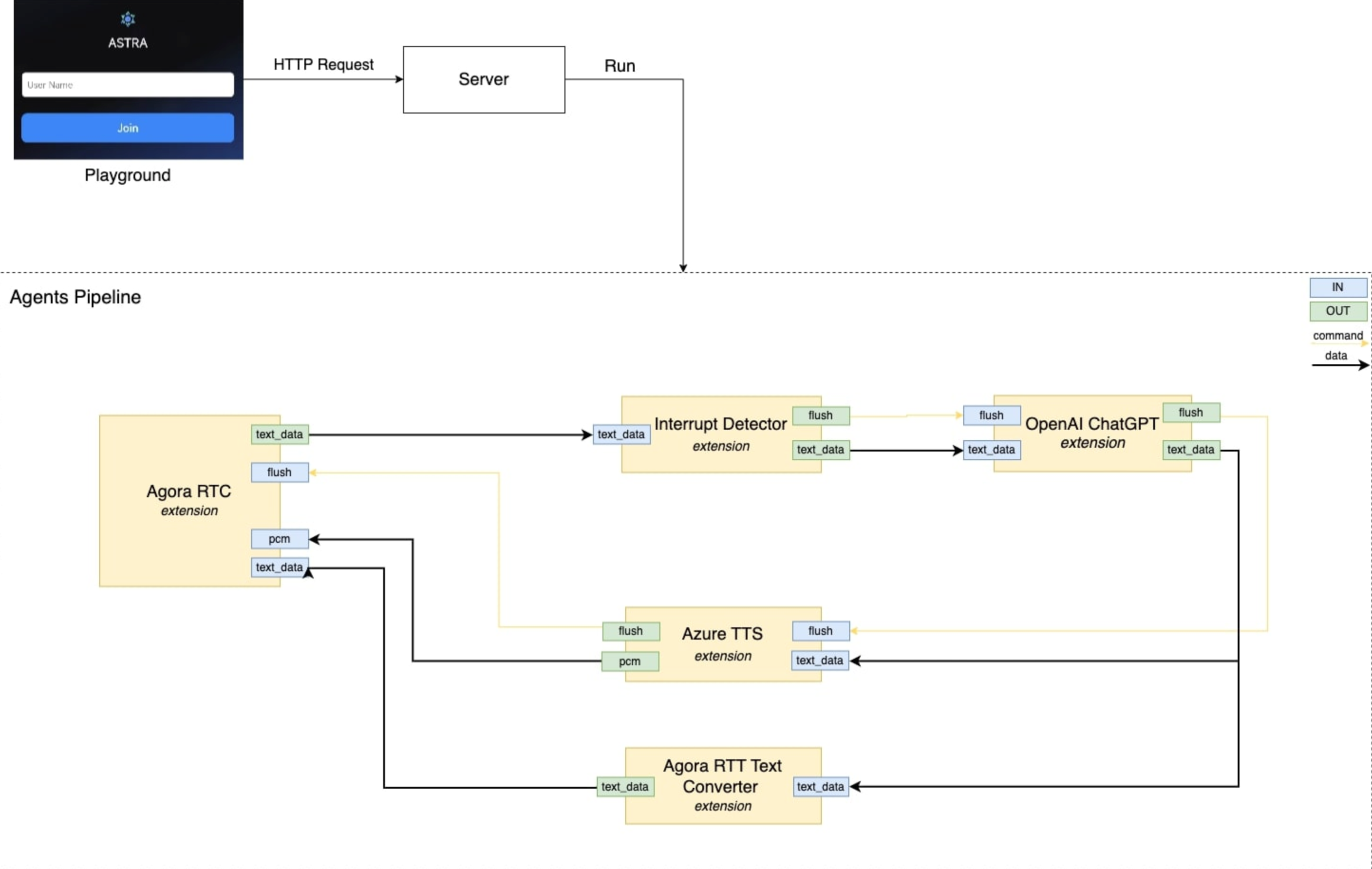
You might want to add more flavors to make the agent better suited to your needs. To achieve this, you need to change the source code of extensions and build the agent yourselves.
You need to prepare the proper manifest.json file first.
# rename manifest example
cp ./agents/manifest.json.example ./agents/manifest.json

# pull the docker image with dev tools and mount your current folder as workspace
docker run -itd -v $(pwd):/app -w /app -p 8080:8080 --name astra_agents_dev agoraio/astra_agents_build

# enter docker image
docker exec -it astra_agents_dev bash

# build agent
make build
This code generates an agent executable. To customize your prompts and OpenAI parameters, modify the source code in agents/addon/extension/openai_chatgpt/openai_chatgpt.go.
Once you have made the necessary changes, you can use the following commands to start a server. You can then test it out using the ASTRA voice agent playground as we did in previous steps.
export AGORA_APP_ID=<your_agora_appid>
export AGORA_APP_CERTIFICATE=<your_agora_app_certificate>
export AZURE_STT_KEY=<your_azure_stt_key>
export AZURE_STT_REGION=<your_azure_stt_region>
export OPENAI_API_KEY=<your_openai_api_key>
export AZURE_TTS_KEY=<your_azure_tts_key>
export AZURE_TTS_REGION=<your_azure_tts_region>

# agent is ready to start on port 8080

make run-server
🎉 Congratulations! You have created your first personalized voice agent.
To understand how the ASTRA service works under the hood, please refer to the ASTRA service documentation .
Star our repository and get instant notifications for all new releases!

- Discord: Ideal for sharing your applications and engaging with the community.
- Github Discussion: Perfect for providing feedback and asking questions.
- GitHub Issues: Best for reporting bugs and proposing new features. Refer to our contribution guidelines for more details.
- X (formerly Twitter): Great for sharing your agents and interacting with the community.
Contributions are welcome! Please read the contribution guidelines first.
This project is licensed under the Apache 2.0 License - see the LICENSE file for details.