





nostromo is a CLI to rapidly build declarative aliases making multi-dimensional tools on the fly.
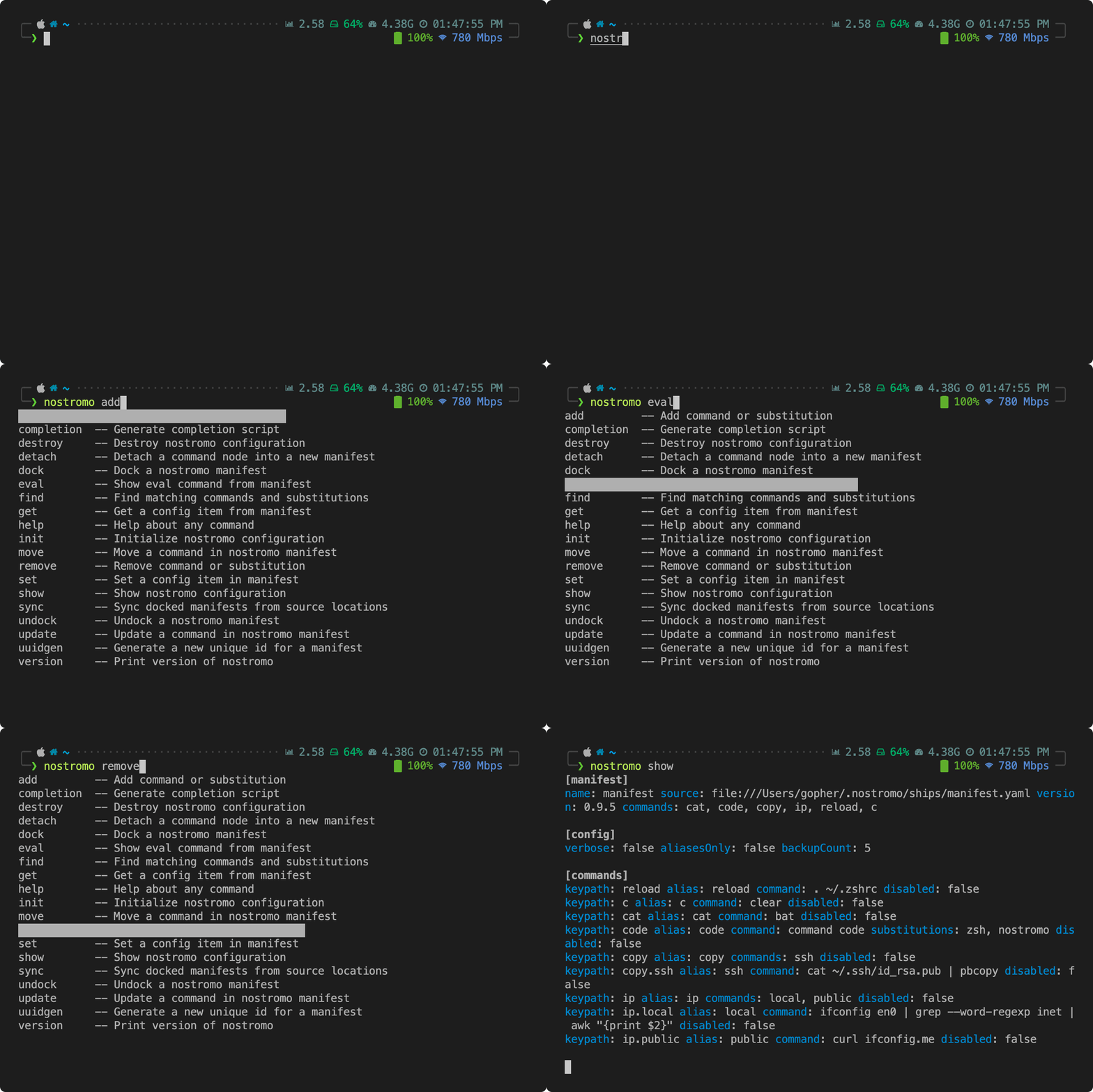
Managing aliases can be tedious and difficult to set up. nostromo makes this process easy and reliable. The tool adds shortcuts to your .bashrc / .zshrc that call into the nostromo binary. It reads and manages all aliases within its manifest. This is used to find and execute the actual command as well as swap any substitutions to simplify calls.
nostromo can help you build complex tools in a declarative way. Tools commonly allow you to run multi-level commands like git rebase master branch or docker rmi b750fe78269d which are clear to use. Imagine if you could wrap your aliases / commands / workflow into custom commands that describe things you do often. Well, now you can with nostromo. 🤓
With nostromo you can take aliases like these:
alias ios-build='pushd $IOS_REPO_PATH;xcodebuild -workspace Foo.xcworkspace -scheme foo_scheme'
alias ios-test='pushd $IOS_REPO_PATH;xcodebuild -workspace Foo.xcworkspace -scheme foo_test_scheme'
alias android-build='pushd $ANDROID_REPO_PATH;./gradlew build'
alias android-test='pushd $ANDROID_REPO_PATH;./gradlew test'
and turn them into declarative commands like this:
build ios
build android
test ios
test android
The possibilities are endless 🚀 and up to your imagination with the ability to compose commands as you see fit.
Check out the examples folder for sample manifests with commands.

- Works for MacOS and Linux with
bash,zsh,fishand PowerShell (pwsh) shells - Windows with PowerShell should work but is untested
Every release ships binaries and packages for macOS, Linux and Windows on the releases page. Pick your platform below.
Using brew:
brew install pokanop/pokanop/nostromoUsing brew (Linuxbrew):
brew install pokanop/pokanop/nostromoDebian / Ubuntu: download the .deb for your architecture from the latest release and run:
sudo dpkg -i nostromo_<version>_amd64.debFedora / RHEL / openSUSE: download the .rpm and run:
sudo rpm -i nostromo-<version>-1.x86_64.rpmAlpine: download the .apk and run:
sudo apk add --allow-untrusted nostromo_<version>_x86_64.apkArch Linux (AUR, using yay or any AUR helper):
yay -S nostromo-binor download the .pkg.tar.zst from the release and run sudo pacman -U nostromo-<version>-1-x86_64.pkg.tar.zst.
Nix (NUR-style repository):
nix profile install github:pokanop/nur-packages#nostromoSnap (classic confinement):
sudo snap install nostromo --classic
arm64(aarch64) andi386(i686) variants of every Linux package are published alongside theamd64/x86_64ones.
Using scoop:
scoop bucket add pokanop https://github.com/pokanop/scoop-bucket
scoop install nostromo
Using winget:
winget install pokanop.nostromoUsing go install (any platform with Go 1.25+):
go install github.com/pokanop/nostromo@latestThe AUR, Nix, Snap, Scoop and Winget channels are published automatically from each release and become available once their package repositories have been set up (see #64). Until then, grab the archive or package for your platform from the releases page.
This command will initialize nostromo and create a manifest under ~/.nostromo:
nostromo initTo customize the directory (and change it from ~/.nostromo), set the NOSTROMO_HOME environment variable to a location of your choosing.
The first time a config is created in an interactive terminal, nostromo greets you with an ascii-art banner. It is never printed when output is piped or on subsequent runs; pass --no-banner to keep scripted installs quiet. You can bring it back any time with nostromo version --banner.
With every update, it's a good idea to run
nostromo initto ensure any manifest changes are migrated and commands continue to work.nostromowill attempt to perform any migrations as well at this time to files and folders so 🤞
The quickest way to populate your commands database is using the dock feature:
nostromo dock <source>where source can be any local or remote file sources. See Dock, undock and sync for more details.
To destroy the core manifest and start over you can always run:
nostromo destroyBackups of manifests are automatically taken to prevent data loss in case of shenanigans gone wrong. These are located under ${NOSTROMO_HOME}/cargo. The maximum number of backups can be configured with the backupCount setting.
nostromo set backupCount 10Global settings live in the spaceport (~/.nostromo/spaceport.yaml), not in any manifest, so they apply to every docked manifest. Use nostromo set and nostromo get to manage them:
| Key | Values | Default |
|---|---|---|
verbose |
true, false |
false |
aliasesOnly |
true, false |
false |
mode |
concatenate, independent, exclusive |
concatenate |
backupCount |
number | 10 |
theme |
default, grayscale, emoji |
emoji |
# ~/.nostromo/spaceport.yaml
sequence:
  - manifest
config:
  verbose: false
  aliasesOnly: false
  mode: 0
  backupCount: 10
  theme: 2
Older versions stored a
configblock in the core manifest. Running any command (ornostromo init) lifts those settings into the spaceport once; config blocks in docked manifests are ignored.
Manifest and spaceport keys are written in camelCase (
keyPath,aliasOnly,backupCount). Files written by older versions used lowercase keys (keypath,aliasonly,backupcount); these still load and are rewritten in the new format (with a backup in~/.nostromo/cargo) the first timenostromoruns.

- Simplified alias management
- Scoped commands and substitutions
- Build complex command trees
- Shell completion support
- Execute code snippets
- Distributed manifests
- Powerful tree management
- Web UI
- Neato themes
Aliases to commands is one of the core features provided by nostromo. Instead of constantly updating shell profiles manually, nostromo will automatically keep it updated with the latest additions.
Given that
nostromois not a shell command there are some things to note on how it makes its magic:
- Commands are generated by
nostromoand executed using theevalmethod in a shell function.- Commands and changes will be available immediately since
nostromoreloads completions automaticallyIf you want create boring standard shell aliases you can do that with an additional flag or a config setting described below.
To add an alias (or command in nostromo parlance), simply run:
nostromo add cmd foo "echo bar"And just like that you can now run foo like any other alias.
Descriptions for your commands can easily be added as well:
nostromo add cmd foo "echo bar" -d "My magical foo command that prints bar"Your descriptions will show up in the shell when autocompleting!
You can also add commands and substitutions interactively by using just nostromo add without any arguments. This command will walk through prompts to guide adding new commands easily.
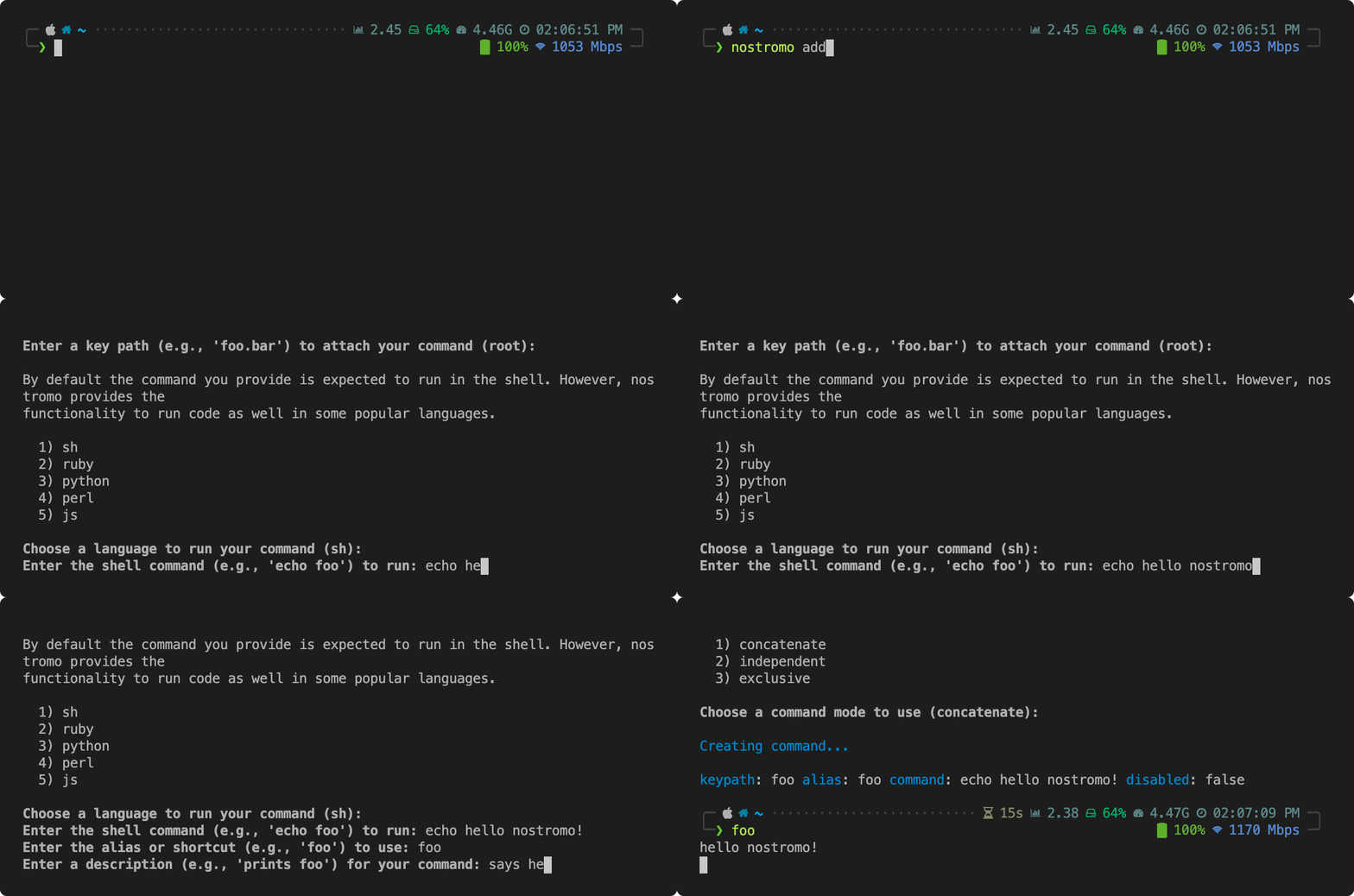
nostromo uses the concept of keypaths to simplify building commands and accessing the command tree. A keypath is simply a . delimited string that represents the path to the command.
For example:
nostromo add cmd foo.bar.baz 'echo hello'will build the command tree for foo 👉 bar 👉 baz such that any of these commands are now valid (of course the first two do nothing yet 😉):
foo
foo bar
foo bar baz
where the last one will execute the echo command.
You can compose several commands together by adding commands at any node of the keypath. The default behavior is to concatenate the commands together as you walk the tree. Targeted use of ; or && can allow for running multiple commands together instead of concatenating. More easily, you can change the command mode for any of the commands to do this for you automatically. More info on this later.
Once the tree grows it can be hard to remember what lives where. Use find with a keypath to get the details of a single command along with its substitutions:
nostromo find foo.bar.baz -v
+--------------+-------------+
| keypath      | foo.bar.baz |
| alias        | baz         |
| command      | echo hello  |
| code         | false       |
| mode         | concatenate |
| aliasOnly    | false       |
| disabled     | false       |
| manifest     | manifest    |
+--------------+-------------+
Any other argument searches every docked manifest for commands whose name, alias or keypath contain it, as well as matching substitutions, e.g. nostromo find bar matches foo.bar and foo.bar.baz. Add -v to print tables including the manifest each match belongs to. Use --exact to only accept an exact keypath (handy in scripts since it fails when the command is missing) or --all to list every match even if the argument happens to be a keypath.
nostromo allows users to manage shell aliases. By default, all commands are designed to execute the binary and resolve a command to be evaluated in the shell. This allows you to run those declarative commands easily like foo bar baz in the shell. It only creates an alias as a shell function for the root command foo and passes the remaining arguments to nostromo eval to evaluate the command tree. The result of that is executed with eval in the shell. Standard shell aliases do not get this behavior.
The use of standard shell aliases provides limited benefit if you only want single tiered aliases. Additionally, commands persist in the shell since they are evaluated (i.e., changing directories via
cd).
There are two methods for adding aliases to your shell profile that are considered standard aliases:
- Use the
--alias-onlyor-aflag when usingnostromo add cmd - Set the
aliasesOnlyconfig setting to affect all command additions
For example, you can see both methods here:
nostromo add cmd foo.bar.baz "cd /tmp" --alias-only

nostromo set aliasesOnly true
nostromo add cmd foo.bar.baz "cd /tmp"
Adding a standard alias will produce this line that gets sourced:
alias foo.bar.baz='cd /tmp'instead of a nostromo command which adds a shell function:
foo() { eval $(nostromo eval foo "$*") }Notice how the keypath has no affect in building a command tree when using the alias only feature. Standard shell aliases can only be root level commands.
Scope affects a tree of commands such that a parent scope is prepended first and then each command in the keypath to the root. If a command is run as follows:
foo bar bazthen the command associated with foo is concatenated first, then bar, and finally baz. So if these commands were configured like this:
nostromo add cmd foo 'echo oof'
nostromo add cmd foo.bar 'rab'
nostromo add cmd foo.bar.baz 'zab'
then the actual execution would result in:
echo oof rab zabStandard behavior is to
concatenatebut you can easily change this with themodeflag when usingaddor globally. More information under Execution Modes.
nostromo also provides the ability to add substitutions at each one of these scopes in the command tree. So if you want to shorten common strings that are otherwise long into substitutions, you can attach them to a parent scope and nostromo will replace them at execution time for all instances.
A substitution can be added with:
nostromo add sub foo.bar //some/long/string slsSubsequent calls to foo bar would replace the subs before running. This command:
foo bar baz slswould finally result in the following since the substitution is in scope:
foo bar baz //some/long/stringGiven features like keypaths and scope you can build a complex set of commands and effectively your own tool 🤯 that performs additive functionality with each command node.
You can get a quick snapshot of the command tree using:
nostromo showWith nostromo, you can also visualize the command tree (or manifest) in several other ways including as json, yaml and a tree itself.
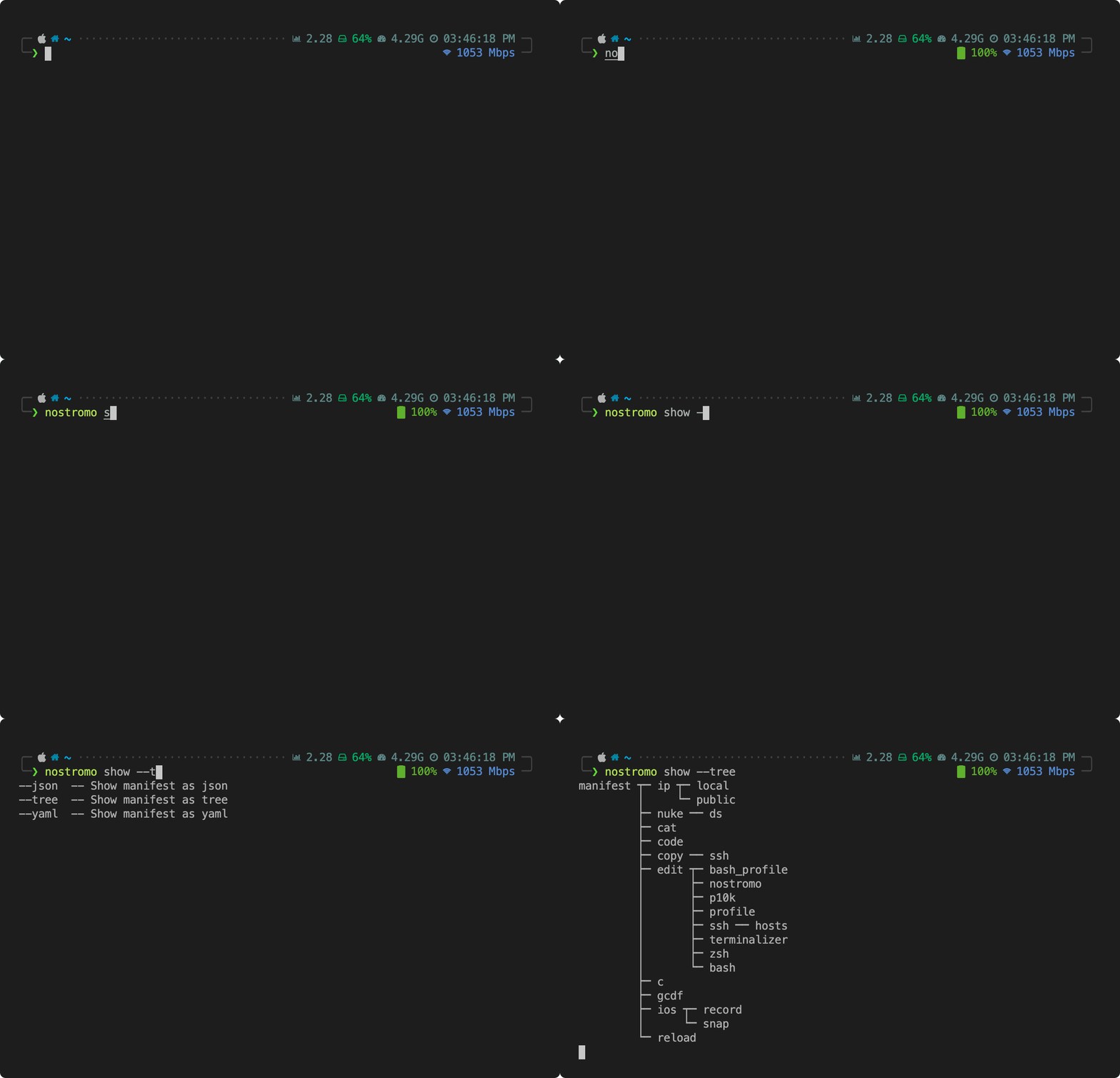
Setting the verbose config setting prints more detailed information as well for all commands.
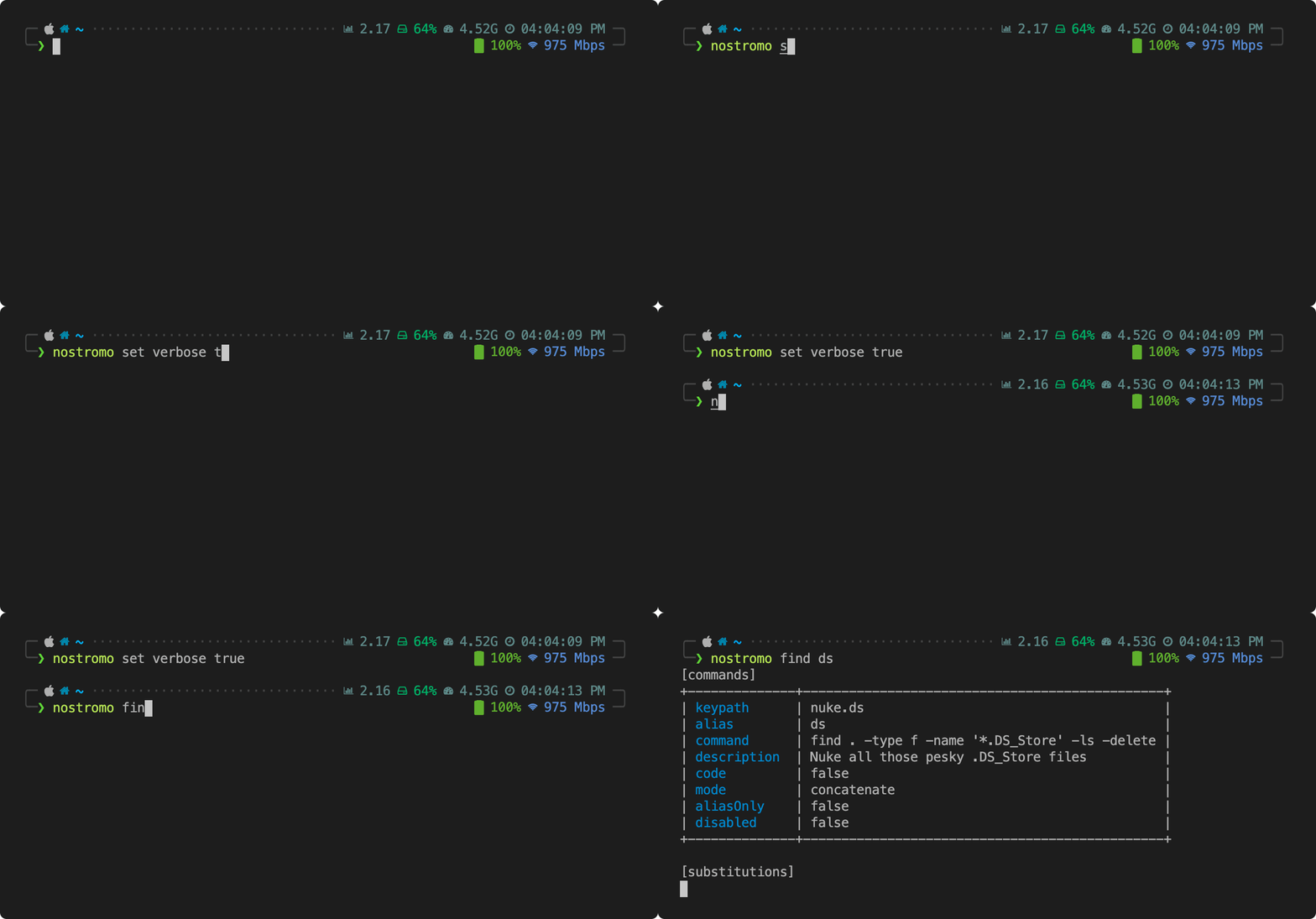
A command's mode indicates how it will be executed. By default, nostromo concatenates parent and child commands along the tree. There are 3 modes available to commands:
  concatenate  Concatenate this command with subcommands exactly as defined
  independent  Execute this command with subcommands using ';' to separate
  exclusive    Execute this and only this command ignoring parent commands
The mode can be set when adding a command with the -m or --mode flag:
nostromo add cmd foo.bar.baz -m exclusive "echo baz"A global setting can also be set to change the mode from the default concatenate with:
nostromo set mode independentAll subsequent commands would inherit the above mode if set.
Commands can be limited to specific platforms, handy when the same manifest is shared between machines running different operating systems. Pass a comma separated list of Go OS names (linux, darwin, windows, …) or os/arch pairs (linux/arm64) with the -p or --platforms flag:
nostromo add cmd copy.ssh "cat ~/.ssh/id_rsa.pub | pbcopy" --platforms darwin
nostromo add cmd copy.ssh "cat ~/.ssh/id_rsa.pub | xclip -selection clipboard" --platforms linux/amd64,linux/arm64
A command with no platforms is available everywhere. Sub commands inherit the restriction of their parents, so limiting copy limits copy.ssh as well. Commands that are unavailable on the current platform are skipped when generating shell aliases, functions and completions, nostromo eval reports command copy.ssh is not available on linux/amd64, and show and find mark them with an unavailable on <platform> note. Platform names are validated, so typos like macos are rejected.
Change or clear the platforms of an existing command with nostromo update. Platforms are kept if the flag is omitted:
nostromo update copy.ssh --platforms linux,darwin
nostromo update copy.ssh --platforms ""
Set
NOSTROMO_PLATFORM=windows(orlinux/arm64) to preview how a manifest behaves on another platform.
Commands can export environment variables before they run, inspired by Taskfile. Pass KEY=VALUE pairs with the -e or --env flag and .env files with --dotenv, both may be repeated:
nostromo add cmd app "cd ~/src/app" --dotenv ~/src/app/.env --env APP_ENV=dev
nostromo add cmd app.serve "make serve" --env APP_ENV=prod --env 'GOBIN=$PWD/bin:$PATH'
Environment is inherited down the command tree and merged root to leaf, so app serve exports everything from ~/src/app/.env, then APP_ENV=prod since a child overrides its parents. On each command the .env files load first and the env values override them. Values may reference other variables with normal shell syntax like $HOME or ${PATH}, they are quoted for the shell running the command and are exported with export for bash and zsh, set -gx for fish and $env:NAME = ... for PowerShell.
.env files are parsed by nostromo rather than sourced by the shell so the same file works everywhere. They support KEY=VALUE lines, an optional export prefix, # comments, and single or double quoted values, where ~ and $VARS in the file paths are expanded. A file that is missing or malformed is reported as a warning and skipped when the command runs.
The stored values appear in the env and dotenv fields of show -v and find -v, and nostromo env prints the effective merged environment of a keypath, add -v to see where each value came from or -s <shell> to print the export statements:
nostromo env app.serve
nostromo env app.serve -v
nostromo env app.serve -s fish
Change the environment of an existing command with nostromo update. Vars are merged, --unset-env removes them, and --dotenv replaces the list of files, pass an empty path to clear it:
nostromo update app.serve --env APP_ENV=staging --unset-env GOBIN
nostromo update app --dotenv ~/src/app/.env --dotenv ~/src/app/.env.local
nostromo update app --dotenv ""
In a manifest the fields look like this:
commands:
  app:
    keyPath: app
    name: cd ~/src/app
    alias: app
    env:
      APP_ENV: dev
    dotenv:
      - ~/src/app/.env
    commands:
      serve:
        keyPath: app.serve
        name: make serve
        alias: serve
        env:
          APP_ENV: prod
          GOBIN: $PWD/bin:$PATH
Environment is not supported for alias only commands since the shell runs them directly.
nostromo provides completion scripts to allow tab completion for bash, zsh, fish and PowerShell. nostromo init adds a # nostromo [section begin] … # nostromo [section end] block to the init files that already exist for these shells:
| Shell | Init file | Block |
|---|---|---|
| bash | ~/.bashrc |
source <(nostromo completion bash) |
| zsh | ~/.zshrc (or $ZDOTDIR/.zshrc) |
autoload -U compinit; compinitsource <(nostromo completion zsh) |
| fish | ~/.config/fish/config.fish (or $XDG_CONFIG_HOME/fish/config.fish) |
nostromo completion fish | source |
| PowerShell | ~/.config/powershell/Microsoft.PowerShell_profile.ps1 (Windows: ~/Documents/PowerShell/Microsoft.PowerShell_profile.ps1) |
nostromo completion powershell | Out-String | Invoke-Expression |
The completion script also defines the shell functions for your top level commands in that shell's syntax, so nostromo commands work the same across shells.
Even your commands added by nostromo get the full red carpet treatment with shell completion. Be sure to add a description and tab completion will show hints at each junction of your command. Cool right! 😎
nostromo provides the ability to supply code snippets in the following languages for execution, in lieu of the standard shell command:
ruby- runs ruby interpreterpython- runs python interpreterjs- runs nodeperl- runs perl interpreter
nostromo add cmd foo --code 'console.log("hello js")' --language jsFor more complex snippets you can edit ~/.nostromo/ships/manifest.yaml directly but multiline YAML must be escaped correctly to work.
nostromo now supports keeping multiple manifest sources 💪 allowing you to organize and distribute your commands as you please. This feature enables synchronization functionality to get remote manifests from multiple data sources including:
- Local Files
- Git
- Mercurial
- HTTP
- Amazon S3
- Google GCS
Details on supported file formats and requirements can be found in the go-getter documentation as
nostromouses that for downloading files
Manifests can be found in the ~/.nostromo/ships folder. The core manifest is named manifest.yaml. Manifests only hold commands; global settings live in the spaceport.
You can add as many additional manifests in the same folder and nostromo will parse and aggregate all the commands, useful for organizations wanting to build their own command suite.
To add or dock manifests, use the following:
nostromo dock <source>...And that's it! Your commands will now incorporate the new manifest.
To update docked manifests to the latest versions (omit sources to update all manifests), just run:
nostromo sync <name>...nostromo syncs manifests using version information in the manifest. It will only update if the version identifier is different. To force update a manifest, run:
nostromo sync -f <name>...If you're tired of someone else's manifest or it just isn't making you happy
nostromo undock <name>Manifests can depend on other manifests through links, letting you compose a command suite out of smaller pieces. A manifest lists its dependencies in a links: block with the source of each linked manifest:
name: manifest
commands:
  ...
links:
- uuid: d6353550-f89d-4bc4-86d6-cd5020cb9d6c
  name: tools
  source: https://github.com/pokanop/nostromo/raw/main/examples/tools.yaml
- uuid: bd28c391-4ba9-43a1-9346-6008883def08
  name: edit
  source: https://github.com/pokanop/nostromo/raw/main/examples/edit.yaml
Docking or syncing a manifest fetches its links recursively, so a single nostromo dock brings in everything it depends on. To add a dependency to the core manifest yourself, link it:
nostromo link <source>This downloads the manifest (and anything it links) just like dock and records the link on the core manifest. Use --to to record the link on another manifest instead:
nostromo link <source> --to <name>nostromo keeps track of why each manifest is present, whether it was docked directly or pulled in by a link. Removing a link, undocking a manifest, or a synced manifest dropping a link only removes manifests that nothing else needs anymore:
nostromo unlink <name> [--to <manifest>]Linking fails with a clear error if a manifest with the same name already exists from a different source or if the link would be circular, and cycles found while docking or syncing are reported and skipped. To see the dependency graph, run:
nostromo links [name]spaceport ┬─ manifest ── tools <- https://github.com/pokanop/nostromo/raw/main/examples/tools.yaml
└─ docker (docked) ── edit <- https://github.com/pokanop/nostromo/raw/main/examples/edit.yaml
Links always fetch the latest manifest from the source; pinning a link to a specific version is not supported yet.
Moving and copying command subtrees can be done easily using nostromo as well to avoid manual copy pasta with yaml. If you want to move command nodes around just use:
nostromo move cmd <source> <destination>where the source and destinations are expected to be key paths like foo.bar.
You can rename a node with:
nostromo rename cmd <source> <name>Next up, you might want to copy entire nodes around, which can also be done between manifests using copy. Again use key paths for source and destination and nostromo will attempt to replicate the branch to the new location.
nostromo copy cmd <source> <destination>So you've created an awesome suite of commands and you like to share, am I right? Well nostromo makes it super easy to create manifests with any set of your commands from the tree using the detach command. It lets you slice and dice your manifests by extracting out a command node into a new manifest.
nostromo detach <name> <key.path>...By default, this removes the command nodes from the manifest but can be kept intact as well with the -k option. Additionally, detaching any command nodes from a docked manifest may have unwanted side effects when running nostromo sync again since the commands will likely be added back from the original source.
Since nostromo updates manifests if the identifier is unique, there might be times you want to update the yaml files manually for whatever reason. In this case you can run the handy uuidgen command to update the identifier so you can push the manifest to others:
nostromo uuidgen <name>Prefer clicking to typing? nostromo ships with a local web UI for browsing and editing your manifests:
nostromo web [--port 8080] [--no-open]This starts a server bound to 127.0.0.1 only and opens the UI in your browser (pass --no-open to skip that, or --port 0 to pick a free port). Press ctrl+c to stop it.
The UI shows every docked manifest along with a collapsible command tree, lets you search commands and substitutions, and edit a command's alias, command, description, mode, code snippet and substitutions. Every change is saved through the same path as the CLI so cargo backups keep working and the result is exactly what nostromo add or nostromo remove would produce. Docked manifests are shown read-only since nostromo sync would overwrite any edits; use nostromo detach to bring commands into your core manifest first.
The frontend is embedded in the binary and follows your system's dark or light appearance.
nostromo now supports themes to make it look even more neat. There's 3 themes currently which can be set with:
nostromo set theme <name>where valid themes include:
default: The basic theme and previous defaultgrayscale: Gray colored things are sometimes niceemoji: The new default obviously
Enjoy!
🐳📑🍥🌞🍓🕖🕐💘🎵🌑🐻🐜📙💥👡🍈👝🎭🐄🌓🎏👔📁🍝🔼🕔💩🌒📥
Full documentation lives at nostromo.sh:
- Getting started — installation,
nostromo init, shell integration - Concepts — manifests, the spaceport, keypaths, substitutions, modes and more
- Command reference — generated from the CLI itself
- Manifest YAML schema
- Examples — walkthroughs of the manifests in
examples/ - FAQ and troubleshooting
The site is built with MkDocs from the docs/ folder; see Contributing for how to work on it.

- This tool was bootstrapped using cobra.
- Colored logging provided by aurora.
- Fan art supplied by Ian Stewart.
- Gopher artwork by @egonelbre and original by Renee French.
- File downloader using go-getter

Contributions are what makes the open-source community such an amazing place to learn, inspire, and create. Any contributions you make are greatly appreciated.
- Fork the Project
- Create your Feature Branch (
git checkout -b feature/AmazingFeature) - Commit your Changes (
git commit -m 'Add some AmazingFeature') - Push to the Branch (
git push origin feature/AmazingFeature) - Open a Pull Request
A Makefile wraps the common workflows: make build, make test, make snapshot (build every release artifact and package manager manifest locally under dist/ with goreleaser) and make release VERSION=vX.Y.Z (tag and push; the release workflow then publishes to GitHub Releases and all package managers). Run make help for the full list.

Distributed under the MIT License.


